P-61B

Steven KLein

Members +
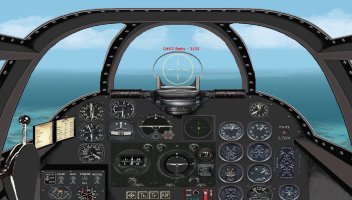
Has anyone tried to model a radar compartment or radar panel for a P-61, or for any multi-engine aircraft that used airborne radar and shows and displays the radar scope(s) like they did with bomb scope panels. Couldn't find anything at SOH , Simviation or Alphasim. Just curious.
 
Come to the conclusion that no one has modeled a working airborne Radar Panel and or Compartment for CFS2 .Looked everywhere I could think of with no luck.Even installed planes that use radar but no luck there either .The aerial antennas look good on the planes that use airborne radar that I placed, but that's all. It's probably very difficult to maybe impossible to model it compared to modeling a working bombsite which has been done a for CFS2 and IL2:1946 and CFS3
I haven't checked out CFS3 or IL2:1946 but I'll give it a go. Happy flying.
 
You're right! There's a way to put the CFS2 air to air display inside a panel like a radar scope.
 
That is the basic FDG2 P-61 2D panel. I just pulled the Tac Display over and made it smaller to fit the scope in the panel. Works pretty good, even in the dark.
 
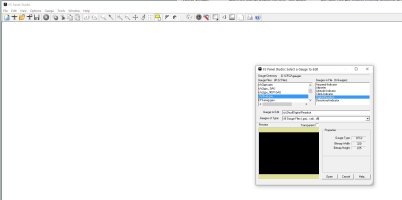
Even the HUD display is a gauge file (cfs2hud.gau) I tried a while ago to place the gauge onto a gauge Polygon for a Virtual cockpit, but unfortunately without success, the ā€œcfs2hud.gauā€ is a catalog, file with six different gauges in it. Mybe someone has success with that idea. I think what we need for the Radar is the ā€œcfs2hud!Digital-Readoutā€ Gauge.

For those who does not have FS Panel studio, search for ā€œFS Panel studioā€, the Demo version is free and works fine to view the gauge files in your gauges folder.

wolfi
 

Attachments

  • cfs2_HUD_Gauge.jpg
    cfs2_HUD_Gauge.jpg
    123.6 KB · Views: 7
Looks really good, but do you need a special program to move it and resize it or can you simply change the panel folder to put it like you did? I'm terrible at trying to move things around on the main panel display and I do have the FDG P-61 installed.Thanks.
 
Even the HUD display is a gauge file (cfs2hud.gau) I tried a while ago to place the gauge onto a gauge Polygon for a Virtual cockpit, but unfortunately without success, the ā€œcfs2hud.gauā€ is a catalog, file with six different gauges in it. Mybe someone has success with that idea. I think what we need for the Radar is the ā€œcfs2hud!Digital-Readoutā€ Gauge.

For those who does not have FS Panel studio, search for ā€œFS Panel studioā€, the Demo version is free and works fine to view the gauge files in your gauges folder.

wolfi
 
Great idea if someone can come up with one. I'm not skilled enough for that. I couldn't find radar scopes or panels in CFS3 or IL2:1946 for the planes that used them.
 
Ok, I tried it out again, this time on a 2d panel and it is unfortunately not the ā€œTactical displayā€ in the Gauge file as I thought. It is the HUD display with the speed, attitude and all the other data. It is nearly invisible and very small, so I could not see it in my first VC Panel attempt.

Mybe it’s interesting to Use in a modern Jet aircraft as overhead display in the window.

wolfi
 
The tactical display parameters are shown in the cfs2.cfg file. Apart from dragging the display and altering its size, I don't know if it can be modified. It may be contained in a dll file.

[RADAR]
Undocked=False
ScreenUniCoords=0,0,1212,1418
UndocCoords=0,0,0,0
ZoomMultiplier=2.000000
lonDistance=16000.000000
altDistance=16000.000000
latDistance=3000.000000
fixedHeading=-1.000000
ShowPlayer=True
ShowWaypointIndicator=True
ShowAircraft=True
ShowGroundUnits=True
ShowNavyUnits=True
ShowVehicles=True
ShowOnlyEnemies=False
ShowFatal=True
ShowRange=False
ShowResolution=False
BackgroundColor=7
AlphaLevel=32
LastItem=0
 
I don't know guys but I just left click on it and move it like a cut and past thing, so I can move it around with the mouse. Then I resize it like I would any notepad, with the little arrows on each side or an arrow at the corner to make it the size that fits the space I'm using. I've never used the cfg at all. I'm speaking of the 2d panel only.
 
Last edited:
Excuse my ignorance, but do you need to use the FS
Panel Studio to move and resize the Tactical Display like you did on the 2D Panel? It seems like you didn't have to. Just click and use the mouse to move and resize to make it fit where you want. Right? Thanks.
 
I was able to do it for a P-61 and some German Night Fighters. A post by Stoney explained what he did with the Tactical Display and it wasn't that hard. All the credit goes him. The only problem was I couldn't do the move and resize in Free Flight, just in Quick Combat and in Missions. Look under my recent posts P-61b to find the discussion on this and what he did.
 
I tried what you did and it worked! Thanks so much. I even sent a post to wolfi about it and what you did as a reply to a recent post he sent to me. The only issue was I couldn't do it in Free Flight ,only in Quick Combat or in mission.
 
Back
Top