• There seems to be an uptick in Political comments in recent months. Those of us who are long time members of the site know that Political and Religious content has been banned for years. Nothing has changed. Please leave all political and religious comments out of the forums.

    If you recently joined the forums you were not presented with this restriction in the terms of service. This was due to a conversion error when we went from vBulletin to Xenforo. We have updated our terms of service to reflect these corrections.

    Please note any post refering to a politician will be considered political even if it is intended to be humor. Our experience is these topics have a way of dividing the forums and causing deep resentment among members. It is a poison to the community. We appreciate compliance with the rules.

    The Staff of SOH

  • Please see the most recent updates in the "Where did the .com name go?" thread. Posts number 16 and 17.

    Post 16 Update

    Post 17 Warning

Caravan - OUT

Scratch, have you tried the highmemfix=1 entry in your fsx.cfg? That's supposed to eliminate these sorts of problems. I find them when there's a missing texture in the model, and when the video card is over-driven. While there might be a missing texture in this case, it's much more likely that all those HD textures are straining your video card. Do a search on the Avsim FSX forum for highmemfix and you'll see how to use it and where to put it.

Yup, I've tried all of those and have re downloaded it from Carenado and reinstalled it twice. No other a/c I have are affected except for not having any shiny aluminum textures on any of them.
 
What's it called mate 32 textures sounds right so why isn't it showing, there all dx10 optimised so all I can think of is that your missing some the trottle problem I've had not with this bird but with aircraft I've had in the past uninstall reinstall if that fails show me the results bud! I'm not part of carenado but I do try to help mates!
 
Thanks for the help Pete. I really started having problems after the last REX update so I think I'll just uninstall everything and start from scratch. I did manage to get my aluminum textures back though.
 
That looks like a Shaders issue, Scratch. Sort of what happened when I messed with that silly Shaders 3.0 mod. Ugh....
 
What's the best way to take a screenshot of that? I've never done it before.

I just use print screen right on the keyboard to do that. Then just open whatever you use to edit screen shots, PS, PSP, GiMP, MS Paint; you get the idea. Then just past it (Ctrl + V) and save it as a jpeg to upload here.

Of course, you can always just "select, cut, and paste" the area in the image that just shows the open folder after you paste the original image, unless you want us to see what awesome wall paper you have on your desktop. ;)
 
Got a link to a sample pic?


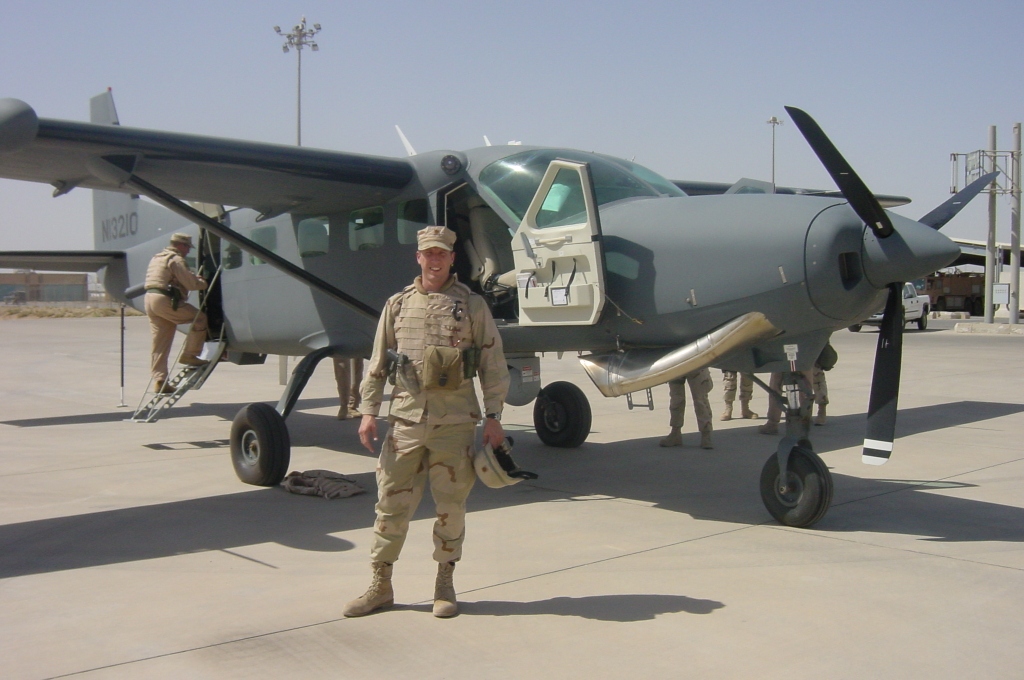
Here's a pic of the Iraqi one. It's fitted with IR detectors/counter measures and has the capability to mount Hellfire missles, as well as optics for surveillance. I am trying to find one used by the SOCOM community. I know I have seen one. More to follow.

Matt
 
Here's another, though showing the darker gray tone. I cannot find the USAF one and perhaps they never had one, aside from getting it flown from CONUS to Iraq. Anyway, still a great looking military paint, in my opinion. If there were only a way to put on the FLIR/EO turret and have an display in the pit too.

DSC00086.JPG
 
Scratch everthing that should be there is mate, seems like nothing is wrong with that as said above it looks to be a shaders problem, I would email Carenado and ask them if they've encountered anything like this during beta tests! Best of luck resolving it mate, sorry I couldn't help more!
 
Scratch everthing that should be there is mate, seems like nothing is wrong with that as said above it looks to be a shaders problem, I would email Carenado and ask them if they've encountered anything like this during beta tests! Best of luck resolving it mate, sorry I couldn't help more!

Thanks for the help Pete! I have never had this problem from Carenado and I own almost everything they have produced thus far. I will contact them and see what help they can give me.
 
Yeah same here mate I also own everthing from carenado and have never seen or heard of this problem mate, it has me stumped as to what can be causing it!:salute:
 
One of the guys over in the Carenado Forum at Avsim is reporting a partial invisible texture problem similar to this.

Last time I checked I don't think there was a real answer yet.

FAC
 
This is way out there on a limb, but one of the effects Carenado said might happen if you disabled their weather radar was missing textures like this in the VC. I wonder if there's some chance that the weather radar didn't get installed properly or validated on your system? Like I said, this is probably barking up the wrong tree, but you might check to see if the Wx radar has a "trusted" entry in your FSX.cfg.
 
Back
Top