• There seems to be an uptick in Political comments in recent months. Those of us who are long time members of the site know that Political and Religious content has been banned for years. Nothing has changed. Please leave all political and religious comments out of the forums.

    If you recently joined the forums you were not presented with this restriction in the terms of service. This was due to a conversion error when we went from vBulletin to Xenforo. We have updated our terms of service to reflect these corrections.

    Please note any post refering to a politician will be considered political even if it is intended to be humor. Our experience is these topics have a way of dividing the forums and causing deep resentment among members. It is a poison to the community. We appreciate compliance with the rules.

    The Staff of SOH

  • Please see the most recent updates in the "Where did the .com name go?" thread. Posts number 16 and 17.

    Post 16 Update

    Post 17 Warning

Howard...Now available for download here at SOH!!

Am missing something. All the Com-Central textures worked for me in FSX/Accel. Is this a DX10 thing? I definately have the native FSX model(s) as there is the second one for the interior.
Clarification - the Com-Central textures did work but they need a prop fix. I guess I abandoned them looking for something easier.
 
There is an easier way to convert the BMP files to DDS (DXT5) using a batch file and Image Tool.
I have used this to convert a few of the fs9 texture files for the Howard.
These are the file names that will need to be converted:

cowling_t
eng_t
flaps_t
fuse_t
nacelletail_t
ruddertail_t
spinner_t
spinner2_t
wings_t

Another thing i did to the fsx Howard was to place all other files from the texture folder
(except the ones above) into a new folder and named it texture.shared (saves HD/D space)
and keeps it nice and clean. Now in the texture folder with above files i make a thumbnail
and texture.cfg to point at the shared folder and then add the new paint to the aircraft.cfg
and i'm good to go. Also if like me you use Bananabob's fsx props for the Howard you can add
them to the texture folder or place them into the shared folder. I use em on different paints
so i place em in the texture folder of said paint.
If anyone wants the batch converter i can zip it up and post it here, just let me know.

Joe
 
Joe,
For us klutzes, it would be great to have a "by the numbers" way to convert BMP to DDS files. (And maybe the reverse?)
Thanks.

...

And Ed, great work!
 
I have paints with both bmp and DDS textures. Frankly I have never noticed any difference in visual quality or FPS between them and the DDS paints invovle several more steps to work with. Do others see that big a difference?
 
Joe,
For us klutzes, it would be great to have a "by the numbers" way to convert BMP to DDS files. (And maybe the reverse?)
Thanks.

Ok, you need Image tool which is in the fsx sdk. Its located in the Environment Kit/Terrain SDK folder. Next is to open notepad
and add this line:

imagetool -nobeep -nomip -dxt5 -dds -nodither *

Now save the file (save as) and name it (compiler.bat). Create a new folder any where on your computer and name it something
you'll remember. Place Image Tool and the batch file into the folder. Now to convert the bmp files, you can just move them into
the folder or copy/paste (your choice). Then double click on the batch file and it will convert the files from bmp to dds.
Once its done you will have the bmp's and the newly created dds files in the folder, just delete the bmp's and move the dds files
into the texture folder of said paint.

Joe

 
Ok, you need Image tool which is in the fsx sdk. Its located in the Environment Kit/Terrain SDK folder. Next is to open notepad
and add this line:

imagetool -nobeep -nomip -dxt5 -dds -nodither *

Now save the file (save as) and name it (compiler.bat). Create a new folder any where on your computer and name it something
you'll remember. Place Image Tool and the batch file into the folder. Now to convert the bmp files, you can just move them into
the folder or copy/paste (your choice). Then double click on the batch file and it will convert the files from bmp to dds.
Once its done you will have the bmp's and the newly created dds files in the folder, just delete the bmp's and move the dds files
into the texture folder of said paint.

Joe
Does that batch file also flip the texture or must you still go back into DXTbmp and flip the texture and the corresponding alpha?
 
Does that batch file also flip the texture or must you still go back into DXTbmp and flip the texture and the corresponding alpha?

In this case the conversion is being performed by Image Tool, which means that the images will be flipped. A couple of points to remember is that any conversion performed will lower the resolution of the images, also remember from an earlier thread that Image Tool performed the worst in this regard.
 
In this case the conversion is being performed by Image Tool, which means that the images will be flipped. A couple of points to remember is that any conversion performed will lower the resolution of the images, also remember from an earlier thread that Image Tool performed the worst in this regard.

Yes to all of the above. Image tool takes care of the flipping.:mixedsmi:

Joe
 
In this case the conversion is being performed by Image Tool, which means that the images will be flipped. A couple of points to remember is that any conversion performed will lower the resolution of the images, also remember from an earlier thread that Image Tool performed the worst in this regard.
Yea, I don't use Imagetool and I use a plugin inside PSP for the dds conversions. I was just curious since I've seen others post about using a batch file to do large numbers of conversions and wondered about the ability to also flip the image.
 
Attached is the converter I use. It was sent to me by Spad at GAS. I have added another .bat file to take dds to bmp as well
 
I Downloaded those repaints and much to my chagrin, the props need converting ergo Banana Bobs props fix and the VC cockpit look like from FS9.
I wonder where everybody is getting the liveries to those nice clear photos that they are showing? I sure can't find them.
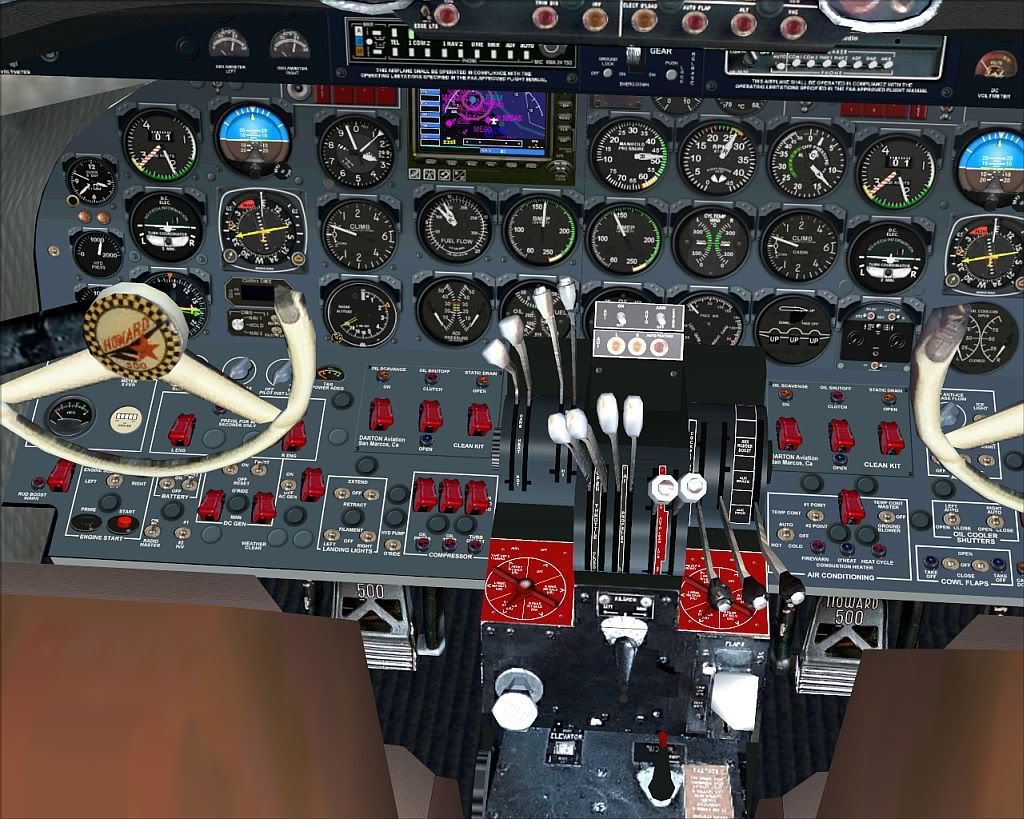
On that note, I'll be uploading the HiRes VC textures in a few hours.:salute:
 
I Downloaded those repaints and much to my chagrin, the props need converting ergo Banana Bobs props fix and the VC cockpit look like from FS9.
I wonder where everybody is getting the liveries to those nice clear photos that they are showing? I sure can't find them.

Well, that is where to get them. And, it is an FS9 cockpit, built in 2005, a 6-year old model.

We had 2200 hours in that project and it is nice that some are wiling to put in a few hours to freshen it up.
Props are easy ... just do it. :)
 
I Downloaded those repaints and much to my chagrin, the props need converting ergo Banana Bobs props fix and the VC cockpit look like from FS9.
I wonder where everybody is getting the liveries to those nice clear photos that they are showing? I sure can't find them.
At Com-Central in the search, type in 'Howard 500 prop fix'. That download will install in the 'collection'. Works.
 
:ernae:

howardhiresvc.jpg
 
VC textures have been uploaded.:salute:

Thanks WORKS great !!

If one would have some more wishes?

1.) a ligther VC/2D main cockpit texture(lightgrey instead of dark)
2.)High resulution Aluminium for wings and engines

Its at 99 % allrady would move then to 100%

Thanks

Roland
 
Back
Top