
-
Please see the most recent updates in the "Where did the .com name go?" thread. Posts number 16 and 17.
-
IMPORTANT DOWNLOADING INFORMATION - ALL MEMBERS PLEASE READ
Please see this thread for updates. Update Thread
SOH ADMINISTRATION
You are using an out of date browser. It may not display this or other websites correctly.
You should upgrade or use an alternative browser.
You should upgrade or use an alternative browser.
3D GPS Maps
- Thread starter JoeW
- Start date

gradyhappyg
Charter Member
Yes I remember. Before I could try it out the thread was buried and now I can't find it.
I reckon you mean this tweak. 

JoeW,
If you go to:
http://forums.flightsim.com/vbfs/showthread.php?t=202117
you will get this:
FS9/FSX GPS: Adding Terrain Shadowing
If you go to:
http://forums.flightsim.com/vbfs/showthread.php?t=202117
you will get this:
FS9/FSX GPS: Adding Terrain Shadowing
There is a parameter missing from both the FS9 and FSX G500 GPS scripts that will add a "terrain shadowing" effect to the color terrain map view.
I have discovered that there is one entry to "add" and another to "modify" in order for this to work:
Code:
"<LayerVehicles>1<</< font>LayerVehicles>
<TerrainShadow><True</< font>TerrainShadow>
</< font>CustomDraw>"
</PRE>
Open the default gps_500.xml script file in notepad.exe and add the entry <TERRAINSHADOW>True</TERRAINSHADOW> entry just above the closing </CUSTOMDRAW>entry.
Edit the <LAYERVEHICLES>0</LAYERVEHICLES> entry from 0 to 1 as shown above. You should now have a color terrain map that looks like this:
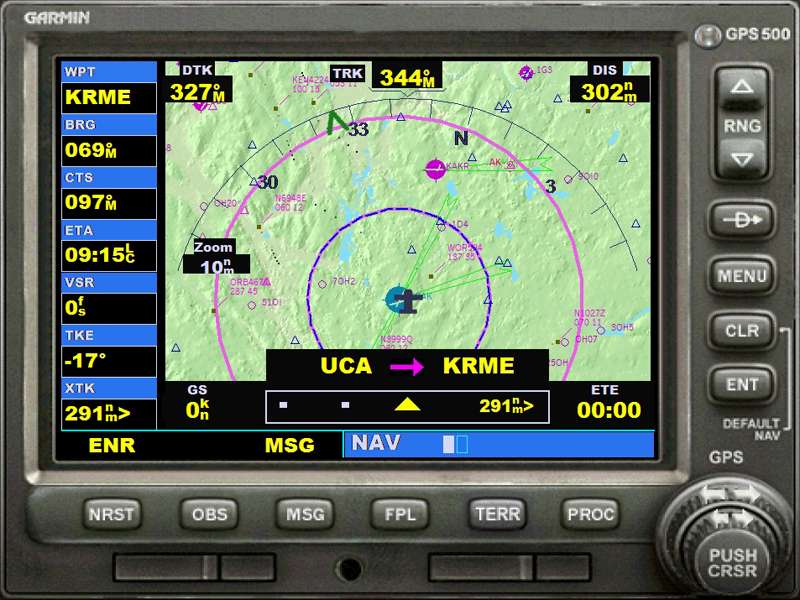
Then you have to recompile the CAB file from which the GPS was extracted.
Free Cab maker programs can be found on the internet, but my advice is to use
The cab maker that is already in Windows (XP & Vista for sure, don't know about W7). Just go to the Start button, click the "Run" icon and type "iexpress.exe" in the small window. Then follow the instructions.
I hope this is what you were looking for.
I did this tweak and it works great.
Bye,
Ezio
WARNING --- For safety reasons the code shown above may be altered by the server, pls refer to the original Flightsim post for the exact sintax<!-- / edit note -->
I have discovered that there is one entry to "add" and another to "modify" in order for this to work:
Code:
"<LayerVehicles>1<</< font>LayerVehicles>
<TerrainShadow><True</< font>TerrainShadow>
</< font>CustomDraw>"
</PRE>
Open the default gps_500.xml script file in notepad.exe and add the entry <TERRAINSHADOW>True</TERRAINSHADOW> entry just above the closing </CUSTOMDRAW>entry.
Edit the <LAYERVEHICLES>0</LAYERVEHICLES> entry from 0 to 1 as shown above. You should now have a color terrain map that looks like this:
Then you have to recompile the CAB file from which the GPS was extracted.
Free Cab maker programs can be found on the internet, but my advice is to use
The cab maker that is already in Windows (XP & Vista for sure, don't know about W7). Just go to the Start button, click the "Run" icon and type "iexpress.exe" in the small window. Then follow the instructions.
I hope this is what you were looking for.
I did this tweak and it works great.
Bye,
Ezio
WARNING --- For safety reasons the code shown above may be altered by the server, pls refer to the original Flightsim post for the exact sintax<!-- / edit note -->

On the same forum is another thread that tells you how to get the nearby aircraft to display as 'live' tracks as shown in the screenshot above.
I set mine up for both and it is very useful. If you do a direct connect MP session the other player(s) in MP also show up as moving tracks (this DOES NOT work with a FS Host MP session however).
I set mine up for both and it is very useful. If you do a direct connect MP session the other player(s) in MP also show up as moving tracks (this DOES NOT work with a FS Host MP session however).