• Please see the most recent updates in the "Where did the .com name go?" thread. Posts number 16 and 17.

    Post 16 Update

    Post 17 Warning old domain name stealing credentials

  • Special Server Maintenance

    Just when you think you have everything running some what better...

    You get a message from the Hosting company. Short story they need to move us to a new server. I have been working with them to plan a good date for all concerned. Here is what we have come up with as a schedule.

    1. November 4th 17:00 -5UTC shut off the forums and start backup proceedures. During this time there will be no access to the forums or the Resource Section.
    2. November 5th Continue with Backups and download same until complete.
    3. November 6th 7:00 turn over server to hosting company to move system to new server
    4. November 7th - 8th restore backups and upgrade forum software.

    If all goes well we should be back online on November 8th.

    To keep you updated we will post updates on AVSIM forums.

    Thank you for your support.

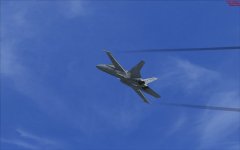
Black wingtip vortex - help

menef

Charter Member
Hello, I've just downloaded and installed FSXBA Hornet Version v17.1.31 and I've noticed this problem, also the vapour at high angle of attack manouvres on the back of the aircraft is black :banghead:
The same thing happens with all the others aircraft ( in the picture there's the stock FSX Hornet). So I've uninstalled the FSXBA Hornet and copied from a backup all the original FSX effects into my
FSX effect folder overwriting when asked but the problem is still there ....
Also my VRS Superbug now has this graphic issue... Suggestions off course are welcome!

attachment.php
 

Attachments

  • 2018-5-2_23-1-1-984.jpg
    2018-5-2_23-1-1-984.jpg
    20.8 KB · Views: 0
The vapor trail effect used by the Superbug might be corrupt or missing. I suggest reinstalling the Bug and it should likely fix the issue.
 
How about jet contrails at high altitude? Are they showing black as well? If so, then look for this download here, flightsim.com or AVSIM.

gauges_recovery_fsx.zip
 
Usually a black effect (unless intentional) means the texture file of the effect is missing. The effect is being called and displayed in your images, it just lacks the BMP file.
:ernaehrung004:
 
When you installed, did you install the Effects and the Effects\Textures in the correct places? I honestly can't recall if the autoinstaller does it properly, if at all.
Check the D:\steam\steamapps\common\FSX\SimObjects\Airplanes\FA-18C_FSXBA_BA_17.1.31\Extras\Effects folder. Your pathing may vary. Copy the files in the plane's ...\Effects\Textures folder to your FSX\effects\Texture folder, and the files in the plane's ...\Effects folder to your FSX\effects folder, and see how that works out.

Good luck!
Pat☺
 
OK mates, everything has been restorated !!!
I didn't remember to have a copy of FSX effects folder done just after a fresh FSX installation some monts ago, so the problem has gone.
Yesterday I've had a bad moment looking at those black stripes in the sky and my first thought was to be forced to reinstall FSX ...:dizzy:
Thank you to all of you!
For MrZippy : I've downloaded the gauges_recovery_fsx.zip and I'll keep for emergencies ( hoping to never need it !!!) thank you
 
Back
Top