
• There seems to be an uptick in Political comments in recent months. Those of us who are long time members of the site know that Political and Religious content has been banned for years. Nothing has changed. Please leave all political and religious comments out of the forums.

    If you recently joined the forums you were not presented with this restriction in the terms of service. This was due to a conversion error when we went from vBulletin to Xenforo. We have updated our terms of service to reflect these corrections.

    Please note any post refering to a politician will be considered political even if it is intended to be humor. Our experience is these topics have a way of dividing the forums and causing deep resentment among members. It is a poison to the community. We appreciate compliance with the rules.

    The Staff of SOH

  • Please see the most recent updates in the "Where did the .com name go?" thread. Posts number 16 and 17.

    Post 16 Update

    Post 17 Warning

Bloom problem

Montie

Charter Member
Hi,

Recently I started having problems with FSX crashing when ending a flight. So I removed the fsx.cfg and regenerated a new, but since then the bloom effect has looked a bit off. There are no spikes coming from the bloom effect, just the softed light. I can not figure it out, what could be wrong?
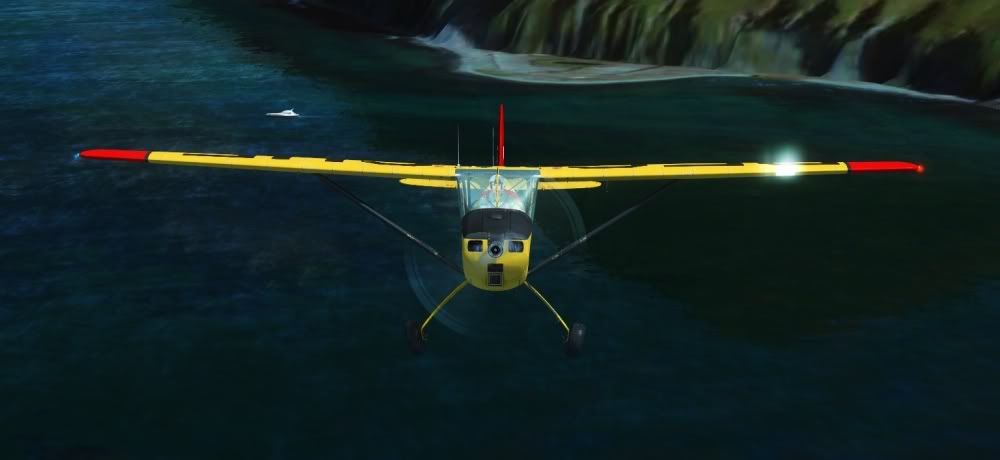
bloomproblem.jpg
 
I dont have an answer for you as I don't use it - but here's a friendly bump in case someone does
 
Did you check that FSX hasnt set itself to run in DX10 [Preview] mode ?

from the looks of the bloom and the water in your shot it seems that its running under DX10 if so that the way bloom works in DX10 you'll have to switch back to the DX9 render to get flare/spike bloom
 
Did you check that FSX hasnt set itself to run in DX10 [Preview] mode ?

from the looks of the bloom and the water in your shot it seems that its running under DX10 if so that the way bloom works in DX10 you'll have to switch back to the DX9 render to get flare/spike bloom

Yes, DX10 Preview is turned off. Tried turning it on and off to see if that would help, but it did not...
 
Try adding these lines to your FSX config in the graphics section.
I had some problems getting mine to work after a config delete and rebuild.
If it doesn't help you can always take it back out.

[GRAPHICS]
ALLOW_SHADER_30=1
SHADER_CACHE_VERSION=98
 
Back
Top