• Please see the most recent updates in the "Where did the .com name go?" thread. Posts number 16 and 17.

    Post 16 Update

    Post 17 Warning old domain name stealing credentials

  • Special Server Maintenance

    Just when you think you have everything running some what better...

    You get a message from the Hosting company. Short story they need to move us to a new server. I have been working with them to plan a good date for all concerned. Here is what we have come up with as a schedule.

    1. November 4th 17:00 -5UTC shut off the forums and start backup proceedures. During this time there will be no access to the forums or the Resource Section.
    2. November 5th Continue with Backups and download same until complete.
    3. November 6th 7:00 turn over server to hosting company to move system to new server
    4. November 7th - 8th restore backups and upgrade forum software.

    If all goes well we should be back online on November 8th.

    To keep you updated we will post updates on AVSIM forums.

    Thank you for your support.

Connecting Quest 3 to my PC. Help!

Navy Chief

Senior Member
It has literally been months since I used my Quest 3 headset. Used to be I would boot up Virtual Reality Desktop app on my PC, and the same app on my Quest 3, and then all worked just fine, once I toggled to VR in the sim. Yeah, well not happening now. To begin with, do I have to connect to wireless network? I don't recall having to do that. Either way, I DID connect to my wireless network (my PC is connected via ethernet cable). Is Steam VR required? I tried with and without, no luck. Steam VR says headset not connected. Reset does nothing. Seems like I recall using OPENXR Toolkit, but apparently THAT doesn't work with Win 11?

Also, I did update my Quest 3. I see the new layout when it turns on, etc. And my Virtual Reality apps on headset and PC ARE updated.. Also uninstalled/reinstalled Steam VR, thinking IT was the problem.

I am flabbergasted now. Would really, REALLY appreciate some help here. NC
 
Last edited:
I use Virtual Desktop with my PC all the time, no SteamVR needed, etc.

I would suggest starting troubleshooting by checking the Virtual Desktop app on your PC. I've had VR Desktop not connect because the PC app was in the process of updating itself -- which is almost guaranteed to be happening if you haven't use the app in months.

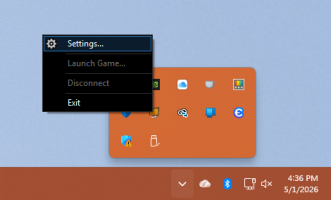
Start Virtual Desktop on your PC. If the window doesn't open, go to the Windows notification area, right click the icon, and choose Settings:
1777678603572.png

Go to the Accounts tab in Virtual Desktop Streamer and make sure it's showing your Meta account (which is how it connects with the app on the headset). Also, look at the bottom of the VD Streamer window and make sure it's Version: 1.34.18, which is the most recent as I write this.

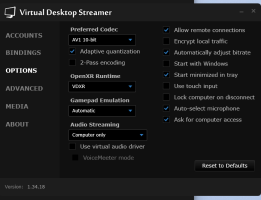
Go to Options and make sure everything is set right there:

1777678754689.png

Hope that helps...
 
Back
Top