
-
There seems to be an uptick in Political comments in recent months. Those of us who are long time members of the site know that Political and Religious content has been banned for years. Nothing has changed. Please leave all political and religious comments out of the forums.
If you recently joined the forums you were not presented with this restriction in the terms of service. This was due to a conversion error when we went from vBulletin to Xenforo. We have updated our terms of service to reflect these corrections.
Please note any post refering to a politician will be considered political even if it is intended to be humor. Our experience is these topics have a way of dividing the forums and causing deep resentment among members. It is a poison to the community. We appreciate compliance with the rules.
The Staff of SOH
-
Please see the most recent updates in the "Where did the .com name go?" thread. Posts number 16 and 17.
You should upgrade or use an alternative browser.
Darker water?
- Thread starter rdaniell
- Start date

Daube
SOH-CM-2025
Is there a replacement water texture available for FSX that makes the inland water a little more muddy rather than the bright blue? I have something similar for FS9 but am not sure it will work in FSX.
Thanks.
RD
I don't know about an equivalent to "inland water textures" FS9 addon for the FSX world, unfortunately.
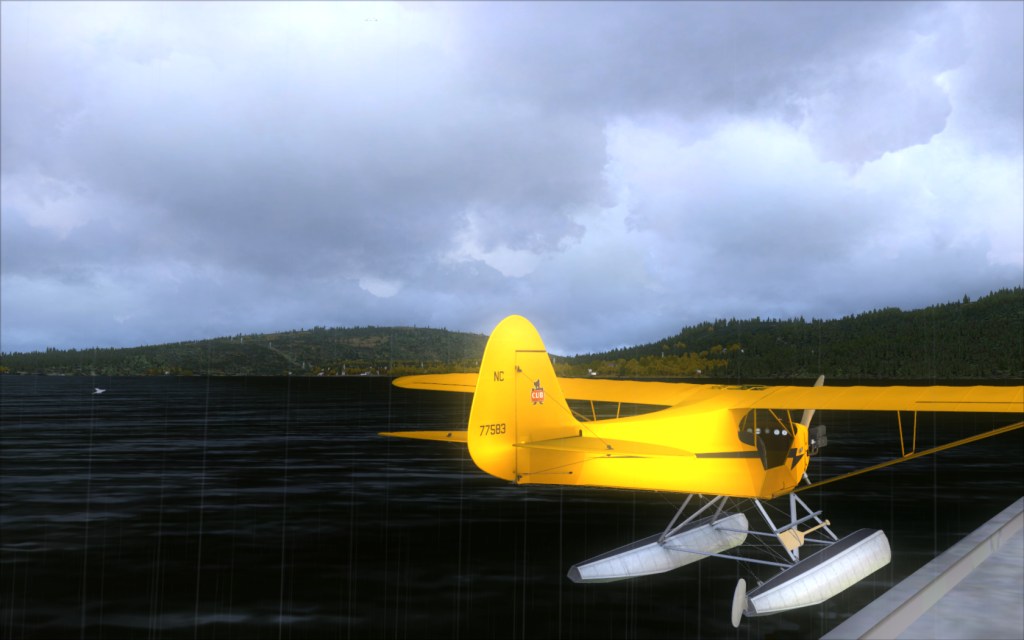
However, using the freeware FS Water Configurator, you can fully adjust the color and the intensity of the water/reflections.
Thanks to this tool, my water has a color which can be quite dark depending on the orientation, and I'm pretty happy about that

http://www.strikingsoftware.com/


rdaniell
SOH-CM-2013
RD
Update: Program failed to install properly onto my computer. I tried twice. Each time when I try to run it, I get an error message telling me that the program has stopped running. But thanks anyway.
RD

papab
Charter Member
You can change inland water darker
Many combinations of shades.....
http://www.realenvironmentxtreme.com/index.html
Rick
rdaniell
SOH-CM-2013
Strange...
Have you tried to run it with the right-click + "run as an administrator" ?
Have you tried downloading the "Lite" version instead ?
No I have not. I afraid that when something doesn't run when I double click on the shortcut icon, I'm totally lost then. Your statement: "Have you tried to run it with the right-click + "run as an administrator?" might as well be written in Klingon or something. But, again, thanks for trying to help.
Peace+
Romeo-Delta
rdaniell
SOH-CM-2013
When you go to run the program, don't double click on it like you normally do (left side mouse button). Instead, right click on it (right side mouse button), and you will get a pop up window next to the cursor. Click on "Run as Administrator". Not so Klingon-ish after all.
Did exactly what you suggested. Here's the result....
rdaniell
SOH-CM-2013
Uninstall it, then when you reinstall do the "Run as Administrator" when you execute the installer.
Tried that. Still NO JOY! Get the same message when I try to run it using your directions above.
To all of you who have tried to help me with this question: Thanks a bunch. Especially to you Bone for sticking with me; however, I'm throwing in the towel on this project for the time being. I did mess with the sliders in FSX and set it to low x1 or something like that. The water is somewhat darker but with less definition.
That will just have to do for the time being.
Romeo-Delta OUT
rdaniell
SOH-CM-2013
Actually, this is a known issue that occurs on some computers. Reinstalling, no matter how many times, will not help. The only workaround is to use FSWC Lite, which will allow you to install the presets, but not allow for manual customization via sliders.
Thanks Orionll. At least I haven't lost touch with reality...LOL. I really hate to admit this but, I downloaded the Lite version and couldn't figure out how to work it either. Now if someone would just upload a couple modified bmp files like in FS9 where all I have to do is paste them somewhere and overwrite the existing files, I just might be able to pull that off....

RD

Daube
SOH-CM-2025
Actually, this is a known issue that occurs on some computers. Reinstalling, no matter how many times, will not help. The only workaround is to use FSWC Lite, which will allow you to install the presets, but not allow for manual customization via sliders.
Yes, this is also the conclusion I came to after reading some feedbacks in the FSWC support forums.
The "FSWC Lite" program is the alternative, and the simmers who could not run the "normal" FSWC (they got the same error popup "stopped working") could successfully use FSWC Lite. The difference is that in FSWC Lite, you cannot adjust the water settings "precisely" with sliders. You can only choose some "presets".
Daube
SOH-CM-2025
As FSX is not installed on my actual computer, I cannot "use" the software. However I took a look to the files and the documentation, and I understood how to use it. Here are some simple explanations:
- the presets are all stored into the FSWC folder. You can see them by yourself, each of these folders also contain some preview screenshots. If you want darker water, the preset "Ashton Favorite Setting" will surely please you. That's also the one I used (and tweaked, since I could use the full FSWC) for my FSX.
- you should indeed run FSWC lite by right-clicking the program, and choosing "run as an administrator".
- when the program runs, you can see a button 'set custom shader'. By pressing this button, a window appears to let you navigate to one of the presets. So for example, you'll have to navigate to the folder "Ashton Favortie settings", select the water20.fx file there, and press Open.
And that's all, you can start your FSX now
rdaniell
SOH-CM-2013
I have never used FSWC Lite, but I have downloaded it to see how it works. As FSX is not installed on my actual computer, I cannot "use" the software. However I took a look to the files and the documentation, and I understood how to use it. Here are some simple explanations: - the presets are all stored into the FSWC folder. You can see them by yourself, each of these folders also contain some preview screenshots. If you want darker water, the preset "Ashton Favorite Setting" will surely please you. That's also the one I used (and tweaked, since I could use the full FSWC) for my FSX. - you should indeed run FSWC lite by right-clicking the program, and choosing "run as an administrator". - when the program runs, you can see a button 'set custom shader'. By pressing this button, a window appears to let you navigate to one of the presets. So for example, you'll have to navigate to the folder "Ashton Favortie settings", select the water20.fx file there, and press Open. And that's all, you can start your FSX now
Well Daube, you probabley won't believe this but, I now have darker water thanks to your help on how to use FSWC Lite. I would like for it to be a little more "brownish" in color; nevertheless, it sure beats the default color.
And in addition to Daube, thanks again to everyone who responded to my question.
RD
Also, for others without the so called "Kevin's Bug of D00m" (don't ask why, that's what Ashton (the developer) named it), you can share your FSWC preset at the Striking Software Community FSWC Profiles board (a very underutilized part of their forum, if you ask me).
Daube
SOH-CM-2025
Daube, if you like, you can upload a copy of the Water20.fxh file from your Microsoft Flight Simulator X\ShadersHLSL\Terrain folder, so rdaniell can install it via FSWC Lite.
Also, for others without the so called "Kevin's Bug of D00m" (don't ask why, that's what Ashton (the developer) named it), you can share your FSWC preset at the Striking Software Community FSWC Profiles board (a very underutilized part of their forum, if you ask me).
Thanks for the tip. I have sent this file to RDaniell some minutes ago, but I was fearing that perhaps this file was not enough, and that perhaps the FSWC program was also writting some stuff somewhere, or modifying some other files etc... Now it's clear that the water20.fxh is enough
... or is it ? He just needs to place this file directly in his \Microsoft Flight Simulator X\ShadersHLSL\Terrain\ folder, right ? Or is it mandatory to go through FSWC lite ?