Frictionality configuration menu problem

Navy Chief

Senior Member
I have "Frictionality" by FSPS. Had not used it in a long time, and had to uninstall/reinstall due to an update.

When I initiate the addon, I am not getting the full-size configuration menu. Any ideas on how to fix this? I did not see any questions

about this on their forums. NC

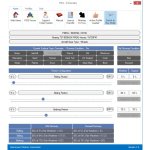
This is what I am supposed to see:

attachment.php


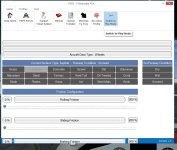
and this is what I have on my screen:

attachment.php
 

Attachments

  • fsps-frictionality-fsx.jpg
    fsps-frictionality-fsx.jpg
    75.1 KB · Views: 0
  • fsps.jpg
    fsps.jpg
    71.1 KB · Views: 0
I don't have that program so I cannot be of much help except to note that you have a different (later) version than what you are expecting to see.

Does that program do anything for water?

cheers,
Lane
 
I don't have that program so I cannot be of much help except to note that you have a different (later) version than what you are expecting to see.

Does that program do anything for water?

cheers,
Lane

Nope, it doesn't. And the version I am using is supposed to be Steam compatible. THanks. NC
 
Have you altered your screen resolution?

Some apps do not scale well when using anything other than native screen resolutions.

cheers,
Lane
 
Only by going from the screenies, but...

On the button bar there is a thumbs up for having a profile loaded and you have a thumbs down for not having a profile loaded. Does the program require defining a profile before allowing the settings to be adjusted?
 
Problem solved.

I had my desktop Icon display settings to 150%, or something like that, as it is easier for these old eyes to see.

But.....once I reverted to default, the complete Frictionality Configuration menu shows just fine:encouragement: Thanks all! NC
 
Back
Top