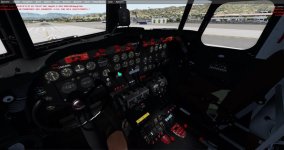
FS Spotlight. Did you try it?

YoYo

SOH-CM-2023
I see that it works in P3Dv5.1 also. This tool looks really nice, watch it:


https://www.flightsimlabs.com/index.php/spotlights-2/

Now it works with 5.1 too and its free (before it was payware addon) https://forums.flightsimlabs.com/index.php?/files/file/2218-fslspotlights-64bit-for-p3d-v5x-only/ .

Did you try it? For sure it can help if someone has too dark cockpit in P3Dv5. As I see you can add any color of light so for old airplanes its a nice tool also.

Tutorials:

https://youtu.be/Vojy-5xXorE
https://youtu.be/AMWXicBC8FA
https://youtu.be/kzXgz245e_A
 
I ve built a lot profiles for addons with limited lighting, including:
CLS Dc-10 HD
SkySim Md-11 v2
Just Flight L1011
Currently i am working on Flight Replicas Dc-4.

Happy to share my profiles.

Rgdrs,
Kris
 
I ve built a lot profiles for addons with limited lighting, including:
CLS Dc-10 HD
SkySim Md-11 v2
Just Flight L1011
Currently i am working on Flight Replicas Dc-4.

Happy to share my profiles.

Rgdrs,
Kris

Please do share, Kris! Would really like to see them in the DC-4.

cheers,
steve
 
I ve built a lot profiles for addons with limited lighting, including:
CLS Dc-10 HD
SkySim Md-11 v2
Just Flight L1011
Currently i am working on Flight Replicas Dc-4.

Happy to share my profiles.

Rgdrs,
Kris

Oh thx. Today I got access to this forum and I already have the file but I will install tomorrow (Christmas time). Is this editor is easy or do you need to know NASA :biggrin-new:?
Are these auxiliary lights turned on by some shortcut from the keyboard for example or if not how to do it?
 
Oh thx. Today I got access to this forum and I already have the file but I will install tomorrow (Christmas time). Is this editor is easy or do you need to know NASA :biggrin-new:?
Are these auxiliary lights turned on by some shortcut from the keyboard for example or if not how to do it?

Not a rocket sience. But you need to learn what effect which control has. Learning curve is rather steep.

You have a transparent control panel which you open or hide via small icon at the lower left corner. Something like REX Environment Force control panel.
 
You have a transparent control panel which you open or hide via small icon at the lower left corner. Something like REX Environment Force control panel.

So its 2D panel? Hmm, it could be a problem for me because I fly in VR only (here is a reason why I asked about shortcut or button to turn on) but I'll try anyway. Thx for reply.
 
So its 2D panel? Hmm, it could be a problem for me because I fly in VR only (here is a reason why I asked about shortcut or button to turn on) but I'll try anyway. Thx for reply.

This button (or rather the icon) is available in VC. The control panel is little bit like ATC window.
 
Finished the Dc-4 profile but for some reason I cannot attach screenshots or files to the post. Anyone?
 
Finished the Dc-4 profile but for some reason I cannot attach screenshots or files to the post. Anyone?

For free screenshot you can always use imgur for example (https://imgur.com/) or other free hosting.
For the file, your google drive, or upload here http://www.sim-outhouse.com/sohforums/local_links.php?catid=218 (Gauges, panel corner for P3D).

Btw. I have read manual and such information is written there:

Prepar3D v5.0 changed its underlying graphics engine to utilize DirectX12. As such,version 5.0.0.1 of FSL Spotlights does not yet have the Spotlights Control Windowinside the Simulator. For now, use the Spotlights Manager to control lights andwatch this space for future additions.
 
Thanks Kris! Big improvement for me on the dark VC of the DC-4.

attachment.php
 

Attachments

  • 2020-12-25_10-31-3-530.jpg
    2020-12-25_10-31-3-530.jpg
    57.9 KB · Views: 100
Back
Top