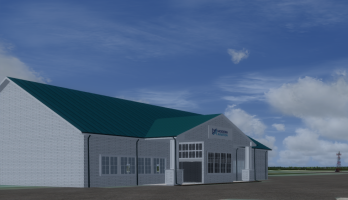
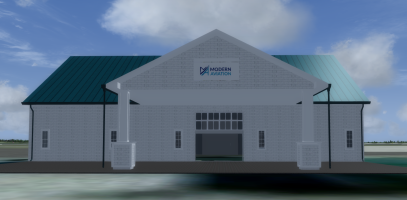
KFOK Francis S. Grabeski Airport and ANG Base

promising
Since I have migrated from flying FSX(A) to P3D V4.5, this is being designed for that sim. It might probably be too frame intensive for FSX if it DID work in it. My FSX sceneries work beautifully in P3D but they used to bog down FSX. Going forward works, but no going backward. I hope that is not disappointing. If you like FSX, you'll love Prepar3D V4.5 because everything except "port-overs" from FS9 to FSX from native FSX work beautifully for freeware. For payware, almost all of the designers say which version their product will work in and some installers find your sim and target it if they are for multiple flight simulators.
 
Last edited:
Since I have migrated from flying FSX(A) to P3D V4.5, this is being designed for that sim. It might probably be too frame intensive for FSX if it DID work in it. My FSX sceneries work beautifully in P3D but they used to bog down FSX. Going forward works, but no going backward. I hope that is not disappointing. If you like FSX, you'll love Prepar3D V4.5 because everything except "port-overs" from FS9 to FSX from native FSX work beautifully for freeware. For payware, almost all of the designers say which version their product will work in and some installers find your sim and target it if they are for multiple flight simulators.
Not at all. I can enjoy and appreciate even if I can’t use.
 
I'd hate to spend all this time and effort for one audience. I will never be able to get this into MSFS 2020 or certainly 2024, but when I have completed it, since I still have FSX on my computer for testing, I will see about an FSX version. Stayed tuned "same bat time, same bat channel!" Holy flightsim Batman. LOL. Showing my age for sure.
 
Richard, I've been out of scenery development for quite a while now so there's a lot I've forgotten, but I remember members that moved to P3D 4.5 saying that my airports work pretty well in that version. Of course in my case all my scenery was built in FSX and it was being used in P3D so maybe that's the difference.
 
Richard, I've been out of scenery development for quite a while now so there's a lot I've forgotten, but I remember members that moved to P3D 4.5 saying that my airports work pretty well in that version. Of course in my case all my scenery was built in FSX and it was being used in P3D so maybe that's the difference.
I found that with my older airports developed for FSX too. They go forward beautifully, but not always backward. Anyway, I opened up my ADEx KFOK layout in ADEx selecting FSX and the only thing that happened was that all the buildings created and placed so far were "black" shapes though not just squares so all I am going to have to do when I have completed it is to upload them with the Library Object Manager in ADEx for FSX and then save and compile the airport. At least that is what I am hoping for right now. Back in 2016 my first, if you remember complex scenery design with my three partners was NAS Alameda. Last year I opened it up in P3D and it was so fantastic to see it with no flickering and no OOMs. Instead with P3D 64bit and its new technology besides such new powerful computers, all of it is there "in its glory" that I envisioned when we created it 10 years ago. That being said, I added a few object updates like the FLOLS and SODE windsocks. I've learned so much about Sketchup, SODE, Photoshop and xml since then. I think that this is keeping this 78 year old mind sharp and my memory working. The knees don't squat quite so well and the ears have hearing aids, but hey, things could be a whole lot worse, thank you Lord. Again thank you for the seasons. I had some help a while ago from a really nice young lady at KFOK Admin who cleared up a few satellite questions for me like where is the windsock and "it ain't where Microsoft put it in the default." LOL! TTYL.
 
I was also able to identify with her help what the "geometric" shaped objects at the North and South ends of the airport are: solar panels and have in my head how I am going to add them without bogging down the fps. No time to work today, maybe tomorrow. Real life ALWAYS gets in the way of having fun. LOL!
 
Considering that the only time they'll be really visible is either as you overfly the airport or once you're in the pattern for landing, I'd make them as nondescript as possible. Build a single long array in Sketchup with a single brace under it maybe every 20' along the array for support. Then find a good texture that can be repeated to match the length of your single array. Map that onto your panel and you're good to go.

Sketchup used to allow you to input a geographic location as a template then resize it to a known object on the airport (a building that you've already built that you know the exact size). Once you have the background sized then you can start placing your strip of solar panels to match until you've built the entire array. . .save as a single object. Repeat for the other array on the airport. That way you'll have two objects instead 30 or 40 individual objects (how ever many there would be in one full array).
 
Thank you for the suggestion. I expect to do it even simpler because I agree with you exactly about the visibility. If this were architecture then each and every panel...but, you are right. What I am going to do is: I have already used the polygon maquis in Photoshop and cropped out only the solar panel fields. Then I am going to create a polygon following that in Sketchup with the DRAW pencil and "push-pull" to some elevation. Then the cropped maquis of the png is going to be a texture on the polygon shape for each one. Really simple. I have done this with buildings before and really low on the triangles after "cleanup". Then into MDCx; bgl and voila! Between you and I if the "noobies" to design pay attention they can learn some tricks of Sketchup. If I could just learn how to do the seasons in SBX...LOL! Again, thanks so much for your help.
 
Back
Top