• There seems to be an uptick in Political comments in recent months. Those of us who are long time members of the site know that Political and Religious content has been banned for years. Nothing has changed. Please leave all political and religious comments out of the forums.

    If you recently joined the forums you were not presented with this restriction in the terms of service. This was due to a conversion error when we went from vBulletin to Xenforo. We have updated our terms of service to reflect these corrections.

    Please note any post refering to a politician will be considered political even if it is intended to be humor. Our experience is these topics have a way of dividing the forums and causing deep resentment among members. It is a poison to the community. We appreciate compliance with the rules.

    The Staff of SOH

  • Server side Maintenance is done. We still have an update to the forum software to run but that one will have to wait for a better time.

Milviz 727-200 Gravel Kit

gray eagle

SOH-CM-2025
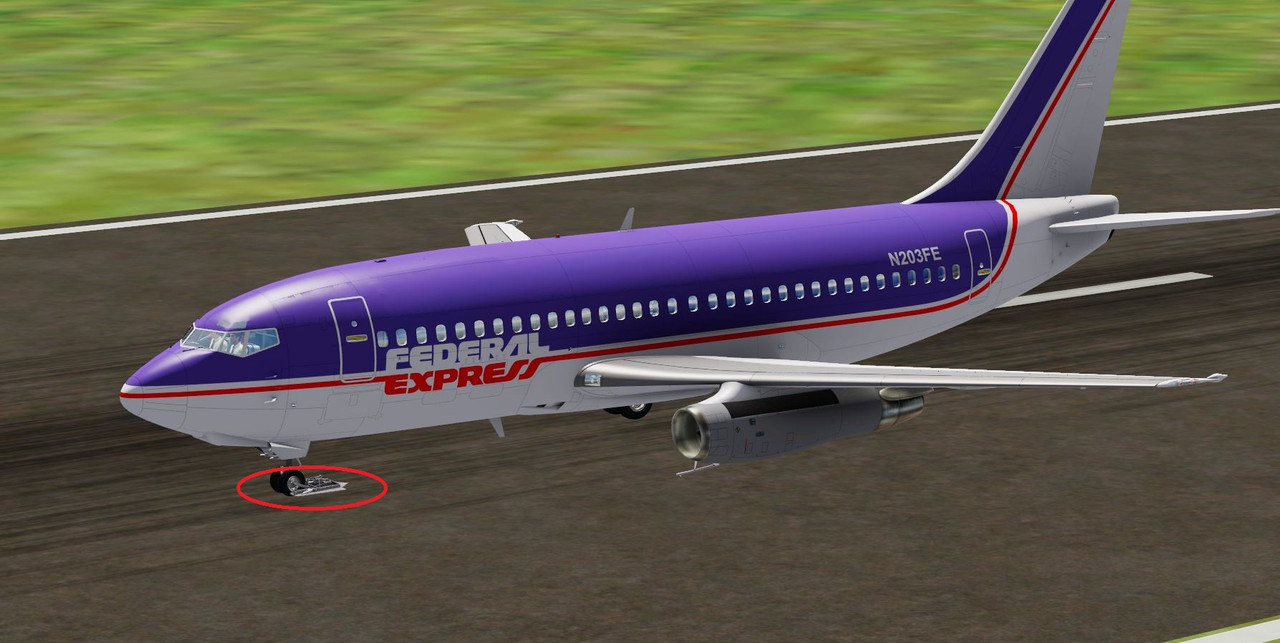
I have the Milviz 727-200 in PeDV5.4 and cannot get rid of that gravel kit on the nose gear.
The Milviz MVAMS doesn't show any way to remove it.

Capture.jpg
 
Last edited:
I don't currently have the MV 727 installed but it sounds and looks like the wrong model is being called. Check to see what model folder names you have and then see what model is being called in the [fltsim.X] section for that particular texture scheme. It will be in the 'model =' line. I am guessing the MV 727 folder will have a simple 'model' folder and possibly one or more folders named something like 'model.gravel' or 'model.something else'. If that is the case and the entry in the [fltsim.X] 'model =' section matches one of those named folders (i.e. 'model.gravel') then just make the line read 'model =' and it will revert to the default model folder which probably doesn't have the gravel kit. Don't forget to save the file after any changes and to reload the aircraft after saving.
 
I don't currently have the MV 727 installed but it sounds and looks like the wrong model is being called. Check to see what model folder names you have and then see what model is being called in the [fltsim.X] section for that particular texture scheme. It will be in the 'model =' line. I am guessing the MV 727 folder will have a simple 'model' folder and possibly one or more folders named something like 'model.gravel' or 'model.something else'. If that is the case and the entry in the [fltsim.X] 'model =' section matches one of those named folders (i.e. 'model.gravel') then just make the line read 'model =' and it will revert to the default model folder which probably doesn't have the gravel kit. Don't forget to save the file after any changes and to reload the aircraft after saving.
For now, I binned it. It was intended for use up to P3DV4 and I was using it in V5. The aircraft cfg file has a gravel kit=false for each livery.
I took it out of V5 and using it in V4 and when while waiting for it to load, a double bing sound was heard and the then P3DV4 went bye bye.
So it is freeware anyway so I just removed it. Thanks anyway.
 
Back
Top