• There seems to be an uptick in Political comments in recent months. Those of us who are long time members of the site know that Political and Religious content has been banned for years. Nothing has changed. Please leave all political and religious comments out of the forums.

    If you recently joined the forums you were not presented with this restriction in the terms of service. This was due to a conversion error when we went from vBulletin to Xenforo. We have updated our terms of service to reflect these corrections.

    Please note any post refering to a politician will be considered political even if it is intended to be humor. Our experience is these topics have a way of dividing the forums and causing deep resentment among members. It is a poison to the community. We appreciate compliance with the rules.

    The Staff of SOH

  • Server side Maintenance is done. We still have an update to the forum software to run but that one will have to wait for a better time.

Need advice about Vertigo model and using carrier in FSX

P38man

Charter Member 2011
I was thinking that for carrier ops in FSX the SBD Dauntless from Vertigo Studios would be the best bet for a WW2 aircraft in FSX. I chose it because I believe it is the only one from Vertigo that has complex engine management?

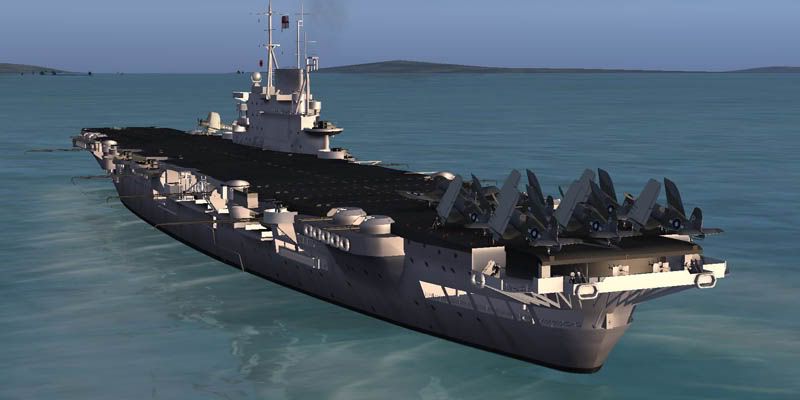
I was thinking of setting it up for us with this WW2 Carrier:
http://www.flyingstations.com/victorious.html


Anyone think another Vertigo model is better in FSX that can be used for carrier-based ops ?

Can this or another plane be easily used with the carrier ? Anyone have a config file to use with aicarriers2 ?

My research has found
1) can use http://www.simviation.com/cgi-bin/syb2.cgi?section=misc&file=aicarriers2.zip
2) If you have any (even one) FS9 AI Traffic files (eg World of AI) convert them using a utility or the Victorius will not show although you could delete the ai traffic file for it which I think would work but then you would not have the challenge of finding the moving carrier without making your own file for it in FS9 format.
3) Under "Program files \ AICarriers \ conf.d" you need to make a text file. Call it flyingstations.cfg and put this info in it:
[formation.0]
title=HMS Victorious Early WW2 (Single)
unit.0=Victorious_1940, 0, 0
 
It’s not just the Victorious, if you have any FS9 AI traffic files they’ll stop all the FSX traffic files from showing.

The text you’ve got should work fine for a cfg file for AI Carriers, just save is as a cfg file in the conf.d directory and it should show up as an option next time you start FSX and AI Carriers.
 
Thanks. Also:

1) Does anyone have a config for the Vertigo Dauntless to use aicarriers2 ?

2) Is the Dauntless the only Vertigo model with complex engine management ?
 
Bruce fitzgeralds CV-6, Mike Davies Essex. SBD's flew for a short time from Escort carriers before being bounced off for TBMs, and I'm sure lots of SBD's hit the decks of the Independence CVL. Do you mean AICarrier formation stuff?
 
Yes and thanks for your help mate - I mean do I need a config file to make the landing hook work on the carrier for the Vertigo Dauntless ?

(Using the carrier Victorious and the Aicarriers2 program)

Wow...do you mean it is possible to set up a fleet ?

I would dearly love a fleet of ships with the Victorious to go up and down the coast near Orbx'x PNW.

Can it be done ?????!!!!
 
I would dearly love a fleet of ships with the Victorious to go up and down the coast near Orbx'x PNW. Can it be done ?????!!!!

Yes, it can be done and you already have the gist of how to do it via the AICarriers utility if you simply want to drop a task group down 5 or 10 miles ahead of your plane and start flight ops. You don't really need a dedicated cfg file in the conf.d folder, all you need is to add the composition of your group as the next formation # in the aicarriers.cfg file, for example:

[formation.10]
title=HMS Victorious
unit.0=Victorious_1940, 0, 0
unit.1=VEH_destroyer01, 600, -100
unit.2=VEH_destroyer01, 0, 600

title is how you want the formation to show as a selection. unit.X is the name from the ship's sim.cfg file. The two number values position each ship relative to the ship you select as the centerpiece unit, in this case Victorious (0, 0). First # is port (-) or starboard (+), second # is ahead (+) or astern (-). I think the numbers represent yards or meters. Experiment a bit and you'll see how it works. :)
 
The VS SBD already has tailhook settings in the cfg, but here is a mod that I have done to slightly adjust the position of the hook end and to add the cat assist,

Open the aircraft.cfg with Notepad

and modify the [Tailhook] section to look like this

[TailHook]
tailhook_length = 2.000000
tailhook_position = -16.000, 0.000, -0.200//-15.000, 0.000, -1.000
cable_force_adjust = 0.68//1.000000

[LSO]
LSOAdjustSpeed = 1.200000


and add the following lines


[launch_assistance]
launch_bar_pivot = 2.41,0.00,-1.3
launch_bar_lug = 7.083333,0.00,-5.50


Bruce
 
Thank you both so much guys!

Wait a sec - don't need to edit the traffic.bgl because I can just dump the Victorious ahead of me? Should I install it without the traffic.bgl then ?

Will it be moving ?
 
I have not yet attempted to set up any carrier using a traffic.bgl file. With AICarriers Vic and her task group will be stationary when you make your selection. Then select 1 - Forward on the "Moves" screen (see screen shot) and the ships will get underway and the wake, bow wave and smoke effects will kick in. On the same screen you'll see the options for turning the ships or moving them to a waypoint. I haven't messed with the waypoint option. So if you're staying overhead your ships you can just eyeball where they're headed and maneuver them as you see fit. :)
 
Wait a sec - don't need to edit the traffic.bgl because I can just dump the Victorious ahead of me? Should I install it without the traffic.bgl then ?

You shouldn't need to edit the traffic.bgl anyway, it just sits in the Scenery/World/Scenery folder and generates the Vic if you happen to be nearby*.

The traffic.bgl won't interfere with the operation of AI Carriers so you can have both options, i.e. the ship following fixed routes around the world and being able to place one wherever you want for some deck landing training. The challenge with the fixed routes is trying to find the damn thing...

*Nearby is somewhere between 64 and 96km if my reading of the SDK is correct, FSX will remove any AI traffic beyond that to maintain performance. This doesn't affect AI Carriers generated objects which will remain in the Sim World until you delete them/close FSX, certainly I've got >500nm from a carrier and gone back and found it.
 
All of the information above is going to be used by me.

I thank you all so much for your help.

THANKS!
 
Hi P38 Man,

If you want a Carrier for the Avenger this should do you well, a late WW2 HMS Victorious and her escorts which should be available for download within a couple of days from FlyingStations.com.

Best

Sketchy.

Vic10.jpg


Vic09.jpg
 
p38man,
Just a couple more items that may be of interest to you since you're working with placing carriers...
(1) This thread: http://www.sim-outhouse.com/sohforums/showthread.php?54718-Moving-Ships-what-s-the-big-deal
(2) Lamont Clark's AI Boat Traffic Compiler utility: http://lc0277.gratisim.fr/boat/
AIBTC uses positional data from Google Earth to build .bgl files that move carriers and whatever other boat/ship traffic you want to set up. Haven't used it yet so can't comment but others have gotten good results from it. Have fun. :)
 
This is ridiculous!

You are all very kind.

Found this important setting from the above link, thanks TARPSBird for all your help!

[Realism]
CatapultForceLimiter=0 //Enables the catapult systems to generate the required force for any type of aircraft


The Victorious rules - well done and thanks Flyingstations!!

Speechless.......a very humble thank you.
 
I have run into a small issue.

When I land the Vertigo SBD Dauntless on the deck of the Victorious Carrier the arresting hook doesn't catch anything (tried many times). What am I doing wrong ?


I lowered the arresting hook, flaps all the way and landing gear and came in to land slow and early on the deck.

Note: I have Acceleration

I think I have missed something ?

I did the following:
1) Installed Victorious

2)To raise and lower the crash barriers - [VCockpit01] section of the Vertigo SBD aircraft's Panel.cfg: gaugeXX=FlyingStations!Hook.xml, 0,0,0,0 (in my case gaugexx was gauge03 as there was already a 01 and 02 gauge)

3) Installed AICarriers2

4) Under "Program files \ AICarriers \ conf.d" I made a text file. Called it flyingstations.cfg and put this info in it:
[formation.0]
title=HMS Victorious Early WW2 (Single)
unit.0=Victorious_1940, 0, 0

5) I put this in the Aircraft.cfg of the SBD

[TailHook]
tailhook_length = 2.000000
tailhook_position = -16.000, 0.000, -0.200//-15.000, 0.000, -1.000
cable_force_adjust = 0.68//1.000000

EDIT - this is not needed as is for Combat flight sim so ignore this - thanks again Rich!
[LSO]
LSOAdjustSpeed = 1.200000


and added the following lines


[launch_assistance]
launch_bar_pivot = 2.41,0.00,-1.3
launch_bar_lug = 7.083333,0.00,-5.50

EDIT - from the next post in this thread this should be in fsx.cfg [Realism] section - thanks Rich!

[Realism]
CatapultForceLimiter=0 //Enables the catapult systems to generate the required force for any type of aircraft
 
One thing there,

[Realism]
CatapultForceLimiter=0 //Enables the catapult systems to generate the required force for any type of aircraft

Should be in FSX.cfg [Realism] section not in aircraft.cfg

There is no need to touch down early and run into the wires the 4 wires are all individual wires not a area encompassing the visual wires, the hook catches or not one of those wires.

I have'nt got that model so can't check but at 2 ft the tailhook length to me looks short.
 
The tailhook length and position entries in the aircraft.cfg are not needed. The hook is modeled into the SBD. Because of its low stall speed this one will trap nicely without any modifications. I use it to get back in practice after non-naval simming for this reason.
 
Hey mfitch.....what do you think I am doing wrong ?

Do you think I missed installing anything ?

I will ask Vertigo for the original hook settings - could that be it ?
 
mfitch
I am afraid the tail hook is not in the aircraft model, I do not have the model but a quick email to a friend who does with a request that he disable the hook section and see what happens, he did with the result he had no working hook so no hook in the model.

Try it yourself and see if you loose your hook

This is a leftover from Combat flight sim and is useless in FSX

[LSO]
LSOAdjustSpeed = 1.200000


The tailhook length and position entries in the aircraft.cfg are not needed. The hook is modeled into the SBD. Because of its low stall speed this one will trap nicely without any modifications. I use it to get back in practice after non-naval simming for this reason.
 
Sorry forgot to mention, even if it did have launch assist and tailhook modeled in the aircraft model those entries in the aircraft.cfg would over ride them
 
Back
Top