

-
Please see the most recent updates in the "Where did the .com name go?" thread. Posts number 16 and 17.
-
IMPORTANT DOWNLOADING INFORMATION - ALL MEMBERS PLEASE READ
Please see this thread for updates. Update Thread
SOH ADMINISTRATION
You are using an out of date browser. It may not display this or other websites correctly.
You should upgrade or use an alternative browser.
You should upgrade or use an alternative browser.
New, from Dino!! USS America, LHA-6! Free!
- Thread starter Navy Chief
- Start date
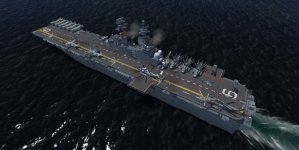


Wow thanks Dino, and thanks for the heads up NC!
Is anyone else struggling to get it to show in aiCarriers?
This is my entry:
[formation.**]
title=USS America
unit.0=USSAmerica, 0, 0
But I keep getting a failed to load object warning, does anyone have any ideas?
Cheers,
Sketchy
Is anyone else struggling to get it to show in aiCarriers?
This is my entry:
[formation.**]
title=USS America
unit.0=USSAmerica, 0, 0
But I keep getting a failed to load object warning, does anyone have any ideas?
Cheers,
Sketchy

PhantomTweak
Members +
Yup!
In the line unit.0=USSAmerica, 0, 0 , get rid of the space between the comma following the word USSAmerica , and the 0 in the coordinates.
In other words, make it look like this: unit.0=USSAmerica,0, 0
I trust you're using AICarriers.NET, not the old JAVA based version.
Can I also suggest you make a single-entry (for now) .cfg file for this ship in the conf.d folder? Adding ships to the main AICarriers.cfg file makes it unwieldy in very short order.
Make sure you add the section
At the top, and ensure the formation(s) start at 0 (zero).
Save a copy in a subfolder to the to the conf.d folder. That way, you can remove/change add-on formations at will. Javier's Nimitz formations, you name it. Adding them to the main aicarrers.cfg makes the SHFT+J menu huge very quickly. You wind up having search through page after page after page to find the formation you want.
Making individual .cfg files, for ship types, or formation types, whatever you want, allows you to swap them in and out instantly, and keeps the SHFT+J menu short enough to be usable easily.
Good luck!
Pat☺
In the line unit.0=USSAmerica, 0, 0 , get rid of the space between the comma following the word USSAmerica , and the 0 in the coordinates.
In other words, make it look like this: unit.0=USSAmerica,0, 0
I trust you're using AICarriers.NET, not the old JAVA based version.
Can I also suggest you make a single-entry (for now) .cfg file for this ship in the conf.d folder? Adding ships to the main AICarriers.cfg file makes it unwieldy in very short order.
Make sure you add the section
Code:
[base]throttle=60
menu_shortcut=shift+j
confdir=conf.dSave a copy in a subfolder to the to the conf.d folder. That way, you can remove/change add-on formations at will. Javier's Nimitz formations, you name it. Adding them to the main aicarrers.cfg makes the SHFT+J menu huge very quickly. You wind up having search through page after page after page to find the formation you want.
Making individual .cfg files, for ship types, or formation types, whatever you want, allows you to swap them in and out instantly, and keeps the SHFT+J menu short enough to be usable easily.
Good luck!
Pat☺

Thanks PhantomTweak and LouP,
Firstly @Phantom, I removed the spaces as suggested but this did not make any difference, also note all my other AiCarrier formations have the spaces between the "," and "0"'s but that does not seem to cause an issue. I am indeed using the ".Net" version and not the old Java.
I must confess the one thing that always have me scratching my head is what name to place against the "unit" line of the Ai Carriers Config file. Sometimes it works using the "title=" from the sim.cfg file in the root folder of the Ship, then other times it needs the "normal=" from the sub folder's "model.cfg" if you are looking to use a different variant deck layout for example.
So this time I have pretty much used every variation of "USS America LHA-6 empty deck" , "clean" , or "USSAmerica", I am wondering if there may be some other issue this time plaguing me I cannot figure out. I have files sat inside the same folder as all my other ships and they work fine, any smarter people than myself have any ideas?
@LouP I shall certainly place your BGL files in as soon as I know its working in AiCarriers. Ironically I was in Oahu last week and have a great photo of USS Bonne Holme Richard sailing back into Pearl that I took from the top of Diamond Head, I'll post it here when I grab them from my camera.
Hope someone call help my ineptitude! Cheers,
Sketch
Firstly @Phantom, I removed the spaces as suggested but this did not make any difference, also note all my other AiCarrier formations have the spaces between the "," and "0"'s but that does not seem to cause an issue. I am indeed using the ".Net" version and not the old Java.
I must confess the one thing that always have me scratching my head is what name to place against the "unit" line of the Ai Carriers Config file. Sometimes it works using the "title=" from the sim.cfg file in the root folder of the Ship, then other times it needs the "normal=" from the sub folder's "model.cfg" if you are looking to use a different variant deck layout for example.
So this time I have pretty much used every variation of "USS America LHA-6 empty deck" , "clean" , or "USSAmerica", I am wondering if there may be some other issue this time plaguing me I cannot figure out. I have files sat inside the same folder as all my other ships and they work fine, any smarter people than myself have any ideas?
@LouP I shall certainly place your BGL files in as soon as I know its working in AiCarriers. Ironically I was in Oahu last week and have a great photo of USS Bonne Holme Richard sailing back into Pearl that I took from the top of Diamond Head, I'll post it here when I grab them from my camera.
Hope someone call help my ineptitude! Cheers,
Sketch

DaveWG
Charter Member
The "unit.0=" line should always be the same as the "title=" line in the sim.cfg.
This is my "USS America.cfg" I use with AICarriers and SWS CarrierExtensions.
At the risk of stating the obvious, make sure the USS America is in an active SimObjects folder!
This is my "USS America.cfg" I use with AICarriers and SWS CarrierExtensions.
Code:
[formation.0]
title=USS America LHA-6 empty deck
unit.0=USS America LHA-6 empty deck,0,0

[formation.1]
title=USS America LHA-6 F-35 operations
unit.0=USS America LHA-6 F-35 operations,0,0

[formation.2]
title=USS America LHA-6 MV-22 operations
unit.0=USS America LHA-6 MV-22 operations,0,0
At the risk of stating the obvious, make sure the USS America is in an active SimObjects folder!
PhantomTweak
Members +
I must confess the one thing that always have me scratching my head is what name to place against the "unit" line of the Ai Carriers Config file. Sometimes it works using the "title=" from the sim.cfg file in the root folder of the Ship, then other times it needs the "normal=" from the sub folder's "model.cfg" if you are looking to use a different variant deck layout for example.
From what I've seen, the name to use in the unit.X= line, should be the same as the
[fltsim.0]title=USS America LHA-6 empty deck
line.
Note that there's one [fltim.X] section for each variant. I just use a copy-n-paste method to make sure I get them exactly right. And because I'm lazy, but what can I say...

I've never used any other line in the unit.X= entry. Usually, you need a [fltsim.X] entry for each variant using a different model= line to have them show up in AICarriers.
Remember, the first [formation.X] line in any .cfg file must be [formation.0]. Zero not O (oh). I've done that. Very embarrasing.
If you add a formation to an existent .cfg file, it has to the next one in sequence. So, near as I can figure, presuming you are making a new .cfg file for these ships, not just adding them to an already existing .cfg file, you SHOULD have it look like this:
Code:
[formation.0]
title=USS America Empty Deck
unit.0=USS America LHA-6 empty deck,0, 0


[formation.1]
title=USS America F-35s
unit.0=USS America LHA-6 F-35 operations,0, 0Try using what I just entered and see if it works for you. Copy what's inside the code box above to a text file, and rename it something like America.cfg. Make sure you place it in the conf.d folder of your AICarriers install. Make sure it's the ONLY .cfg file in there so we can trouble shoot this one thing. If you have other files already in there, make a sub-folder, and cut-n-paste them to it to get them out of the way without loosing them.
Notice that the Title= line can be whatever you want. It's the unit.X= line that must be the same as the title= line in the ship's sim.cfg file's [fltsim.X] entries.
You can also add other boats if you desire a battle group situation. Like this:
[formation.3]
title=Simple 3 ships fleet
unit.0=CVN68_1, 0, 0
unit.1=CG-49, -200, 0
unit.2=USS_DD_963_SPRUANCE, 200, 0
Make sure to give them adequate separation to prevent a creation failure due to the ships interfering with one another.
We'll get this, you wait n see

Pat☺
@DaveWG and @PhantomTweak,
Thanks so much for your help, she is now underway in my sim and working well. Its always the small things that make the big difference!
She looks great, Dino has done fantastic work as always, it reminds me to get cracking and finish two unfinished Royal Navy ships that have sat on my hard drive for almost 2 years.
Cheers,
Sketchy
Thanks so much for your help, she is now underway in my sim and working well. Its always the small things that make the big difference!
She looks great, Dino has done fantastic work as always, it reminds me to get cracking and finish two unfinished Royal Navy ships that have sat on my hard drive for almost 2 years.
Cheers,
Sketchy

Dino Cattaneo
Charter Member
For the record, a small update is available on my blog - note that the model names were changed again, so you may need to update your AICarriers/Tacpack config.
http://indiafoxtecho.blogspot.com/2018/07/uss-america-lha-6-update-to-version-012.html
http://indiafoxtecho.blogspot.com/2018/07/uss-america-lha-6-update-to-version-012.html
PhantomTweak
Members +
Thanks for the heads-up, Dino. Appreciate it! 
@Sketchy: Glad you got it working right! Now go download the update, and change everything again
Have fun!
Pat☺
@Sketchy: Glad you got it working right! Now go download the update, and change everything again
Have fun!
Pat☺
Dino, please accept my sincere thanks and appreciation for all your efforts in producing this magnificent gift to the
sim community. She is spectacular.
I've only recently become interested in all things carrier related in a more serious way and have sampled a number of freeware carriers. The detail and functionality on USS America is amazing; how can you possibly have optimized that much detail so well? It barely registers a performance hit in my FSX-A, fully decked out and with all sim details cranked. It is my absolutely favorite carrier and I've now accumulated over a dozen, some better than others, of course.
I've been a simmer for decades and can't believe I've missed all this fun, having only recently discovered it all. Thanks to all who have contributed to these and other forums on how to get acquainted and become proficient at naval aviation. My recently acquired addons and related skills/knowledge now include:
AICarriers2 - wow
AIBTC - great program, bit of a learning curve but managed to create my first AI fleet, now happily puttering around Orbx Pago Pago, with Dino's flagships.
VLSO - what a fabulous utility. I have an axe to grind with that LSO however...
FSXBA F-18 - another great gift.
All of Dino's freeware - 'nuff said!
Aerosoft F-14. Simply incredible. Challenging flight model just feels right. You get a nice carrier and fine ships with this one.
Maryadi and Rob's extraordinary MV-22B. This is simply of unbelievable quality. Well beyond most payware offerings and a treasure not to be missed.
All things hoist/sling load related. This has greatly expanded my enjoyment of FSX. Performing fleet resupply from NSTU on moving ships is way more fun than I would have thought possible.
The whole shebang simply opens a completely new dimension for me and I know I'll be spending many hours with these flight activities. PhantomTweak, also a special thanks to you; your many informative posts in no small measure placed me on the right paths.
Gotta go...radio call just in. USS Patuxent needs another food crate and USS America ordering a cable car wheel.
sim community. She is spectacular.
I've only recently become interested in all things carrier related in a more serious way and have sampled a number of freeware carriers. The detail and functionality on USS America is amazing; how can you possibly have optimized that much detail so well? It barely registers a performance hit in my FSX-A, fully decked out and with all sim details cranked. It is my absolutely favorite carrier and I've now accumulated over a dozen, some better than others, of course.
I've been a simmer for decades and can't believe I've missed all this fun, having only recently discovered it all. Thanks to all who have contributed to these and other forums on how to get acquainted and become proficient at naval aviation. My recently acquired addons and related skills/knowledge now include:
AICarriers2 - wow
AIBTC - great program, bit of a learning curve but managed to create my first AI fleet, now happily puttering around Orbx Pago Pago, with Dino's flagships.
VLSO - what a fabulous utility. I have an axe to grind with that LSO however...
FSXBA F-18 - another great gift.
All of Dino's freeware - 'nuff said!
Aerosoft F-14. Simply incredible. Challenging flight model just feels right. You get a nice carrier and fine ships with this one.
Maryadi and Rob's extraordinary MV-22B. This is simply of unbelievable quality. Well beyond most payware offerings and a treasure not to be missed.
All things hoist/sling load related. This has greatly expanded my enjoyment of FSX. Performing fleet resupply from NSTU on moving ships is way more fun than I would have thought possible.
The whole shebang simply opens a completely new dimension for me and I know I'll be spending many hours with these flight activities. PhantomTweak, also a special thanks to you; your many informative posts in no small measure placed me on the right paths.
Gotta go...radio call just in. USS Patuxent needs another food crate and USS America ordering a cable car wheel.