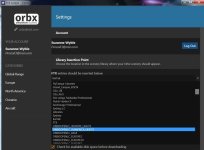
Maybe I'm misunderstanding your question Chief, but to set up Orbx in your Scenery Library, you just use the Library Insertion Tool
in Orbx Central Settings. OpenLC's should always be below FTX. Then just choose a particular third party scenery that FTX should
always load under in the Scenery Library. And that's it.
Any new Orbx sceneries, airports or OpenLC regions will follow those set-up parameters when installed. Orbx itself will have set up
in that Orbx scenery how it's suppose to stack against other Orbx sceneries, so you don't need to adjust yourself. Any new third party
sceneries will generally load first time at the top of the Scenery Library, and so above that particular third party scenery you specified
Orbx FTX entries should always load below.
Or do you mean that, even when a third party scenery is loaded above all the Orbx entries in the Scenery Library, you're still getting
scenery anomalies, like Otbx buildings pushing up through the third party scenery buildings, or elevation anomalies, like sunken
runways, in that third party scenery? That's usually a sign of a conflict between that scenery's .bgl and another scenery's .bgl, maybe
an Orbx .bgl, but not always. It usually means finding the conflicting .bgl and setting it to off.
I hope that helps -Rob


 NC
NC