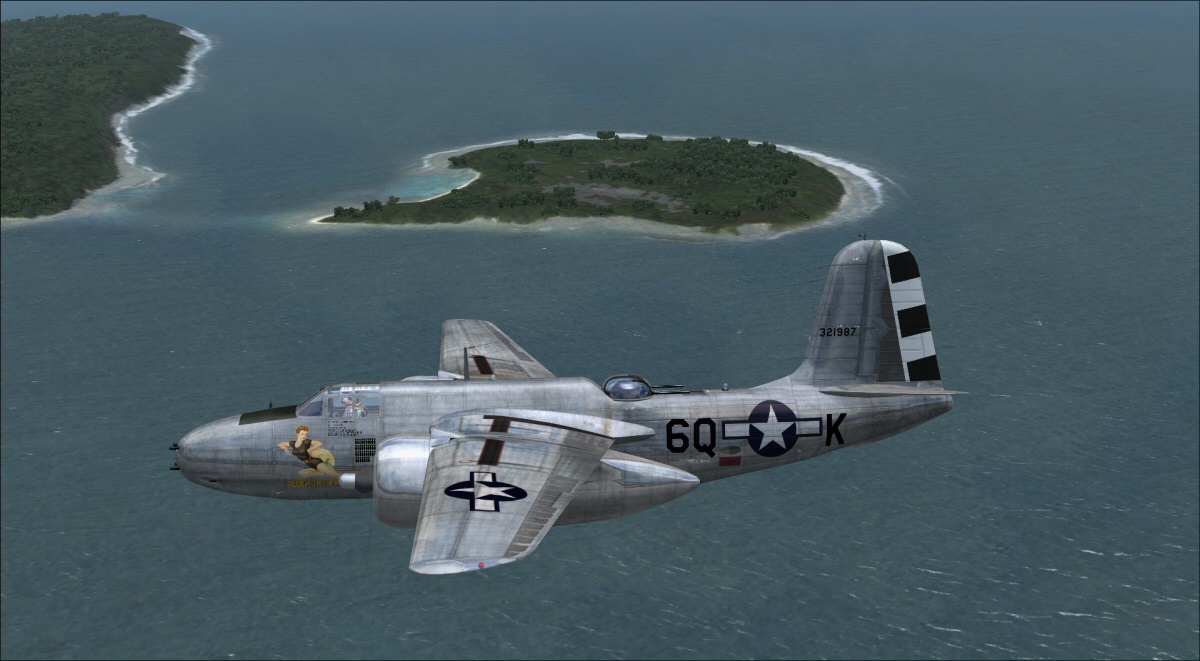
Question on Milton Shupe's Douglas A-20Cs

Kuckoo

Members +
Is there an FSX A-20C model (with blisters) available that support a reflective layer?

I already have the G model addon model that supports a bare metal layer, and the Russian C model (without blisters) that support a reflective layer. All the non-bare metal G models already have a sheen to them in the sim. But except for the Russian model, none of the C models do since they lack reflective layer support, apparently.

Discovered this when I downloaded Duckies beautiful paints for the various A-20C gun nose models. The paints look great on the models, and I can see shadowing effects from the bump mapping, but there is no reflective sheen on the models at all. I created an extra texture folder for Yellow Fever so I could use it on the standard glass nose A-20C, and the issue persists there as well.

I then had that created fltsim entry call for the A-20 Russian model with reflections, instead of the standard A-20C. Fired FSX up, and it had that nice metal effect that it was missing before (not the wet-looking, polished effect in the bare metal G model, just a metallic sheen). Made a world of difference.

Been through the library to no avail. Is this something that was never done or am I missing something?

Thanks.
 
Indeed the A20C with glass nose (A20RUR.mdl) has a nice reflective shine:

8EBzlmP.jpeg


The A20G with guns (A20G.mdl), even with a similar metallic repaint, looks dull, dark and flat:

ExYS6Bt.jpeg


I tried to add some reflection to the A20G model with Martin Wright's MDLMatXX tool, with no success... yet... But I have the feeling the solution is with MDLMatXX, possibly with spec layer and correct alpha channel... I hope some developper/repainter can help...

8jH3dXg.jpeg


Scenery: UK Royal Navy & US Navy Support Facility "Diego Garcia" FJDG (Chagos Archipelago, Mauritius) by Tiberius Kowalski (Simviation). Repaints by Jan Kees Blom (SOH library)
 
Last edited:
Noticed your post; did a quick look but with so many variants plus FSX and FS9 differences, and having been retired from modeling since 2019, I do not recall. I may get time later to research the question better when I return home. Everything has been archived related to simming and design work so will have to drag it all out to refresh my memory.
 
In the G model, there is only one model with the reflective properties and that is: model = A20Grefl .
You can possibly copy the model folder with the gun setup you wish and change the properties to match the reflective model, give the folder and the sub-mdls in the folder, and the model.cfg names to try it. Not sure that would work but may be worth a try. I have forgotten so much about changing any of this that I doubt I could even create a variant for you.
 
Is there an FSX A-20C model (with blisters) available that support a reflective layer?

I already have the G model addon model that supports a bare metal layer, and the Russian C model (without blisters) that support a reflective layer. All the non-bare metal G models already have a sheen to them in the sim. But except for the Russian model, none of the C models do since they lack reflective layer support, apparently.

Discovered this when I downloaded Duckies beautiful paints for the various A-20C gun nose models. The paints look great on the models, and I can see shadowing effects from the bump mapping, but there is no reflective sheen on the models at all. I created an extra texture folder for Yellow Fever so I could use it on the standard glass nose A-20C, and the issue persists there as well.

I then had that created fltsim entry call for the A-20 Russian model with reflections, instead of the standard A-20C. Fired FSX up, and it had that nice metal effect that it was missing before (not the wet-looking, polished effect in the bare metal G model, just a metallic sheen). Made a world of difference.

Been through the library to no avail. Is this something that was never done or am I missing something?

Thanks.
Hi, sorry there was no further updates for reflective models beyond the:
[models]
normal=a20rur //added alpha support for reflectivity, and Fresnel ramp
interior=a20rur_interior
 
In the G model, there is only one model with the reflective properties and that is: model = A20Grefl .
You can possibly copy the model folder with the gun setup you wish and change the properties to match the reflective model, give the folder and the sub-mdls in the folder, and the model.cfg names to try it. Not sure that would work but may be worth a try. I have forgotten so much about changing any of this that I doubt I could even create a variant for you.

Thank you for replying. :)

So I tried what you suggested.

I copied the "model.a20c" folder and renamed it to "model.a20cr". Also renamed to two .mdl files to "a20cr.mdl" and "a20cr_interior.mdl".

For the model.cfg, I used entries from the a20rur folder:
[models]
normal=a20rur //added alpha support for reflectivivity, and fresnel ramp
interior=a20rur_interior


I used the 84thBS-47thBG A-20 to test the result and changed the model entry from =a20c to =a20cr.

Fired up the sim, and while the A-20 in question loaded with everyone else when going into the aircraft selection menu, when selecting the aircraft itself I got an "aircraft model failed to load" error. When backing out to the main UI, the sim crashed and I had to kill it in the task manager.

I'm guessing the names of the entries for the model config, and the model itself, not matching (a20rur vs a20cr) would cause this. And that changing the model.cfg entries to "a20cr" to match would have only produced the non-reflective/fresnel model.

Anyway, I can't ask you to come out of retirement just to accommodate this. I've been using the reflective non-blistered C variant mentioned in my earlier post, and have already resolved to sticking with that for other plexi-nosed C-variants, at least for paints depicting early Cs or other non-blistered versions.

Thank you and your team for making this beautiful airplane and all its variants.
 
Back
Top