Scenery Gurus?

Shadow Wolf 07

SOH-CM-2025
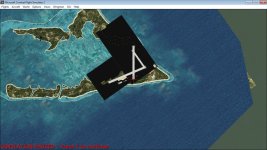
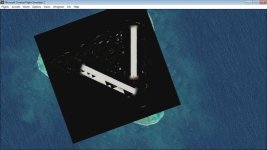
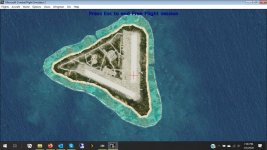
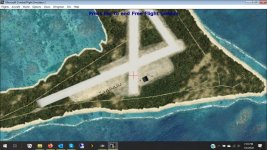
I am installing/testing UT's Wake and Marcus. I've tried everything I know, but I stll get thee black texture squares. Any idea on how to get them to display right? If you've seen the screenshots by UT, he doesn't have this problem. I hsve it on both my Win7 and Win10 systems :banghead: :dizzy:
 

Attachments

  • EX_047.jpg
    EX_047.jpg
    73.7 KB · Views: 1
  • EX_048.jpg
    EX_048.jpg
    57.2 KB · Views: 0
Wolf,
it looks like you have rotated the square. According to NR tutorial it has to be stricly North/South. You can rotate the scenery within the square but not the square itself.
Cheers
Achim
 
Achim

Squares are North-South, it's just SW took screengrabs zoomed in & it's aligned with his airplane direction...

Textures are the usual DXT3 blended backgrounds. I'm on WIN7 & have no display issues. Other beta tester reports no issues too, this scenery will be uploaded very soon.

However, I am concerned that people with "new install" WIN 10 PCS seem to report black squares for airbase backgrounds. Are we losing backwards compatibility as people move to WIN 10 native hardware, & DXT3 textures are the "canary in the mine"?

I don't recall this old sim using DXT3 textures anywhere else, which brings me to another thought - has anyone tried using 444-4 or even 888 format bitmaps for airbase scenery? The 444-4 format seems stable enough, we use it for prop disks all the time. It would offer 4 grades of alpha channel. 888-8 offers 8 grades of alpha, but might be a step too far, process-wise for CFS2 to handle smoothly.
 
Last edited:
Hi UncleTgt

Many aircraft are painted using DTX3 including my own and Team Daedalus. It's a good halfway compression point between DTX1 and Extended16 bit 565. The file is 2/3 the size of the 16 bit 565 and the detail is hard to tell apart between those two. I certainly hope that Win10 is not going to be a problem.
 
I am installing/testing UT's Wake and Marcus. I've tried everything I know, but I stll get thee black texture squares. Any idea on how to get them to display right? If you've seen the screenshots by UT, he doesn't have this problem. I hsve it on both my Win7 and Win10 systems :banghead: :dizzy:

Any possible solutions?
 
OK, I can report that DXT3, 444-4 and 888-8 blended bitmaps all work in CFS2 & display OK (for me). The best visual results seem to be with either DXT3 or 888-8, you seem to lose a little subtlety with 444-4, but I'll provide all three texture options when I upload the Marcus & Wake scenery, in case the other texture formats are useful to somebody experiencing display issues in the future.
 
Hi Shadow Wolf 07,
I may be of help if I coul have a look into the sca-files of the airfield. Without it is impossible to find out what has gone wrong.
Cheers

Achim
 
Back
Top