Thinking about getting MSFS 2024

gray eagle

SOH-CM-2026
I am so close to jumping into MSFS 2024.....But I need to know a few things from the users here.
I found the MS page where to purchase and was gobsmacked by the versions they have, i.e standard
premium etc. I see there are more aircraft and sceneries that come with each level and the price goes
up with each lever.

I would replace my P3DV3 with MSFS2024 and keep my P3D V4 and V5 just to have something to fall back on.
I have seen some former 2024 users that reverted back to P3D with their horror stories.

I see that MSFS 2020 is a mature version over the 2024 version and that 2024 version has some bugs to work out (what I obviously don't know)

So, I think I my rig can handle the sim but which version I guess will be what disk space I can afford and price.
I have seen comparisons on Utube of both versions (2020/2024) and the 2024 looked brighter then the 2020.\

What would I stand to gain with 2024 over 2020 and visa versa?

Thanks


I have a NVIDIA GFORCE GTX 660 card windows 10,
Capture.JPG
 
I honestly don't think your GFORCE GTX 660 is up to it Butch.

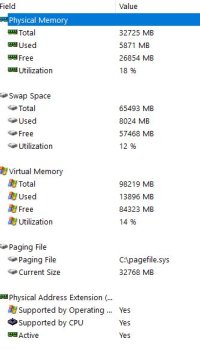
RAM, you're ok. What kind of CPU/Processor do you have?
 
I don't have time right this second to go into detail, but there's some discussion over the different editions here: https://sim-outhouse.org/sohforums/threads/msfs-2024-now-20-off-sale.167222/

Personally, I went with Premium Deluxe, as there were planes in each of the deluxe versions that I really wanted. PLUS, you get 35% off any other MS add-on planes (like the new Fokker 27) if you buy the higher versions. The topic above talks about the Aviator Edition. It's a mixed bag due to lots of the planes being 2020. Don't just get the Standard edition despite Hollister56's recommendation. :) The Albatross alone is worth the cost of Deluxe, at least.

On the 2020 vs 2024 decision, I absolutely 100% with confidence say go with 2024.
* Better performance; it uses hardware better. 2020 stutters on my rig, 2024 is silky smooth.
* Better visuals (especially if you do any bush flying)
* More planes
* A bunch of new features you may or may not use, but they are there
* Better long-term support, both of the sim and from third parties
* Compatibility nowadays with about 95% of 2020 add-ons, PLUS all the new 2024-specific add-ons
* None of the frustrations about 2020 support I see 2020 hangers-on expressing over in the 2020 forum :)
* Smaller install

Downsides;
* Still some bugs and issues (but that's true of 2020 as well, and at least here, they are still being actively worked on)
* Much more content streams down. This makes your install about 100GB smaller, but could be frustrating if you have a bad Internet connection. That said, you can download and cache frequently used content

Oh, I typed more than I meant to. :)
 
I don't have time right this second to go into detail, but there's some discussion over the different editions here: https://sim-outhouse.org/sohforums/threads/msfs-2024-now-20-off-sale.167222/

Personally, I went with Premium Deluxe, as there were planes in each of the deluxe versions that I really wanted. PLUS, you get 35% off any other MS add-on planes (like the new Fokker 27) if you buy the higher versions. The topic above talks about the Aviator Edition. It's a mixed bag due to lots of the planes being 2020. Don't just get the Standard edition despite Hollister56's recommendation. :) The Albatross alone is worth the cost of Deluxe, at least.

On the 2020 vs 2024 decision, I absolutely 100% with confidence say go with 2024.
* Better performance; it uses hardware better. 2020 stutters on my rig, 2024 is silky smooth.
* Better visuals (especially if you do any bush flying)
* More planes
* A bunch of new features you may or may not use, but they are there
* Better long-term support, both of the sim and from third parties
* Compatibility nowadays with about 95% of 2020 add-ons, PLUS all the new 2024-specific add-ons
* None of the frustrations about 2020 support I see 2020 hangers-on expressing over in the 2020 forum :)
* Smaller install

Downsides;
* Still some bugs and issues (but that's true of 2020 as well, and at least here, they are still being actively worked on)
* Much more content streams down. This makes your install about 100GB smaller, but could be frustrating if you have a bad Internet connection. That said, you can download and cache frequently used content

Oh, I typed more than I meant to. :)
Oh that's okay, you were most helpful in telling it like it is with both versions and I appreciate your candor.
 
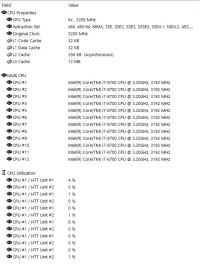
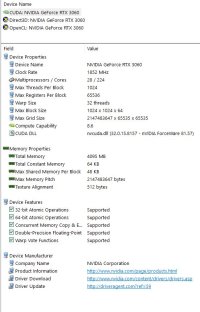
My son did the stats on my rig

You have an I7-8700, 32GB of RAM, and an RTX 3060. That should be plenty to run this on medium to medium-high settings.

Amen
 
I purchased the standard version of MSFS 2024 and got the setup program downloaded. I will let my son help me this weekend to run the setup
and download the actual files then make a backup after that. So for now I paid for the standard edition at the sale price and things can
wait till Sunday when I remove my old P3D V3 from external hardrive and use it for the new MSFS2024 install. I'm slowly getting there.
 
I have a i7-8700k, so similar to yours. Coupled with an old GTX 1070ti.
In 1080p resolution on a single screen, the performance in the sim is quite good with fairly high details. The thing is, you won't need to push the settings very high to get something impressive, especially compared to P3Dv3. In fact, some settings will give some impressive results even when set to "low" or medium...
One trap is still the same as in any sims though: for some settings, it's better to choose "high" than "ultra" level, because the visual difference may not be worth the performance impact.
So I'd recommend you to start with everything at medium, see what you get, then check what you can increase :)

Concerning the install, it's going to be surprisingly quick, because the sim will not install much scenery at all. The scenery around you and the plane you choose for your flight are downloaded every time you launch a flight.
It sounds scary but works quite well. If you have a good and fast internet connection, I would recommend you to keep the sim configured this way.
You technically *can* force the download of the sim, but it's mostly a waste of disk space in my opinion, unless your internet connection is metered or very very slow...
 
Back
Top