• Please see the most recent updates in the "Where did the .com name go?" thread. Posts number 16 and 17.

    Post 16 Update

    Post 17 Warning old domain name stealing credentials

  • Special Server Maintenance

    Just when you think you have everything running some what better...

    You get a message from the Hosting company. Short story they need to move us to a new server. I have been working with them to plan a good date for all concerned. Here is what we have come up with as a schedule.

    1. November 4th 17:00 -5UTC shut off the forums and start backup proceedures. During this time there will be no access to the forums or the Resource Section.
    2. November 5th Continue with Backups and download same until complete.
    3. November 6th 7:00 turn over server to hosting company to move system to new server
    4. November 7th - 8th restore backups and upgrade forum software.

    If all goes well we should be back online on November 8th.

    To keep you updated we will post updates on AVSIM forums.

    Thank you for your support.

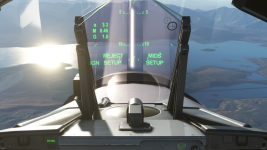
Touchingcloud's F/A-18E "Super Warrior" Hud Error

I think that's caused by a compatibility issue with one of the sim updates, and since the developer seems to have abandoned the project (and pulled it off .to), it probably won't get officially fixed.

This was posted in the comments section prior to the file being deleted, so hopefully it helps.

Fix for the bugged hmd and hud.!!!BACKUP THE *asobo-vcockpits-instruments-fa18* FOLDER!!!I'm not responsible if you mess something up.Go to the packages folder (the one where you community folder is located in) then Official>onestore>asobo-vcockpits-instruments-fa18>html-ui>pages>VCockpit>instruments>FA18>shared>DDI edit the FA18_DDI_HMD.html file and place <!-- after the first line of code and -- > (without the space) after </div>EDIT : just replace everything in the aforementioned file with the text found here: ( https://pastebin.com/zeYHDmP3).In sim don't go to your DDI HMD page.
 
I think that's caused by a compatibility issue with one of the sim updates, and since the developer seems to have abandoned the project (and pulled it off .to), it probably won't get officially fixed.

This was posted in the comments section prior to the file being deleted, so hopefully it helps.

Fix for the bugged hmd and hud.!!!BACKUP THE *asobo-vcockpits-instruments-fa18* FOLDER!!!I'm not responsible if you mess something up.Go to the packages folder (the one where you community folder is located in) then Official>onestore>asobo-vcockpits-instruments-fa18>html-ui>pages>VCockpit>instruments>FA18>shared>DDI edit the FA18_DDI_HMD.html file and place <!-- after the first line of code and -- > (without the space) after </div>EDIT : just replace everything in the aforementioned file with the text found here: ( https://pastebin.com/zeYHDmP3).In sim don't go to your DDI HMD page.

Not sure if they'll continue supporting the mod, but just an FYI for anyone interested, Touching Cloud's stuff is now available for download off their own website.

F/A-18E mod's here: https://msfs.touching.cloud/mods/f-a-18e-super-warrior-mod/
 
I think that's caused by a compatibility issue with one of the sim updates, and since the developer seems to have abandoned the project (and pulled it off .to), it probably won't get officially fixed.

This was posted in the comments section prior to the file being deleted, so hopefully it helps.

Fix for the bugged hmd and hud.!!!BACKUP THE *asobo-vcockpits-instruments-fa18* FOLDER!!!I'm not responsible if you mess something up.Go to the packages folder (the one where you community folder is located in) then Official>onestore>asobo-vcockpits-instruments-fa18>html-ui>pages>VCockpit>instruments>FA18>shared>DDI edit the FA18_DDI_HMD.html file and place <!-- after the first line of code and -- > (without the space) after </div>EDIT : just replace everything in the aforementioned file with the text found here: ( https://pastebin.com/zeYHDmP3).In sim don't go to your DDI HMD page.

Thanks a lot. Fine now....
 
Back
Top