View Problem

Willy

Administrator
Staff member
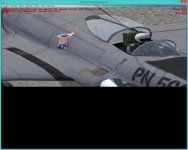
I've been messing around trying my hand at porting over a few old favorites from FS9. The latest victim is the AlphaSim F-80 Shooting Star. And it's doing something I've never seen before. In all views, it's showing everything in the top of half of the screen, but the bottom half is black. I'm thinking that it's probably a setting in the aircraft.cfg.

Any Help?
 

Attachments

  • flt 19-2015-aug-3-003.jpg
    flt 19-2015-aug-3-003.jpg
    55.1 KB · Views: 0
Seen this before a few times (though not recently). I think you'll find the solution in the panel.cfg. Look for this line.. render_3d_window=0. If it already says =0.. change it to =1 or vice versa;)

ATB
DaveB:)
 
Thanks! It was set at 1, I changed it to 0 and all is as it should be.
 
Over the years, I have collected tips, adjustments and fixes for the panel and aircraft.cfg files to get them to work in FSX and kept them in an "Add-on" file. I will add DaveB's "render_3d_window" tip to my file.

One that I use repeatedly when porting an FS9 model into FSX is to adjust the panel set-up as follows:

/// FSX Panel Set-Up
[Color]
Day=255,255,255
Night=20,15,5
Luminous=147,130,94

[Default View]
X=0
Y=0
SIZE_X=8191
SIZE_Y=6143
 
Back
Top