

-
Please see the most recent updates in the "Where did the .com name go?" thread. Posts number 16 and 17.
-
Special Server Maintenance
Just when you think you have everything running some what better...
You get a message from the Hosting company. Short story they need to move us to a new server. I have been working with them to plan a good date for all concerned. Here is what we have come up with as a schedule.
- November 4th 17:00 -5UTC shut off the forums and start backup proceedures. During this time there will be no access to the forums or the Resource Section.
- November 5th Continue with Backups and download same until complete.
- November 6th 7:00 turn over server to hosting company to move system to new server
- November 7th - 8th restore backups and upgrade forum software.
If all goes well we should be back online on November 8th.
To keep you updated we will post updates on AVSIM forums.
Thank you for your support.
You are using an out of date browser. It may not display this or other websites correctly.
You should upgrade or use an alternative browser.
You should upgrade or use an alternative browser.
Autogen hangars on top of custom hangars....
- Thread starter Navy Chief
- Start date

gray eagle
SOH-CM-2026
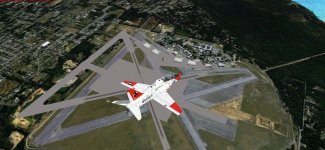
I have hangars for KNUN (NAS Saufley Field) installed, but the default hangars are also there, on top of Jim D's hangars. Is there a way to get rid of the default hangars? Oh, and the runways are blurred, and not clear at all.....Thanks, NC

Pete,
Gonna ask the obvious, did you activate the new field in FSX? I have fsx on another drive and will see if I can duplicate your situation.
Edit: I don't have this scenery, thought I did and I can't seem to find a copy of it online.
I went over to Flightsim where a lot of [SIZE=-1]Jim Dhaenens' sceneries are located and KNUN is not there.[/SIZE]
NC,
I use that scenery and have never seen the default buildings overlaying JD's stuff. On my end that scenery sits in it's own folder, "FSX\Addon Scenery\Fla_Mil_KNUN"
The default KNUN airport is located at D:\FSX\scenery\0302\scenery "APX24210.bgl".
You might try renaming that file temporarily as a quick fix.
FAC
I use that scenery and have never seen the default buildings overlaying JD's stuff. On my end that scenery sits in it's own folder, "FSX\Addon Scenery\Fla_Mil_KNUN"
The default KNUN airport is located at D:\FSX\scenery\0302\scenery "APX24210.bgl".
You might try renaming that file temporarily as a quick fix.
FAC
Navy Chief
Senior Member
NC,
I use that scenery and have never seen the default buildings overlaying JD's stuff. On my end that scenery sits in it's own folder, "FSX\Addon Scenery\Fla_Mil_KNUN"
The default KNUN airport is located at D:\FSX\scenery\0302\scenery "APX24210.bgl".
You might try renaming that file temporarily as a quick fix.
FAC
I found the source of the problem, which was a incomplete Jim D. scenery directory. Reinstalled. All ok. Thanks! NC
Navy Chief
Senior Member
I was thinking about sending you a screenshot of the folder, with the full set of files in it.
Glad you got it fixed.
FAC
Thanks for your offer though! NC
Navy Chief
Senior Member
NC,
It looks like you might have an extra KNUN at work there. My KNUN from JD looks like the top layer in your aerial, not the fancier photo real runway lower layer.
Looking at the read-me from JD, it mentions that the only thing he did was to add the hangers (to the default runway).


I've also attached an image showing my folder with all of JD's KNUN files in it.
The other thought is that you managed to get a later fancier version of JD's KNUN than I have???
Layering:
KNUN is scenery layer #132 on my end. Any regional scenery layers that might cover the Pensacola area are farther down the stack.
Forest
It looks like you might have an extra KNUN at work there. My KNUN from JD looks like the top layer in your aerial, not the fancier photo real runway lower layer.
Looking at the read-me from JD, it mentions that the only thing he did was to add the hangers (to the default runway).
I've also attached an image showing my folder with all of JD's KNUN files in it.
The other thought is that you managed to get a later fancier version of JD's KNUN than I have???
Layering:
KNUN is scenery layer #132 on my end. Any regional scenery layers that might cover the Pensacola area are farther down the stack.
Forest
Navy Chief
Senior Member
Forest,
I did just install RealWorld Northwest Fla. scenery.. NC
I did just install RealWorld Northwest Fla. scenery.. NC

Navy Chief
Senior Member
That'll do it.
NC you're going to have to delete one of the two AFD files.
Preferrably the one that does not have the parking for all the 'boot' aviators.
If there's a AFD for Saufley in the Northwest Fla scenery that's the one to disable.
It is a long list of .bgl files with latitude/longitudes. Not sure how to find which one to delete..... NC