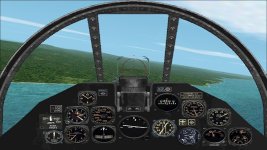
P-40Q Warhawk by bub released!

bub- CFS2 is clean install. Your P-40Q and weapons/tank pack are only additions.

UncleTgt- thanks, It'll take me a while to configure that gunsight... My view mode is grayed-out until new view window item is selected.

In general- It make no difference whether I use compatibility mode; Win 2000, XP SP1-SP3, run as administrator... Everything works fine without compatibility mode. I can switch to classic theme to run fullscreen without conflicting with Aero theme. Only issue is Fly Now not initializing default view mode.
 
Hi All,

I just downloaded Bubs P-40Q and installed it. I had not DL it before because I sort of had a copy, but not the official release.
Took it for a flight with no problems. I did already have the weapons and tanks so no problems there.

My system is Win 7 pro. I have not had any real problems.
Just the 600x800 windows and I have to use the "Windows Key" to min CFS2 or I return to the black screen.
CFS2 is installed in C:/CombatFS/Combat Flight Simulator 2.
I did not use the disks for install. I have always had a "clean" install on a portable HD to make new copy's .


Regards,
B24Guy


P. S. I am still working on that other matter Bub.
 
B24Guy- I'm on Win7 Ult x64 and am able to minimize/restore from caption buttons or taskbar. Strange how different systems with same OS encounter different issues.
What do you mean by: "Just the 600x800 windows" ?
 
Hi Swagler,

For some unknown reason win7 does not like 1024 x 768 bitmaps in the panels. This causes lock-up with many AC.

Resizing to 800 x 600 fixed the problem for me.

Allen has fixed this issue with many AC.

I think the different video cards may have something to do with the different experiences running CFS2.


Regards,
B24Guy
 
New Panel and Something For Ivan

Hi All,
Here's a modified panel. I put the original windscreen back in and using CFG edit, was able to tighten up the gauges and trim off some of the panel to look more like the "real" panel. It still needs a little "tweaking". I'll upload it with a set of gauges and a 800 x 600 bmp for the Win. 7 users.
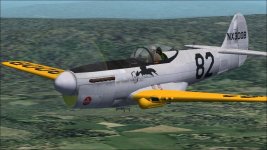
A little something for Ivan. I took the texture done by Michael Pook for a FS 2004 model and modified it to suit. All I did was to soften up the colors a bit. It's the NX 300 B Racer. It still has the .50's and bomb/tank rack. Something to deal with the competition.
Thanks B24 Guy, for keeping at those mods. Take your time the F-3 isn't going anywhere.
Sorry for not being around. I went away for the weekend and then back working nights, sleeping the day away.
Bob
 

Attachments

  • P-40Q-2-CU panel.jpg
    P-40Q-2-CU panel.jpg
    77.4 KB · Views: 0
  • P-40Q-2-CU Racer.jpg
    P-40Q-2-CU Racer.jpg
    71.7 KB · Views: 0
I wondered if I was missing gauges, so installed some old aircraft I had: P-51D Mustang D-Day - Thorson/Roger Dial/Mike Hambly/Gary D.Jones and
Supermarine Spitfire MkIIa - Dan Hopgood/Mike Hambly/Barry Bromley.

Then installed a new aircraft from SOH: P-51D Mustang - DIDIER Patrick/Allen
All work perfectly. Then tried P-40Q, rear dropped 18+ inches, settled, wheels to ground looks perfect, and flew perfect. I tweaked the contact points in ACM 2.5 so settles perfect.
The P-51D's and Spitfire added many gauges, and must have fixed something. BUT! I have to load any other aircraft first, exit flight, then load P-40Q. If I initially load P-40Q, the wait cursor issue still exists.
The P-40Q never settles during wait cursor issue. Hope this reveals something.

I will try bub's new panels next.
 
I have win 7. I don't know if this would work for anyone else but I use the re-size feature in ms paint to change the panel.bmp size from 1024 X 768 to 1025 X 770. And in the panel.cfg I change the size_mm= from 1024,768 to 1025,770. If it is just 1024 I just change it to 1025. If it is any other number I leave it as is. Also any of the fixed window bmps need the same treatment if they are 1024 x 768.

voyager
 
Dropping Aircraft

Swagler,
What did you set the contact points at? I've been meaning to fix that.

Voyager,
That may be the trick, resizing. I tried an 800 x 600 panel and it worked perfectly. Fingers crossed.

Thanks,
Bob
 
voyage- Thank you. Your method worked perfect. I used my app Image Draw, copied 1024x768, created new 1025x769, pasted copy at altered 1025x769, saved as 24-bit. Issue fixed!

bub- Static Pitch: 15.4, Static CG Height: 6.4, everything else is perfect. I tweaked with wheels... to make visually correct, but would drop and explode.
Started from scratch only adjusting pitch and Height fixed.
 
Hi Swagler,

For some unknown reason win7 does not like 1024 x 768 bitmaps in the panels. This causes lock-up with many AC.

Resizing to 800 x 600 fixed the problem for me.

Allen has fixed this issue with many AC.

I think the different video cards may have something to do with the different experiences running CFS2.


Regards,
B24Guy

If you use a 1024x768 bitmap you have to also use 640x480 bitmap like the stock aircraft do. Removing the
render_3d_window=1 key completely also works or did back before 8 and 10. Otherwise resize the panel down to 800x600.
 
I finally fixed black screen after 'Fly Now'. The_Editor, here at SOH addressed this back in 2009: http://www.sim-outhouse.com/sohforums/showthread.php/8193-Unable-to-start-CFS2
cfs2.CFG LOADWINDOW=0 needs changed to LOADWINDOW=1 Don't know if '0' is always default.

Now, views 1-9 are static, not whipping around as before, I'd like to know how to access both static and dynamic viewing.
Other present settings: LOADSIM=0 LOADWEATHER=0
Anyone know what changing these to '1' do?
 
If you use a 1024x768 bitmap you have to also use 640x480 bitmap like the stock aircraft do. Removing the
render_3d_window=1 key completely also works or did back before 8 and 10. Otherwise resize the panel down to 800x600.

I think 'render_3d_window=x' is in several cfg's, which files are you referring to? I tried 1280x960, and it flew, but gauges... were way out of alignment.
I feared downsizing for same reason. Strangely simply making 1025x769 works.
 
Allen- I should have checked first. I see in default_panels.cfg, and every aircraft panel.cfg. All of mine are set to 1.
 
The render_3d_window= key seem to only be a problem if your aircraft only uses 1024x768 panel bitmaps. Stock aircraft use 1024x768 and low res 640x480. default_panels.cfg doesn't use a bitmap image so it works just fine with the key in place as well.

Not sure if CFS2 can make since of things above 1024x768. Never seen a problem resizing down to 800x600 ever or seen any post of a problem from it.

Another thing is maybe using CFGedit to move the gauges on the panel that are out of place.

http://www.thefreeflightsite.com/Design.htm
 
A little something for Ivan. I took the texture done by Michael Pook for a FS 2004 model and modified it to suit. All I did was to soften up the colors a bit. It's the NX 300 B Racer. It still has the .50's and bomb/tank rack. Something to deal with the competition.
Bob

Definitely a cool looking aeroplane!
We don't mind guns as long as the Race authorities don't have a problem with it.
Those Mustangs may be faster, but P-40's maneuver better!

;-)
- Ivan.
 
Ivan,
I'll send you a copy of the textures. I agree, the P-40's could maneuver better. Erik Shilling, of the Flying Tigers, wrote an article about the P-40. If I still have it, I'll post it. It was a real eye opener.
Bob
 
Back
Top