
-
Please see the most recent updates in the "Where did the .com name go?" thread. Posts number 16 and 17.
-
IMPORTANT DOWNLOADING INFORMATION - ALL MEMBERS PLEASE READ
Please see this thread for updates. Update Thread
SOH ADMINISTRATION
You are using an out of date browser. It may not display this or other websites correctly.
You should upgrade or use an alternative browser.
You should upgrade or use an alternative browser.
Dvslats-schupe a-20g conversion....
- Thread starter Fibber
- Start date

Okay....
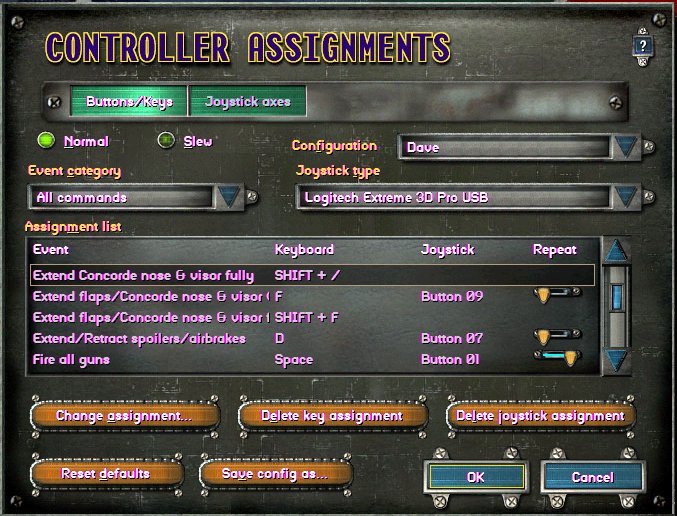
...just dug out the old bosun pipe and trilled "Flight quarters!" and those who don't show lose their allotment of JWB for the month!" Well the Flight Officer showed up (concorde assignment re-done ) but no turret enlisted puke.
Do I need to cut off his 3.2 or does he need a special invitation (another key assignment) for him?
...just dug out the old bosun pipe and trilled "Flight quarters!" and those who don't show lose their allotment of JWB for the month!" Well the Flight Officer showed up (concorde assignment re-done
) but no turret enlisted puke. Do I need to cut off his 3.2 or does he need a special invitation (another key assignment) for him?

dvslats
Charter Member
...just dug out the old bosun pipe and trilled "Flight quarters!" and those who don't show lose their allotment of JWB for the month!" Well the Flight Officer showed up (concorde assignment re-done
Do I need to cut off his 3.2 or does he need a special invitation (another key assignment) for him?
How do you get a rear gunner to stand up? With a tail hook of course.

Sarg Willy
SOH-CM-2014
That nude brunet off the coast should work as well

Reply...
Are you suggesting that both barrels are cocked and loaded? Or did he unload on the target before it got within range?
..we only needed him to stand up. Not be at "ATTENTION"!
Are you suggesting that both barrels are cocked and loaded?
Or did he unload on the target before it got within range?
Off this topic....
...on a serious side. I was using the TR A-20B, first time using it, in the Bismark Sea missions and I seem to have a small problem with it. The bloody thing puts its nose up and wants to keep climbing. I go in for a strafe and have to keep full down pressure on the stick to even get the nose to go down! Slack off and it climbs. Anyone else have a problem, or is it only me.
Also in the mission the plane starts on a hilltop! The field can be seen to the left a bit away. When I fly over that airfield it shows a location of So. 23.60' East 147.13.30' at dead center of the strip. What mesh is used in that campaign\mission?
...on a serious side. I was using the TR A-20B, first time using it, in the Bismark Sea missions and I seem to have a small problem with it. The bloody thing puts its nose up and wants to keep climbing. I go in for a strafe and have to keep full down pressure on the stick to even get the nose to go down!
Slack off and it climbs. Anyone else have a problem, or is it only me. Also in the mission the plane starts on a hilltop! The field can be seen to the left a bit away. When I fly over that airfield it shows a location of So. 23.60' East 147.13.30' at dead center of the strip. What mesh is used in that campaign\mission?

bearcat241
SOH-CM-2023
Fibber,
Decrease the cruise lift scale in the aircraft.cfg:
[flight_tuning]
cruise_lift_scalar=1.0
parasite_drag_scalar=1.0
induced_drag_scalar=1.0
elevator_effectiveness=1.0
aileron_effectiveness=1.0
rudder_effectiveness=1.0
pitch_stability=1.0
roll_stability=1.0
yaw_stability=1.0
elevator_trim_effectiveness=1.0
aileron_trim_effectiveness=1.0
rudder_trim_effectiveness=1.0
Set it at 0.7, test in normal level flight to top speed and also in gliding attack runs. Then make incremental adjustments downward in tenths from there to get what you want.
When flying a model that seems nose-heavy (without trim), you can adjust carefully in the opposite direction by increasing the the scale by hundredths, i.e. 1.05, 1.06 and so on.
Decrease the cruise lift scale in the aircraft.cfg:
[flight_tuning]
cruise_lift_scalar=1.0
parasite_drag_scalar=1.0
induced_drag_scalar=1.0
elevator_effectiveness=1.0
aileron_effectiveness=1.0
rudder_effectiveness=1.0
pitch_stability=1.0
roll_stability=1.0
yaw_stability=1.0
elevator_trim_effectiveness=1.0
aileron_trim_effectiveness=1.0
rudder_trim_effectiveness=1.0
Set it at 0.7, test in normal level flight to top speed and also in gliding attack runs. Then make incremental adjustments downward in tenths from there to get what you want.
When flying a model that seems nose-heavy (without trim), you can adjust carefully in the opposite direction by increasing the the scale by hundredths, i.e. 1.05, 1.06 and so on.
Last edited:

That's a new one to me Bearcat. I'll have to experiment with it.
I also adjust nose or tail heavy conditions in the .cfg file, but I do it in the weight and balance / empty weight CG section section. This section looks like this:
------------------------------------------------------------------------------------------------------------------------------------------------------------------------------------------------------
[WEIGHT_AND_BALANCE]
empty_weight=33280
reference_datum_position= 0.0, 0, 0 // (feet) distance from FlightSim Reference position: (1/4 chord, centerline, waterline)
empty_weight_CG_position= 0.0, 0, 0 // (feet) longitudinal, lateral, vertical distance from specified datum
-----------------------------------------------------------------------------------------------------------------------------------------------------------------------
If the aircraft center of gravity is positioned correctly the (feet) longitudinal number is 0.0. This is often wrong.
If the plane is nose heavy the CG needs to be shifted rearwards until the plane files level in cruise - which is a negative number like this:
empty_weight_CG_position=-1.5, 0, 0 // (feet) longitudinal, lateral, vertical distance from specified datum
If the plane is tail heavy the CG needs to be shifted forwards until the plane files level in cruise - which is a positive number like this:
empty_weight_CG_position=1.5, 0, 0 // (feet) longitudinal, lateral, vertical distance from specified datum
It's a matter of changing the CG position to find where the same weight is fore and aft of the CG, and test flying until the plane flies level. It can take some time but it makes flying the plane much more pleasant when you get it adjusted.
In much the same way, a real life cargo aircraft Loadmaster will calculate the position of the cargo so that fore and aft weight balances at the CG as much as possible.
I also adjust nose or tail heavy conditions in the .cfg file, but I do it in the weight and balance / empty weight CG section section. This section looks like this:
------------------------------------------------------------------------------------------------------------------------------------------------------------------------------------------------------
[WEIGHT_AND_BALANCE]
empty_weight=33280
reference_datum_position= 0.0, 0, 0 // (feet) distance from FlightSim Reference position: (1/4 chord, centerline, waterline)
empty_weight_CG_position= 0.0, 0, 0 // (feet) longitudinal, lateral, vertical distance from specified datum
-----------------------------------------------------------------------------------------------------------------------------------------------------------------------
If the aircraft center of gravity is positioned correctly the (feet) longitudinal number is 0.0. This is often wrong.
If the plane is nose heavy the CG needs to be shifted rearwards until the plane files level in cruise - which is a negative number like this:
empty_weight_CG_position=-1.5, 0, 0 // (feet) longitudinal, lateral, vertical distance from specified datum
If the plane is tail heavy the CG needs to be shifted forwards until the plane files level in cruise - which is a positive number like this:
empty_weight_CG_position=1.5, 0, 0 // (feet) longitudinal, lateral, vertical distance from specified datum
It's a matter of changing the CG position to find where the same weight is fore and aft of the CG, and test flying until the plane flies level. It can take some time but it makes flying the plane much more pleasant when you get it adjusted.
In much the same way, a real life cargo aircraft Loadmaster will calculate the position of the cargo so that fore and aft weight balances at the CG as much as possible.
Bc and ck.....
Thanks for the info. What I actually did was utilize both suggestion. I decreased the cruise_lift_scalar to 0.5 from 1.00 I also moved the CG to .2 . Now it flies reasonably level and I am not constantly fighting to keep the nose down. And as a mohel would say "thanks again for the tips" J/k. Both of you.
Thanks for the info. What I actually did was utilize both suggestion. I decreased the cruise_lift_scalar to 0.5 from 1.00 I also moved the CG to .2 . Now it flies reasonably level and I am not constantly fighting to keep the nose down. And as a mohel would say "thanks again for the tips" J/k. Both of you.