
-
Please see the most recent updates in the "Where did the .com name go?" thread. Posts number 16 and 17.
-
Special Server Maintenance
Just when you think you have everything running some what better...
You get a message from the Hosting company. Short story they need to move us to a new server. I have been working with them to plan a good date for all concerned. Here is what we have come up with as a schedule.
- November 4th 17:00 -5UTC shut off the forums and start backup proceedures. During this time there will be no access to the forums or the Resource Section.
- November 5th Continue with Backups and download same until complete.
- November 6th 7:00 turn over server to hosting company to move system to new server
- November 7th - 8th restore backups and upgrade forum software.
If all goes well we should be back online on November 8th.
To keep you updated we will post updates on AVSIM forums.
Thank you for your support.
You are using an out of date browser. It may not display this or other websites correctly.
You should upgrade or use an alternative browser.
You should upgrade or use an alternative browser.
Dash 8
- Thread starter Aircanuck
- Start date

Yossarian1943
SOH-CM-2025
The Majestic Dash 8 is surely one of the best addons ever made.
http://majesticsoftware.com/mjc8q400/
http://majesticsoftware.com/mjc8q400/
Anybody out there make a half decent Dash 8 ? Pay ware / free ?
....my bad , meant the original version ... smaller capacity .
Yossarian1943
SOH-CM-2025
As far as I know they have a Q300 in the pipeline...

Portia911
Charter Member
VirtualCol's Dash 8 series includes Q-100, 200, 300 and 400.
You get what you pay for, but there are lots of skins!
Here's a link with some user reviews:
https://secure.simmarket.com/virtualcol-dash-8-series-x-fsx-p3d.phtml
You get what you pay for, but there are lots of skins!
Here's a link with some user reviews:
https://secure.simmarket.com/virtualcol-dash-8-series-x-fsx-p3d.phtml
VirtualCol's Dash 8 series includes Q-100, 200, 300 and 400.
You get what you pay for, but there are lots of skins!
Here's a link with some user reviews:
https://secure.simmarket.com/virtualcol-dash-8-series-x-fsx-p3d.phtml
Appreciate the link ,no panic, think I'II wait for the Majestic 300 ... their Q400 looks outstanding.
Trying to make a Dash 8-100 work in p3dv4. I use Model X Converter but it keeps coming up missing DECAL_NNUMBER.BMP and RIGHTTAIL_D.BMP are missing which they are and I go to Flyaway Simulation where this came from and someone said:
I am repainting the FSX default Dash8-100. I notice the fuselage repaint is one sided ie the left side of the aircraft, so there is a separate DDS file called "Decal_DH_dash8_100.dds" which puts the airline name onto the fuselage and flips it to face the right way on the other side of the fuselage (right hand side).
Question is how do I create a 'second' .dds file to put the registration on one side and it flips it to the other side of the fuselage? What would I call the file and how do I get it to locate in the correct position on the aircraft?
Too difficult? I can't figure it out.
That's an interesting question. I'm not very knowledgeable with it comes to repainting but I would have thought that there would be different texture files for each side of the aircraft. Is this not the case?
WE"ll this is my problem and I don't know anything about painting but this was suppose to be a complete plane and I am missing 2 pieces.... Wanted to use the Piedmont paint on it for an ai. Anyone got these testures laying around..lol......Dash 8-39 (Microsoft David8_100 FSX)
Any help appreciated,

Bob M.
I am repainting the FSX default Dash8-100. I notice the fuselage repaint is one sided ie the left side of the aircraft, so there is a separate DDS file called "Decal_DH_dash8_100.dds" which puts the airline name onto the fuselage and flips it to face the right way on the other side of the fuselage (right hand side).
Question is how do I create a 'second' .dds file to put the registration on one side and it flips it to the other side of the fuselage? What would I call the file and how do I get it to locate in the correct position on the aircraft?
Too difficult? I can't figure it out.
That's an interesting question. I'm not very knowledgeable with it comes to repainting but I would have thought that there would be different texture files for each side of the aircraft. Is this not the case?
WE"ll this is my problem and I don't know anything about painting but this was suppose to be a complete plane and I am missing 2 pieces.... Wanted to use the Piedmont paint on it for an ai. Anyone got these testures laying around..lol......Dash 8-39 (Microsoft David8_100 FSX)
Any help appreciated,
Bob M.
Attachments
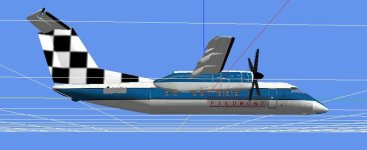
I have this and it’s true, you get what you pay for. However, I am satisfied with what I got for what I spent. Decent graphics and tons of paints. I usually don’t fly study sims, I just want to set up a flight and go and this lets you with no hassles.VirtualCol's Dash 8 series includes Q-100, 200, 300 and 400.
You get what you pay for, but there are lots of skins!
Here's a link with some user reviews:
https://secure.simmarket.com/virtualcol-dash-8-series-x-fsx-p3d.phtml

Bjoern
worst developer ever
https://www.fsdeveloper.com/forum/threads/dash-8-100-300.311281/
Don't hold your breath though, he still has quite a way to go.
Don't hold your breath though, he still has quite a way to go.

blanston12
SOH-CM-2025
They are a bit dated but there is always Premier Aircraft Design
https://www.premaircraft.com/dhc8_FSX/index.html
https://www.premaircraft.com/dhc8_FSX/index.html
On sale right now
FSPilotShop has this on sale right now for $15.05
[h=1]Virtualcol - DASH 8 Series X for FSX and P3D[/h]
https://www.fspilotshop.com/virtual...e=PilotShop&osCsid=geevqm2m55fscgapu2qd7lnnp3
FSPilotShop has this on sale right now for $15.05
[h=1]Virtualcol - DASH 8 Series X for FSX and P3D[/h]
https://www.fspilotshop.com/virtual...e=PilotShop&osCsid=geevqm2m55fscgapu2qd7lnnp3
