• Please see the most recent updates in the "Where did the .com name go?" thread. Posts number 16 and 17.

    Post 16 Update

    Post 17 Warning old domain name stealing credentials

  • Special Server Maintenance

    Just when you think you have everything running some what better...

    You get a message from the Hosting company. Short story they need to move us to a new server. I have been working with them to plan a good date for all concerned. Here is what we have come up with as a schedule.

    1. November 4th 17:00 -5UTC shut off the forums and start backup proceedures. During this time there will be no access to the forums or the Resource Section.
    2. November 5th Continue with Backups and download same until complete.
    3. November 6th 7:00 turn over server to hosting company to move system to new server
    4. November 7th - 8th restore backups and upgrade forum software.

    If all goes well we should be back online on November 8th.

    To keep you updated we will post updates on AVSIM forums.

    Thank you for your support.

Milviz Phantom navigation lights

Hiya NC:wavey:

I picked this up earlier but on the mobile so didn't reply. Agree on the switches. You get BRT, DIM or OFF.. no other option. I couldn't read Pete's link on the mobile.. it said I'd viewed it too many times:dizzy:

I've looked at a few screenies of the interim J model (the one that came as a freebie with the E) and it has a working port position light so I guess a 'fix' somewhere along the line to the full J busted it. They'll get it sorted;) I'm not really fussed about being able to select right or left formation lights.. I'd sooner not see them but it would be a 'nice to have' option.
ATB
DaveB:)
 
I am having this problem AGAIN. I turn all the exterior lights on, go to outside view, and the only visible light is the landing light. When I hit the "L" key, the lights momentarily flicker, but do not stay on. If I hold the "L" key, sometimes fire momentarily comes from exhaust area.:dizzy:

Any help here at all? Thanks, NC
 
I am having this problem AGAIN. I turn all the exterior lights on, go to outside view, and the only visible light is the landing light. When I hit the "L" key, the lights momentarily flicker, but do not stay on. If I hold the "L" key, sometimes fire momentarily comes from exhaust area.:dizzy:

Any help here at all? Thanks, NC

Post the [lights] section of the aircraft.cfg. Developers love to hide random flames for A/B in there.
 
Post the [lights] section of the aircraft.cfg. Developers love to hide random flames for A/B in there.


[lights]
//Types: 1=beacon, 2=strobe, 3=navigation, 4=cockpit, 5=landing
//light.0 = 1, 0.0, 0.0, 0, fx_Milviz_Estart_2,
light.0 = 10, -11, -3, -3, fx_engsmoke2,
light.1 = 10, 6, -3, -2, fx_engsmoke,
light.2 = 1, -11, 3, -3, fx_engsmoke2,
light.3 = 1, 6, 3, -2, fx_engsmoke,
light.4 = 4, -8.11, 0.0, 0.0, fx_ForestFireMedium
light.5 = 4, -2.11, 0.0, 0.0, fx_ForestFireMedium
 
[lights]
//Types: 1=beacon, 2=strobe, 3=navigation, 4=cockpit, 5=landing
//light.0 = 1, 0.0, 0.0, 0, fx_Milviz_Estart_2,
light.0 = 10, -11, -3, -3, fx_engsmoke2,
light.1 = 10, 6, -3, -2, fx_engsmoke,
light.2 = 1, -11, 3, -3, fx_engsmoke2,
light.3 = 1, 6, 3, -2, fx_engsmoke,
light.4 = 4, -8.11, 0.0, 0.0, fx_ForestFireMedium
light.5 = 4, -2.11, 0.0, 0.0, fx_ForestFireMedium

Engine smoke for lights? ForestFire lights? I wonder if they are putting the actual lights into the model and using the [lights] section for engine smoke and forest fires???? I'd hate to think what happens if you hit the I key?
 
I am having this problem AGAIN. I turn all the exterior lights on, go to outside view, and the only visible light is the landing light. When I hit the "L" key, the lights momentarily flicker, but do not stay on. If I hold the "L" key, sometimes fire momentarily comes from exhaust area.:dizzy:

Any help here at all? Thanks, NC

I've run into this situation where the light switches are specially hard coded to particular lights and the code is not the default code FSX uses.
By pressing "L" you are "short circuiting" the built in code. With the Landing light you got lucky with the codes matching. I have a special light switch
pop-up that has all 10 aircraft.cfg defined light types. I like to add this to panels and have bumped into this "wall" before watching my switches go on
and then off when pressing "L".
 
I've run into this situation where the light switches are specially hard coded to particular lights and the code is not the default code FSX uses.
By pressing "L" you are "short circuiting" the built in code. With the Landing light you got lucky with the codes matching. I have a special light switch
pop-up that has all 10 aircraft.cfg defined light types. I like to add this to panels and have bumped into this "wall" before watching my switches go on
and then off when pressing "L".

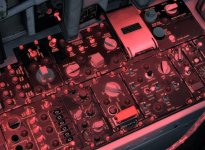
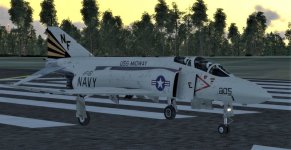
I am revisiting this topic. I still have the problem of lights not working. As you can see, I have the lights selected on the console panels. Only light that shows lit is the taxi light. If I press the "L" key, the lights all flash momentarily, and go off. Still no fix for this, as I have been able to discern.

Any help here? Seahawk, would your "special light switch" pop-up work for this? NC

attachment.php


attachment.php
 

Attachments

  • Cockpit light panel.jpg
    Cockpit light panel.jpg
    114.5 KB · Views: 0
  • External view.jpg
    External view.jpg
    75.8 KB · Views: 0
The plot thickens.

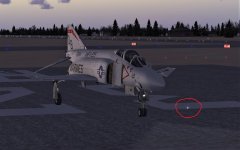
When I posted the previous post, I had forgotten that initially I had reported the lighting problem for FSX. NOW, I have the Milviz Phantom installed in FSX SE AND in P3DV4.4. The pictures in my previous post are in P3D. The following screenshot is in FSX SE. Notice the curious light a few feet in front of the aircraft nose.

attachment.php
 

Attachments

  • FSX lights.jpg
    FSX lights.jpg
    53.5 KB · Views: 0
When I posted the previous post, I had forgotten that initially I had reported the lighting problem for FSX. NOW, I have the Milviz Phantom installed in FSX SE AND in P3DV4.4. The pictures in my previous post are in P3D. The following screenshot is in FSX SE. Notice the curious light a few feet in front of the aircraft nose.
Is that light still in-place, relative to the aircraft, when it's up in the air? Or could it be an artifact of the runway? Just checking...

Is it possible for you to post the [Lights] section of the aircraft.cfg? Maybe the lights are hidden in the fuselage?

Just trying to think of possibilities...
Pat☺
 
Using the L key doesn't work. I had to assign a joystick button in MVAMS for "Exterior Lights Master". I then had to turn on the lights in the cockpit. Then, I can control them from my Joystick.
 
Using the L key doesn't work. I had to assign a joystick button in MVAMS for "Exterior Lights Master". I then had to turn on the lights in the cockpit. Then, I can control them from my Joystick.


That worked, THANKS! NC:encouragement:
 
@Navy Chief one request please :)

When you go to the Milviz forum, by all means read it searching for solutions. But if you don't find one, please, pleeeeease post a request. I will acknowledge posts do occasionally get overlooked but we do our best to answer all.
 
Back
Top