

-
Please see the most recent updates in the "Where did the .com name go?" thread. Posts number 16 and 17.
-
IMPORTANT DOWNLOADING INFORMATION - ALL MEMBERS PLEASE READ
Please see this thread for updates. Update Thread
SOH ADMINISTRATION
You are using an out of date browser. It may not display this or other websites correctly.
You should upgrade or use an alternative browser.
You should upgrade or use an alternative browser.
fuzzy aircraft textures
- Thread starter highpockets
- Start date

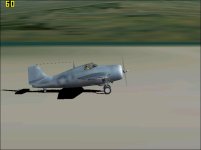


What are your CFS2 Display settings? I have my video card set up to provide my in game display rather than CFS2 so I can't recreate the issue. But it used to appear for me some years ago. IIRC it is the Mip Mapping that caused the issue. If your in game graphics use the CFS2 display settings, try turning Mip Mapping in the CFS2 Settings page on and off and see if that affects the texture. I could be mis-remembering but it's worth a shot. 
If that doesn't work, then UncleTgt's solution will fix it but it will be time consuming. You will need to go texture by texture, plane by plane.
If that doesn't work, then UncleTgt's solution will fix it but it will be time consuming. You will need to go texture by texture, plane by plane.

Roxane-21
SOH-CM-2023
What are your CFS2 Display settings? I have my video card set up to provide my in game display rather than CFS2 so I can't recreate the issue. But it used to appear for me some years ago. IIRC it is the Mip Mapping that caused the issue. If your in game graphics use the CFS2 display settings, try turning Mip Mapping in the CFS2 Settings page on and off and see if that affects the texture. I could be mis-remembering but it's worth a shot.
If that doesn't work, then UncleTgt's solution will fix it but it will be time consuming. You will need to go texture by texture, plane by plane.
This makes me think... I have a similar issue with ground textures. CFS2 is often switching to lower-res textures, and takes ages to switch back to high-res ones. Can this be solved by changing the settings as you suggested, or may I have to fix every hundreds of ground texture files?
I don't have access to my CFS2 rig right now but I sure will experiment next time.
This makes me think... I have a similar issue with ground textures. CFS2 is often switching to lower-res textures, and takes ages to switch back to high-res ones. Can this be solved by changing the settings as you suggested, or may I have to fix every hundreds of ground texture files?
I don't have access to my CFS2 rig right now but I sure will experiment next time.
Roxane-21
Please report what you find from your experiments

highpockets
SOH-CM-2025
No rum Rami!
Thanks all. I will try to get to it before Christmas. Will inform what I find out. I am a bit of novice here for sure.
Thanks all. I will try to get to it before Christmas. Will inform what I find out. I am a bit of novice here for sure.

HP...
..had to dig out some old notes for this from my brain. This is how I do it as sent to me by he who can't be named here.
Start DXT BMP , open the plane file that you want to fix, this will give you a smaller box screen.
-Open the "Texture" folder. click on one of the texs then hit "preview (565)". This will open another screen close that screen and ensure that MIPMAPS is unchecked.
-Then go "save" this will open another box screen , at this point you will save it as "Extended 16 bit 565" close then repeat for the others.
I usually just go the "T" texs as those appear to be the externals.
This only a guide as I lost the original e-mail sent to me years ago with the specifics.
Hope this helps.,
..had to dig out some old notes for this from my brain. This is how I do it as sent to me by he who can't be named here.
Start DXT BMP , open the plane file that you want to fix, this will give you a smaller box screen.
-Open the "Texture" folder. click on one of the texs then hit "preview (565)". This will open another screen close that screen and ensure that MIPMAPS is unchecked.
-Then go "save" this will open another box screen , at this point you will save it as "Extended 16 bit 565" close then repeat for the others.
I usually just go the "T" texs as those appear to be the externals.
This only a guide as I lost the original e-mail sent to me years ago with the specifics.
Hope this helps.,
highpockets
SOH-CM-2025
OK guys, I played around with your suggestions and found no real solutions. I didn't want to mess around too much but then an inspiration to look for other skins for Talon's USMC.
Thank you UncleTg for your skins of the FDG2 Wildcats
Solved my problem!
Thank you UncleTg
for your skins of the FDG2 WildcatsSolved my problem!
Roxane-21
SOH-CM-2023
Roxane-21
Please report what you find from your experiments
This may take a little while, since my 15-year old Win98 rig died a few minutes ago (impossible to boot, and no 3.5'' boot disk).

I will have to wait until after the new year eve to install everything on a new one.
One good thing though: I know I will have all the needed information here on how to make CFS2 work with the most recent versions of Windows.


highpockets
SOH-CM-2025
Allen
I use electric
I use electric
Sarg Willy
SOH-CM-2014
Hp -- go back and check settings /sliders / and remax them out , the aircraft texture looks washed out ,, and settings can be altered by the Cfs2 Gremlin,s , and or a system crash ,
highpockets
SOH-CM-2025
sarge
I had done that before and I "think" i tried it here but it did not work. Anyway, I will try to remember to try that again if I have that issue come up.
I had done that before and I "think" i tried it here but it did not work. Anyway, I will try to remember to try that again if I have that issue come up.