• Please see the most recent updates in the "Where did the .com name go?" thread. Posts number 16 and 17.

    Post 16 Update

    Post 17 Warning old domain name stealing credentials

  • Special Server Maintenance

    Just when you think you have everything running some what better...

    You get a message from the Hosting company. Short story they need to move us to a new server. I have been working with them to plan a good date for all concerned. Here is what we have come up with as a schedule.

    1. November 4th 17:00 -5UTC shut off the forums and start backup proceedures. During this time there will be no access to the forums or the Resource Section.
    2. November 5th Continue with Backups and download same until complete.
    3. November 6th 7:00 turn over server to hosting company to move system to new server
    4. November 7th - 8th restore backups and upgrade forum software.

    If all goes well we should be back online on November 8th.

    To keep you updated we will post updates on AVSIM forums.

    Thank you for your support.

Unusual problem with repaints

Bruce66

Members +
Recently I cleaned up my gaming computer - did a disc cleanup, defragged and then installed a new video card.

Then I noticed a couple repaints went a bit odd. They looked fine before so I deleted my copies, re-downloaded and reinstalled but the problem remains.

I am reluctant to approach the artists as I am sure its not a problem with their repaint as it worked fine before.

Has anyone seen this kind of problem before and know of a solution?

attachment.php


attachment.php


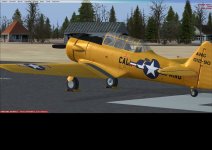
This is the Calif ANG skin for the A2A T-6 Texan

attachment.php


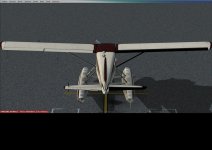
This is a bonus repaint for the MilViz DHC-2 Beaver.
 

Attachments

  • 20190211180153_1.jpg
    20190211180153_1.jpg
    83.2 KB · Views: 1
  • 20190209210330_1.jpg
    20190209210330_1.jpg
    70.3 KB · Views: 1
One possible issue could be lost connections to 'fallback' texture folders that may have overwritten [been ahead of] the textures you ended up with....check the texture.cfg in each plane folder [texture.xxx] and see if locations are missing...;)
 
Thanks for the response.

I admit I am no whizz at this but as far as I can tell there is nothing missing. I checked each texture folder and their cfg files were all identicle. Then I checked the path described in the cfg and it was correct - although I do not know what each repaint is looking for in the folders identified by those paths.

Thanks to the kind soul who pointed out my error.

Odd because with the Texan it is only one repaint affected and likewise with the Beaver it is only one repaint affected. I have not noticed any other annomolies since the clean up.

If it was just one plane I would be looking at recent updates but I haven't installed any updates for quite a while.

I am still confused....
 
Last edited:
Hi Bruce,

The texture-bug at the T-6 Texan is caused by the selected Canopy-type.

The repainter has to copy some parts to get the textures to correctly to show up at all Canopy-types. This repaint does not have that, so only show correctly at the "default" canopy. (selectable via the hangar-menu).

Regards,

Marcel
 
Bruce,

I seem to recall some issues with Beaver repaints. Milviz updated their models, but older repaints had issues as shown in your photo.

The initial release had a different paint configuration

..which means that repaints based on the initial release will show a black aileron and elevator if not updated.
 
Hi Bruce,

The texture-bug at the T-6 Texan is caused by the selected Canopy-type.

The repainter has to copy some parts to get the textures to correctly to show up at all Canopy-types. This repaint does not have that, so only show correctly at the "default" canopy. (selectable via the hangar-menu).

Regards,

Marcel

Thanks, yes I got that sorted (I don't know what happened to the post I wrote to say that - I must have forgot to submit.)

Someone else pointed out the elephant to me as well - I did know that originally just forgot.

Cheers
 
Bruce,

I seem to recall some issues with Beaver repaints. Milviz updated their models, but older repaints had issues as shown in your photo.


..which means that repaints based on the initial release will show a black aileron and elevator if not updated.

Ah that explains it!

So that is the mystery solved.

Thanks for the responses!
 
Back
Top