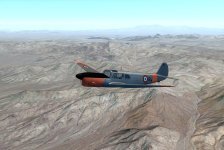
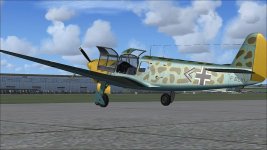
And there have been a number of them painted in Luftwaffe-themed markings over the years, including:
do you plan to do a repaint ? A LW repaint would round up the package. I will try soon.

-
Please see the most recent updates in the "Where did the .com name go?" thread. Posts number 16 and 17.
-
Special Server Maintenance
Just when you think you have everything running some what better...
You get a message from the Hosting company. Short story they need to move us to a new server. I have been working with them to plan a good date for all concerned. Here is what we have come up with as a schedule.
- November 4th 17:00 -5UTC shut off the forums and start backup proceedures. During this time there will be no access to the forums or the Resource Section.
- November 5th Continue with Backups and download same until complete.
- November 6th 7:00 turn over server to hosting company to move system to new server
- November 7th - 8th restore backups and upgrade forum software.
If all goes well we should be back online on November 8th.
To keep you updated we will post updates on AVSIM forums.
Thank you for your support.
You are using an out of date browser. It may not display this or other websites correctly.
You should upgrade or use an alternative browser.
You should upgrade or use an alternative browser.
Nord 1101 Ramier by Restauravia available !
- Thread starter flying v
- Start date

Mario Donadon
Members +
Is there any Paitkit for him? I created one for the Norecrin of Restauravia, but the model did not help in the paintings



falcon409
SOH-CM-2026
I've run into an odd scenario. . .I wanted to add a different floor for the airplane and so I made the changes necessary on the texture and checked it via MCX to be sure it looked ok. Everything looked as it should so I loaded it into the Sim (FSX). It doesn't show in the sim. . .it shows the original flooring even though it no longer exists. No matter what I try the original floor is all that displays. . .any ideas?

Bjoern
worst developer ever
I've run into an odd scenario. . .I wanted to add a different floor for the airplane and so I made the changes necessary on the texture and checked it via MCX to be sure it looked ok. Everything looked as it should so I loaded it into the Sim (FSX). It doesn't show in the sim. . .it shows the original flooring even though it no longer exists. No matter what I try the original floor is all that displays. . .any ideas?
Reboot FSX. If that won't work, reboot the PC. Not kidding. FSX has atrocious garbage collection when it comes to temporary memory (e.g. page file).
falcon409
SOH-CM-2026
Thanks Bjoern, gave that a try once more. . .actually since the initial texture update the Sim and the PC have been shutdown and rebooted more than a few times without any change. Pretty puzzling because it does seem to be loading a texture from cache rather than the correct one in the "common texture" folder. Weird.Reboot FSX. If that won't work, reboot the PC. Not kidding. FSX has atrocious garbage collection when it comes to temporary memory (e.g. page file).
Mario Donadon
Members +
Could not find one so far. So decided to paint a bit. Not happy yet, but at least something.

Mario Donadon
Members +
Thanks Bjoern, gave that a try once more. . .actually since the initial texture update the Sim and the PC have been shutdown and rebooted more than a few times without any change. Pretty puzzling because it does seem to be loading a texture from cache rather than the correct one in the "common texture" folder. Weird.
make sure the names are all correct, one letter one point, that already happened to me
falcon409
SOH-CM-2026
Yes, but if that were the case here, you would expect to see "black" in the VC, indicating that it can't find the texture it needs. That's not what's happening. . .it displays a fully textured VC, a VC texture that is no longer even present in the texture folder. Imagine that you did a full livery like the one you posted a screenshot for above. But when you load the airplane into the Sim you see an entirely different livery. . .one that isn't even available in your Aircraft folder. That's basically what's happening here. There is only one N1101_VC.dds. . .it's only found in the "texture folder" of this airplane. . .it's not in any of the livery folders. You paint it entirely a bright pink. . .but after loading into the Sim you see the original texture. I can't think of any other way to explain it except that this airplane is showing a texture that isn't available. . .it does not show the changes I made to it. . .period.make sure the names are all correct, one letter one point, that already happened to me
falcon409
SOH-CM-2026
This will be my last post on this unless someone comes up with a solid explanation for the mystery. The first image is the texture in question with the change I made to the floor (along with other changes as well).

This image shows the MCX screen highlighting the texture and showing the changes made as they should display in the Sim

This is what I should see in the Sim

What actually displays is the original texture with none of the changes.
This image shows the MCX screen highlighting the texture and showing the changes made as they should display in the Sim
This is what I should see in the Sim
What actually displays is the original texture with none of the changes.
falcon409
SOH-CM-2026
I covered that in a previous post, but yes I checked everything. Currently I have one livery loaded and the result remains the same. . .that texture, with the changes I made is not what displays in the Sim. When I ran the setup I had it install to a folder on my desktop so I could see exactly where things were going. . . .(effects, gauges, Aircraft) everything went where it should.Have you checked all livery folders and the folders listed in the texture.cfgs for copies of said texture?
FlyingsCool
SOH-CM-2019
MCX does not read texture.cfg files. The only way it sees files that are not in the texture directory that are called is if those directories are in the search path defined in MCX's options. For that reason, I don't necessarily trust what MCX shows until I've gone through and verified all the files and what it's looking at.
The isolate command in the Hierarchy editor has been really useful for me to see exactly what a texture file is coloring. I just wish there was a way to turn isolate off instead of having to reload the whole plane
I'm also not sure MCX is able to interpret $vc files completely correctly. I might be wrong on this. Is it possible there's a hard code in there somewhere on the VC textures?
Is it also possible that the affected surfaces are double assigned? Or that there's another surface in the model over the surface in question that's looking at a different texture file? Perhaps you can find the old color/texture in another file as well, and it's actually looking at that?
The isolate command in the Hierarchy editor has been really useful for me to see exactly what a texture file is coloring. I just wish there was a way to turn isolate off instead of having to reload the whole plane
I'm also not sure MCX is able to interpret $vc files completely correctly. I might be wrong on this. Is it possible there's a hard code in there somewhere on the VC textures?
Is it also possible that the affected surfaces are double assigned? Or that there's another surface in the model over the surface in question that's looking at a different texture file? Perhaps you can find the old color/texture in another file as well, and it's actually looking at that?
falcon409
SOH-CM-2026
Thanks for the various insights into the possibilities, but in the end it isn't worth all this for a few texture changes. In all the years I've been doing VC updates and embellishments I've never run into anything like this. It's a very well done airplane, I enjoyed the few flights I had in it but I have plenty of other planes laying about to play with.
Please no other "idea's or possibilities" are necessary for this particular thread unless someone else has run into the same thing. I'm not going any further with it.
Please no other "idea's or possibilities" are necessary for this particular thread unless someone else has run into the same thing. I'm not going any further with it.
Mario Donadon
Members +
really something strange, the texture to exchange but it appears very dark, must be something in the model


aardvark62
Charter Member
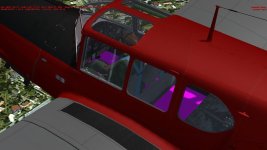
Hi Ed. I've just tried re-colouring this area (bright pink) in my Nord, and results are attached below.
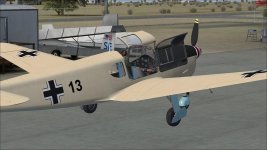
Screen 1 is exterior shot where this area displays as it should - the same colour and hue I used on the BMP.
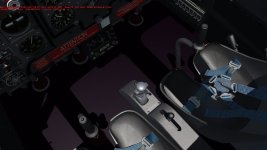
Screen 2 is an interior shot where the re-colour is visible but as a VERY subdued version of the pink I actually used.
Something definitely happening with the display of this texture file in the interior model.
Don't know if this tells you anything or not, but definitely curious.


Gary.
Screen 1 is exterior shot where this area displays as it should - the same colour and hue I used on the BMP.
Screen 2 is an interior shot where the re-colour is visible but as a VERY subdued version of the pink I actually used.
Something definitely happening with the display of this texture file in the interior model.
Don't know if this tells you anything or not, but definitely curious.
Gary.
Attachments

Mario Donadon
Members +
[QUOTE = narah; 1185176] Pensei que esta poderia ser uma tarefa mais fácil do que F BLYU .... não é

QUOTE = narah; 1184954]
Não foi possível encontrar uma até agora. Então decidi pintar um pouco. Não feliz ainda, mas pelo menos alguma coisa. [/QUOTE]
It's wonderful, but does it tell you what scenario it would look like in both photos?
QUOTE = narah; 1184954]
It's wonderful, but does it tell you what scenario it would look like in both photos?