
• Please see the most recent updates in the "Where did the .com name go?" thread. Posts number 16 and 17.

    Post 16 Update

    Post 17 Warning old domain name stealing credentials

  • Special Server Maintenance

    Just when you think you have everything running some what better...

    You get a message from the Hosting company. Short story they need to move us to a new server. I have been working with them to plan a good date for all concerned. Here is what we have come up with as a schedule.

    1. November 4th 17:00 -5UTC shut off the forums and start backup proceedures. During this time there will be no access to the forums or the Resource Section.
    2. November 5th Continue with Backups and download same until complete.
    3. November 6th 7:00 turn over server to hosting company to move system to new server
    4. November 7th - 8th restore backups and upgrade forum software.

    If all goes well we should be back online on November 8th.

    To keep you updated we will post updates on AVSIM forums.

    Thank you for your support.

Need help with the darkenss

Hooky722

Charter Member
Hi All,

I'm in a bit of a fix been trying to make a phantom deck park and the end result is this.....
I have set the texture source folder to the correct one as far as I can tell and they are just about visible in sim through the blackness

has anybody got any ideas what im doing wrong?

any help would be good

many thanks

Hooky

attachment.php
 

Attachments

  • BlackItsALLBlack.jpg
    BlackItsALLBlack.jpg
    59.2 KB · Views: 2
I would try placing the .mdl file in the texture folder and then open it.... if the textures are correct, they should work OK.

Also, ,make sure the normals aren't reversed.

Hi All,

I'm in a bit of a fix been trying to make a phantom deck park and the end result is this.....
I have set the texture source folder to the correct one as far as I can tell and they are just about visible in sim through the blackness

has anybody got any ideas what im doing wrong?

any help would be good

many thanks

Hooky
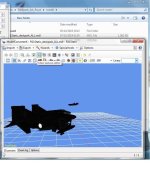
 
Hi H,
Are you saying the problem is in FSX AND MCX, or just in MCX?

If it's just in MCX then it's because either the format of the texs that MCX doesn't like, or more likely the texs alpha channel(s) which are causing the problems. If it's in both then definitely texs alpha channel(s) which are causing the problems.

A suggestion...for your development time I would make a copy of the texs, then save each of the texs as a simple DXT3 tex or even DXT1 with no alpha, this will allow you to see the texs in MCX. Then when done you use your 'full fat' versions in FSX. If it's in FSX as well then open and re-save the texs in the format they are in, or change/save to another FSX compatible format.

Cheers

Shessi

p.s Or give Justin Hawkins a call, he can always help with the Darkness......:a1310:
 
No still no joy with any of that Shessi and I've got no more time to spend on it I've obviously gone seriously wrong somewhere so I'm going to scratch it for now maybe start again someday but thanks for the advice folks it's always appreciated.

Many Thanks

Hooky
 
Make sure you don't have BMP and DDS format of the same textures in the same folder. That will cause the black.
:ernaehrung004:
 
Back
Top