Elevation problems, yet again

Navy Chief

Senior Member
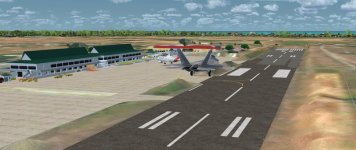
I have a friend at my church who is from Batan, Phillipines. I thought, just for fun, I would try to find the airport closest to his home, populate it with local AI airline traffic, and take a few screenshots to show him. Well, I found a decent freeware offering of Kalibo International Airport (RPVK). Installed it, and is pretty nice, except for the obvious elevation problem. I thought perhaps Orbx Vector would fix it, but nope. No change whatsoever. Am hoping someone here can offer some help in fixing this? Thanks, NC

I got the scenery from this website:

https://fsstressfrees.weebly.com/visayas-sceneries.html


attachment.php
 

Attachments

  • 2020-2-25_10-40-8-656 (2).jpg
    2020-2-25_10-40-8-656 (2).jpg
    56.6 KB · Views: 4
Are you using a third party terrain mesh, like FreemeshX or Pilot's? The airport was probably designed for the sim's default mesh.

-RobM
 
You use ORBX products, right? Move the scenery that has problems to the top of the list in the scenery library and things should return to normal.

Every time you run ORBX or FTX central, the order of the scenery library is altered. Had it happen to me several times...

Priller
 
NC - did that fix it?

I get this issue frequently in P3dv4+ and the Vector Auto Configurator thing doesn't fix it often.
 
I downloaded and installed myself, and I got the exact same issue (runway in a trench). I tried disabling both Pilot's and Vector
in the scenery library, but it made no difference. I couldn't see any alternate RPVK .bgl's that might be running interference.
The airport was at the top of my P3Dv4 scenery library.

Just for the heck of it, I fired up FSX and installed the airport's FSX version (it has a multi-installer). The airport looked
the same, but now there were no elevation issues.

I've only updated my default P3Dv4 scenery to 4.4; I haven't updated the scenery to 4.5 yet. I don't know if that would make
any difference.

It's a nice little freeware airport in an interesting part of Asia, and much better than the default. I don't know if the runway
elevation could be fixed with ADE, or if there's some other cause that's escaping me.

Sorry I couldn't be of more help.

-Rob


,

.
 
I downloaded and installed myself, and I got the exact same issue (runway in a trench). I tried disabling both Pilot's and Vector
in the scenery library, but it made no difference. I couldn't see any alternate RPVK .bgl's that might be running interference.
The airport was at the top of my P3Dv4 scenery library.

Just for the heck of it, I fired up FSX and installed the airport's FSX version (it has a multi-installer). The airport looked
the same, but now there were no elevation issues.

I've only updated my default P3Dv4 scenery to 4.4; I haven't updated the scenery to 4.5 yet. I don't know if that would make
any difference.

It's a nice little freeware airport in an interesting part of Asia, and much better than the default. I don't know if the runway
elevation could be fixed with ADE, or if there's some other cause that's escaping me.

Sorry I couldn't be of more help.

-Rob


,

.

Rob,

Thanks for taking the time to "troubleshoot" the problem. Too bad it isn't a easy fix! NC
 
Back
Top