• Please see the most recent updates in the "Where did the .com name go?" thread. Posts number 16 and 17.

    Post 16 Update

    Post 17 Warning old domain name stealing credentials

  • Special Server Maintenance

    Just when you think you have everything running some what better...

    You get a message from the Hosting company. Short story they need to move us to a new server. I have been working with them to plan a good date for all concerned. Here is what we have come up with as a schedule.

    1. November 4th 17:00 -5UTC shut off the forums and start backup proceedures. During this time there will be no access to the forums or the Resource Section.
    2. November 5th Continue with Backups and download same until complete.
    3. November 6th 7:00 turn over server to hosting company to move system to new server
    4. November 7th - 8th restore backups and upgrade forum software.

    If all goes well we should be back online on November 8th.

    To keep you updated we will post updates on AVSIM forums.

    Thank you for your support.

Curtiss P-36 Hawk

Pierre_NC

Members +
I've downloaded the Curtiss Hawk 75c France May 1940, beautifully painted from Capt. Mercy P-36 and I've converted it to FSX using the hex method like I did for the Zero. The plane works great in FSX but it has what I believe is a texture issue, from the way it looks.

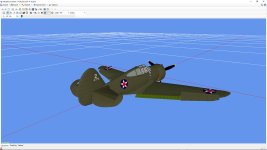
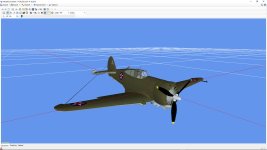
This is what I get when importing the converted model in ModelConverterX :
attachment.php
attachment.php


The front view is perfect, but on the back view, you can see a kinda chessboard square in front of the cockpit, just like a bitmap that should be in the plane texture folder but is not, that's my first thought.

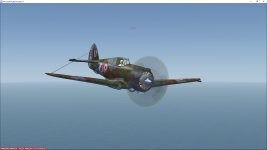
The same shows in Flight Simulator X :
attachment.php
attachment.php


Perfect front view, back view with the issue, this time in black rather than chessboard.

This plane is too beautiful for me to give it up. Is there any way to fix this ?

Thank you so much for your kind coopeation.

Pierre_NC.
 

Attachments

  • ModelConverterX_Front.jpg
    ModelConverterX_Front.jpg
    38.7 KB · Views: 27
  • ModelConverterX_Back.jpg
    ModelConverterX_Back.jpg
    40.2 KB · Views: 25
  • Flight Simulator X_Front.jpg
    Flight Simulator X_Front.jpg
    24.5 KB · Views: 26
  • Flight Simulator X_Back.jpg
    Flight Simulator X_Back.jpg
    28.1 KB · Views: 27
Hi,
The black square is the cockpit texture for 2d gauges (panel vc). In the convert process you must flag this texture as a CV texture. I don't know the method with MCX.
JMC
 
Hi,
The black square is the cockpit texture for 2d gauges (panel vc). In the convert process you must flag this texture as a CV texture. I don't know the method with MCX.
JMC


Hey JMC.


Thank you so much for answering me.


I don't use MCX to convert, actually. I use it fo display the already converted model to see if it's okay.


To convert a CFS2 model into FSX, I use an HEX Editor with which I open the CFS2 .MDL file. I then delete all the lines from the beginning to the second "RIFF" word that I find so the converted .MDL file starts with that "RIFF" word. I also change the "CFS2" word into "FS90" and I save. This is the FSX model and I've been lucky so far because the few planes I've converted with this method work all fine.


I don't know either how to flag a texture as a CV texture - I'm not sure what this is anyway, I'm not familiar wuth the Combat Flight Simulator games. Would you know of another way to flag it ?


Thank you again for your kind answer.


Pierre_NC.
 
Hawk 75C France

good morning Pierre,
I suppose you're using FSX normal. I installed the plane in FSX acceleration and Steam and didn't get your problem.This has to do with the background color=0,0,0 in the [Vcockpit01].
You could try making a simple 125x125 back bitmap and name it $P36a.bmp. Then pass it to DXT1 bitmap converter, color it black and make it black transparant. Then in your panel/panel.cfg, replace texture=$P36 by texture=$P36a (you may not use texture=$P36.bmp ).
Remember also that FSX doesn't accept many of the FS98gauges you may include. Only use default CFS2 gauges ! (wildcat, corsair, etc...).
You could also download my native P36 from Flightsim or Simviation.
kind regards, A.F.
 
good morning Pierre,
I suppose you're using FSX normal. I installed the plane in FSX acceleration and Steam and didn't get your problem.This has to do with the background color=0,0,0 in the [Vcockpit01].
You could try making a simple 125x125 back bitmap and name it $P36a.bmp. Then pass it to DXT1 bitmap converter, color it black and make it black transparant. Then in your panel/panel.cfg, replace texture=$P36 by texture=$P36a (you may not use texture=$P36.bmp ).
Remember also that FSX doesn't accept many of the FS98gauges you may include. Only use default CFS2 gauges ! (wildcat, corsair, etc...).
You could also download my native P36 from Flightsim or Simviation.
kind regards, A.F.

Hey A.F.

Thank you sp much for answering me.

I'm on FSX Steam and I'm using the Hawk 75 as an AI Aircraft with no panel subfolder within the airplane folder. I'm gonna put it there and try your method. If it doesn't work, then I'll go for your native P36.

Thank you again for your kind help.

Pierre_NC
 
Back
Top