• Please see the most recent updates in the "Where did the .com name go?" thread. Posts number 16 and 17.

    Post 16 Update

    Post 17 Warning old domain name stealing credentials

  • Special Server Maintenance

    Just when you think you have everything running some what better...

    You get a message from the Hosting company. Short story they need to move us to a new server. I have been working with them to plan a good date for all concerned. Here is what we have come up with as a schedule.

    1. November 4th 17:00 -5UTC shut off the forums and start backup proceedures. During this time there will be no access to the forums or the Resource Section.
    2. November 5th Continue with Backups and download same until complete.
    3. November 6th 7:00 turn over server to hosting company to move system to new server
    4. November 7th - 8th restore backups and upgrade forum software.

    If all goes well we should be back online on November 8th.

    To keep you updated we will post updates on AVSIM forums.

    Thank you for your support.

Gulfstream V FSX

Correct. Currently downloading v1.0 as getting some hangs and CTDs (including with other models earlier) using a beta version.

My vc screenie features FS Spotlights that is a freeware app I can recommend. Transforms many poorly lit VC’s once you get the hang of using it. If requested I can post my profile for it here.
 
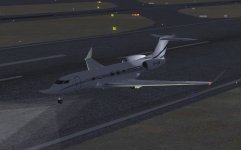
650 lights

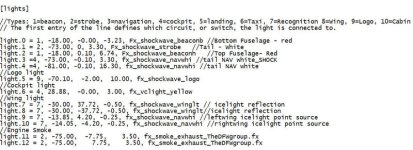
I added lights that the 650 was missing. Aircraft model has NAV, wing tip strobes, nice taxi and landing lights.
Added Beacons, Ice/Wing, tail nav, tail strobe, logo, cockpit and engine exhaust.
 

Attachments

  • 650 lights.jpg
    650 lights.jpg
    54.2 KB · Views: 25
  • lights text.jpg
    lights text.jpg
    96.8 KB · Views: 23
I added lights that the 650 was missing.

Thanks - would like to try these out but cannot copy/paste from a screenie. Could you please paste your light entries directly into a post so lazy people like me can easily copy them?

ALSO: I find the nav lights that are coded into the model WAY too big and bright. In fact I find lights generally in P3D (FSX worse) way too big and bright. The exception being later POSKY/TDS models - Hiroshi got it bang on so these really are not all that visible in daytime.

Other than firing up Model Converter X (which I am hopeless at) is there anyway to dim and make smaller the nav lights? Pasting e.g. shockwave or other lights over them into the air.cfg won't really conceal or fix this I reckon.

Cheers!
 
I added lights that the 650 was missing. Aircraft model has NAV, wing tip strobes, nice taxi and landing lights.

Please advise which 650 model you are using, since these coordinates may only be accurately placed on that model . . .

:banghead:
 
I agree the NAV lights are too big, Shockwave entries would be a good fit.
I'll give a try with Model Converter X, but am a complete beginner.

I've attached a text with the light entries.
 

Attachments

  • Lights.txt
    1.2 KB · Views: 28
I've attached a text with the light entries.

Thank you! I find not even the shockwave nav lights small enough. Think the default "fx_navgres" and "fx_navreds" may be the smallest I can find but I coudl be wrong.
 
Thank you! I find not even the shockwave nav lights small enough. Think the default "fx_navgres" and "fx_navreds" may be the smallest I can find but I coudl be wrong.

A mistake on my part. White NAV lights should be run off the NAV switch.
Like this..

light.3 =3, -73.00, -0.10, 3.30, fx_shockwave_navwhi //tail NAV white_SHOCK
light.4 =3, -81.00, -0.10, 16.30, fx_shockwave_navwhi //tail NAV white
 
Please advise which 650 model you are using, since these coordinates may only be accurately placed on that model . . .

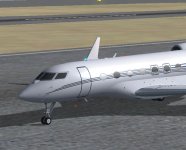
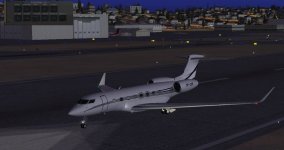
Yes, I got all very misplaced ligths at least using Seahawks's cfg. entries above and using the KAI G650 model you see in my screenies.

The default lights for the KAI G650 are only these (the bottom beacon (disregard that the effect used is "beaconh" - there is only one beacon on the underside) has a very different location than Seahawk's).

​
[lights]​
//Types: 1=beacon, 2=strobe, 3=navigation, 4=cockpit, 5=landing
//def
//light.0 = 3, -47.3, 0, 15.95, fx_navwhih
//light.1 = 1, -2.5, 0, -4, fx_beaconh​

I have to apologise to all as I highjacked this thread that was started by another member using a different Gulfstream V/550 model. Sorry for any confusion or poor etiquette on my part!
 
Yes, I got all very misplaced ligths at least using Seahawks's cfg. entries above and using the KAI G650 model you see in my screenies.

The default lights for the KAI G650 are only these (the bottom beacon (disregard that the effect used is "beaconh" - there is only one beacon on the underside) has a very different location than Seahawk's).

​
[lights]​
//Types: 1=beacon, 2=strobe, 3=navigation, 4=cockpit, 5=landing
//def
//light.0 = 3, -47.3, 0, 15.95, fx_navwhih
//light.1 = 1, -2.5, 0, -4, fx_beaconh​

I have to apologize to all as I highjacked this thread that was started by another member using a different Gulfstream V/550 model. Sorry for any confusion or poor etiquette on my part!

No need to apologize.
I was under the impression we switched to the KAI G650 model, which is what I am using. It has a very nice selection of repaints available.
I am using KCAI Gulfstream g650.mdl dated 6/19/2020
The light1 beacon is for the bottom of the aircraft and from what I can tell looking at the texture its back between the landing gear which fits
a Gulfstream light drawing I saw.

light.0 = 1, -37.50, -0.00, -3.50, Fx_shockwave_beaconb //Bottom Fuselage - red
See picture.
You can see the -2.5 value would place it up near the nose gear.
 

Attachments

  • beacon.jpg
    beacon.jpg
    53.7 KB · Views: 38
  • beacon2.jpg
    beacon2.jpg
    40 KB · Views: 26
Attached effects

I'm attaching all the light effects to the model using ModelConverterx.
All controlled with a pop-up panel.
 

Attachments

  • lights4.jpg
    lights4.jpg
    52.3 KB · Views: 279
[Views]


eyepoint=64.70, -1.78, 1.97 //788
//eyepoint = 38.385, -1.435, 4.012 //CRJ

I tried that value and it puts me forward of the VC by 20'.
Its almost as though we have two different models.
Can you send your panel & aircraft.cfg..?

I was able to get the CRJ vc working without any problems.
 
Its almost as though we have two different models.

Exactly what I am concluding! You have v1.0 of the Rikoo 787 vc and I know we are using the same exterior model.

My air.cfg has unfinished light changes - your lights were way behind the plane. I changed some (-) entries to + and they worked or were close. Have not got your ice lights positioned yet.

Air + panel configs in the zip.
 

Attachments

  • New folder.zip
    9.2 KB · Views: 32
My air.cfg has unfinished light changes - your lights were way behind the plane. I changed some (-) entries to + and they worked or were close.

I think we have different exterior models, for my lights to be so far off..?
 
Back
Top