
-
Please see the most recent updates in the "Where did the .com name go?" thread. Posts number 16 and 17.
-
IMPORTANT DOWNLOADING INFORMATION - ALL MEMBERS PLEASE READ
Please see this thread for updates. Update Thread
SOH ADMINISTRATION
You are using an out of date browser. It may not display this or other websites correctly.
You should upgrade or use an alternative browser.
You should upgrade or use an alternative browser.
Airbus H135 - helicopter
- Thread starter Seahawk72s
- Start date


Navy Chief
Senior Member
I am completely baffled now. Earlier yesterday morning, I switched throttles from my Logitech G940 to my Saitek X52, and instantly, everything was working perfectly....... until it wasn't.
I switched to a different aircraft for a bit, and then went back to the 135. No workee again. Crap. I spent almost all day, trying to get it to work properly, but nope. All other aircraft work just fine with the setup.
- start the helo, press the FADEC button, and the helo raises about 5 - 6 ft, and I have zero control of it. I have cycled the FADEC several times. No effect. Same thing happens. This is driving me effing crazy. NC
I switched to a different aircraft for a bit, and then went back to the 135. No workee again. Crap. I spent almost all day, trying to get it to work properly, but nope. All other aircraft work just fine with the setup.
- start the helo, press the FADEC button, and the helo raises about 5 - 6 ft, and I have zero control of it. I have cycled the FADEC several times. No effect. Same thing happens. This is driving me effing crazy. NC
Last edited:
jetstreamsky
Charter Member
If you have a physical switch bound to undercarriage, then you may see on the PFD at the top that the flight mode is rapidly swapping between Xbox, basic and advanced which of course messes with flight behaviour. Make sure it’s either neutral (3-way switch middle position) or unbound.
Navy Chief
Senior Member
SOLVED IT!
It was binding conflicts with FSUIPC. Once I disconnected it, badabing! I am hovering like a pro! NC
It was binding conflicts with FSUIPC. Once I disconnected it, badabing! I am hovering like a pro! NC
SOLVED IT!
It was binding conflicts with FSUIPC. Once I disconnected it, badabing! I am hovering like a pro! NC
Excellent, Navy


Seahawk72s
SOH-CM-2023
Upgrade v0.8
Some important changes.
https://flightsim.to/file/8970/airbus-h135-helicopter-project
Some important changes.
https://flightsim.to/file/8970/airbus-h135-helicopter-project
Version 0.8 March 25, 2021
We hope that these changes are intuitive enough that much direction is not needed, but should you need help please join our 2K+ member Discord where our devs or our community members can quickly provide troubleshooting advice.
Our Discord - https://discord.gg/dUNDGb2Z7c
- Fixed windshield in rain. (No effects but visuals don't duplicate now)
- Added ENG and FADEC physical switches (below the center panel where they should be)
- Upgraded avionics to multifunction displays
- Added exhaust heat effects
- Upgraded sounds
- Autopilot (AP) modes now supported: LVL PIT HDG NAV ALT

Seahawk72s
SOH-CM-2023
Upgrade v0.81
A major upgrade.
https://flightsim.to/file/8970/airbus-h135-helicopter-project
A major upgrade.
https://flightsim.to/file/8970/airbus-h135-helicopter-project
Version 0.81 April 01, 2021
In our screenshots you can see that the H135 now has an EFB that is capable of displaying a web browser or a screen capture from one of your computer's displays.
This feature requires a bit of advanced setup and we want to walk users through the process as well as take your feedback - the files necessary to run the EFB are exclusive to our Discord members for this reason.
You can join our Discord channel at https://discord.gg/dUNDGb2Z7c
0.81 changelog is as follows:
- Install ADF radio
- Add torque trim (bind to rudder trim controls)
- Add trim indicators to MISC page
- Another fix for copilot still appearing
- Reduce default payload
- Fuel quantity updated. Fuel burn adjusted
- Engine sounds and fuel burn now responsive to collective input
- Add EFB -> Download the required external program
- HDG and ALT synchronize buttons added to MISC page for ease of use
- MISC page has AP modes with state indication
- AP MASTER, BARO, FLT DIR added to MISC page
- FMA text clipping fixed, AP disconnect flashing fixed
- AP ALT mode tamed a bit
- Fixed rotor blur texture
- Better "light skids" feel when on the ground at higher power setting
- Disabled terrain alert on GTNs
- Add high visibility FADEC alert for newcomers
- Add spotlight feature. (Note due to CTDs this is off by default. See the MISC page and dismiss the message to enable it)
- Spolight controls: MIXTURE3 and MIXTURE4 bound to spotlight directional control. Use only the -100%/100% axis, NOT the 0%/100% option. Buttons to increase/decrease mixture 3 and 4 will also work for a hat assignment. Use 'Toggle Wing Lights' to toggle the spotlight on and off.
- Fixed ENG2 not starting
- Added N2 indication to VMS page
- Added hydraulics indication to VMS page
- GEN1 and GEN2 are now managed by the computer, no switches are available
- Flight model: Torque reduced slightly
- Flight model: ETL increased slightly
- Engines: Adjusted fuel consumption at high end
- Ctrl+E will now engage the FADEC
- Rotor animations slightly more fluid through startup and shutdown.
- Nav lights and panel lights now off by default from c&d
- EICAS HYD added
- EICAS alignment adjusted for dual-indications when one side is alerting and the other isn't
- Updated texture for engine controls
- Better tooltips for FADEC and DOORS
- Rotor load now reflects only online engines
- Engine sounds added from both engines
- DMAP ORI now has DTK HDG TRACK and NORTH modes
- EICAS LOW and EMERGENCY fuel set at approx 12% and 6%
- Fuel pump button + EICAS message added
Attachments
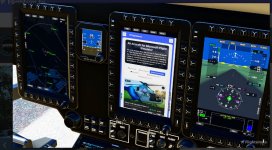
Gave this update another spin. So much improvment on the flght and handling model. Amazed by the many liveries for it.
Seahawk72s
SOH-CM-2023
Upgrade v0.82
A surprisingly large upgrade.
https://flightsim.to/file/8970/airbus-h135-helicopter-project
A surprisingly large upgrade.
https://flightsim.to/file/8970/airbus-h135-helicopter-project
Version 0.82 April 06, 2021
In our screenshots you can see that the H135 now has an EFB that is capable of displaying a web browser or a screen capture from one of your computer's displays.
This feature requires a bit of advanced setup and we want to walk users through the process as well as take your feedback - the files necessary to run the EFB are exclusive to our Discord members for this reason.
You can join our Discord channel at https://discord.gg/dUNDGb2Z7c
0.82 changelog is as follows:
- Add support for autorotation
- Add support for legacy SimConnect axis mappings
- Tweak various textures, messages and indications
- Increase the bank angle of HDG AP mode when over 20kts.
- Installed plush cockpit seat textures, collective/cyclic, glare shield.
- Upgraded engine control panel
- Added a tablet
- rotor blur animation is fixed
- rotor tilt animation added
- AP MISC page buttons up/down will now repeat on hold.
- Flight model: fuel burn adjusted
- Load station and fuel tank points adjusted
- Apron start will now have fuel valves closed, and subsequently the engine start switches will show OFF
- Add POWER UP SELF TEST. It will run at startup and indicate success then disappear in about 90 seconds total.
- Adjust sound to mitigate phasing
- Disable copilot
- Added a "check landing gear hotkey" warning if changing the flight mode more than 10 times in 2 seconds. This warning is intended to display for users who have incorrectly bound hotkeys for landing gear.
- Add a couple README files about managing the copilot, downloading the EFB
- EPU 'white plug' when available, EPU EICAS when available
- EFB on all screens (commands only on the 3 primary displays for now)
- You may now use the PFD Settings page to select the preferred Wind option for FND page, and the COM channel spacing may be set (2 digits vs 3 digits on COM frequencies)
- Add hpa vs in/hg baro mode in PFD Settings. STBY not changed. Must exit sim cleanly for the setting to be saved for next time.
- EFB may now be accessed from the Top-6 softkey on each display
- FND/CLOCK now available on all 3 displays
- Integrate GARMIN GTN 750 beta -> https://pms50.com/msfs/downloads/gtn750-base-beta/
- GTN750: Select Open GTN750 on the PFD Home page if installed. IMPORTANT: Avoid opening maps on the 3 main panels when using GTN750 to avoid a "max 4 maps" bug in the game that causes a CTD
- Engine control panel revamped to use the yellow switches for OFF/IDLE/FLIGHT. Manual mode switches no longer used. Switch guards added.
- You may now click the front pillar/strut to open the front left and right doors. the DOORS button will continue to open the rear cargo bay doors and the side sliding door.
- Move (Cabin, Nav, Strobe, Beacon, Taxi, Landing lights to the overhead panel)
- Move panel lights to the 6-pack of buttons
- Remove all other 6-pack buttons
- Move pitot heat to overhead
- Move cargo doors switch to the overhead
- Move fuel pump switches to the overhead (now two instead of one)
- Move pitot heat switch to overhead
- Speed up switches
- Play some of the correct avionics sounds at startup
- Move parking brake to OH
- Move EPU connect/disconnect to an EPU softkey
- Add a brightness control to 3 main displays
- Add a power button to all 5 displays
- Tablet is retracted by default
- Aircraft systems page is deprecated
- LOW NR warning aural below 97%
- VMS NR gauge now goes to 100% for flight, stays at 100% until doing an auto
- VMS N2 gauges now go red on failure
- VMS Engine status IDLE/FAIL/STARTER at the top of page
- Engine switches are wheel-only now
- Add Animated cyclic control
- Add Animated collective control
- Two brand new liveries by @Crispy136
- D-HYPE: a Black HYPE group livery (default)
- D-HECB: Airbus Helionix corporate livery (soon to be default)
- Baro on standby attitude indicator (knob only, not the display)
- Click base of cyclic to hide it
- Add red guards back to engine panel
- Remove/hide LUM buttons from main displays (confusing/inop)
- Tweak bladeslap sounds
- Boost avionics sounds
- Fix clipped ORI indicator in DMAP page
Seahawk72s
SOH-CM-2023
Video
A video not really covering the update features but for a few minutes in the beginning.
A video not really covering the update features but for a few minutes in the beginning.
Seahawk72s
SOH-CM-2023
Upgrade v0.83
Another new upgrade, impressive.
https://flightsim.to/file/8970/airbus-h135-helicopter-project
Another new upgrade, impressive.
https://flightsim.to/file/8970/airbus-h135-helicopter-project
0.83 change log is as follows:
- Animated torque pedals.
- Added analog compass.
- Added a number of detail elements to the cockpit.
- Added fire extinguisher.
- Added euronav control panels, keyboard outlets (inop).
- Fixed engine control panel texture.
- Upgrade lower radio, AP, systems panels between Capt and FO seats.
- Install carpet.
- Fix texture on base of cyclic.
- Add emergency annunciations / engine control panel (inop).
- Collective control animation now works on the ground with engines IDLE or OFF.
- D-HECB is now the default livery
- Switch added to overhead panel to remove the windshield in rain to prevent glitching
Seahawk72s
SOH-CM-2023
Addons
Some additional features for the H135.
Sound pack:
https://flightsim.to/file/9909/h135-soundpack-first-public-beta
Liveries: (about 150 )
https://flightsim.to/c/liveries/airbus-h135/&page=1
Some additional features for the H135.
Sound pack:
https://flightsim.to/file/9909/h135-soundpack-first-public-beta
Liveries: (about 150 )
https://flightsim.to/c/liveries/airbus-h135/&page=1

Navy Chief
Senior Member
How would you compare this to say, Dodosim's heli? Once there is a heli in msfs actually flying like a heli, I plan to swap in my heli setup and give it a go.
LouP
This project evolves at breakneck speed! Sometimes three updates in one day. They are almost at 100k downloads. It is a incredibly beautiful model, and SO much fun to fly!
NCThis project evolves at breakneck speed! Sometimes three updates in one day. They are almost at 100k downloads. It is a incredibly beautiful model, and SO much fun to fly!
Indeed. There was another update, apparently to fix missing interior textures from the last update, or was it the current update.....
 Anyways, it is a fun flyer. Actually easier than the dedicated hilos in FSX now IMO. Have to remember to switch to Legacy flight mode every time.
  And there must be a gig of liveries to choose from.
Seahawk72s
SOH-CM-2023
Video v0.83
A little more detail on the v0.83 upgrade.
Besides the original video done by the development group I've not found anyone who does a good technical review.
A little more detail on the v0.83 upgrade.
Besides the original video done by the development group I've not found anyone who does a good technical review.
Navy Chief
Senior Member
I have made two donations to these guys. Great work! NC