
• Please see the most recent updates in the "Where did the .com name go?" thread. Posts number 16 and 17.

    Post 16 Update

    Post 17 Warning old domain name stealing credentials

  • Special Server Maintenance

    Just when you think you have everything running some what better...

    You get a message from the Hosting company. Short story they need to move us to a new server. I have been working with them to plan a good date for all concerned. Here is what we have come up with as a schedule.

    1. November 4th 17:00 -5UTC shut off the forums and start backup proceedures. During this time there will be no access to the forums or the Resource Section.
    2. November 5th Continue with Backups and download same until complete.
    3. November 6th 7:00 turn over server to hosting company to move system to new server
    4. November 7th - 8th restore backups and upgrade forum software.

    If all goes well we should be back online on November 8th.

    To keep you updated we will post updates on AVSIM forums.

    Thank you for your support.

Purple Water?

goshawk45

Members +
Hello everyone,

Having a weird issue with the MegaScenery Earth free Delaware scenery displaying the image with a slight purple hue (see attached screenshot). I tried contacting support for help, but have not heard back for months. I was interested in picking up the Texas scenery because its all 50% off on their site, but have my doubts now that this issue has not been resolved. Any idea of what I can do?
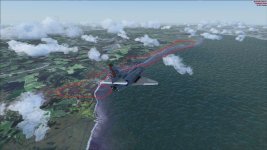
purplewater.jpg

Thanks,

Goshawk45
 
It is part of photoscenery, not the default water. Only developer can fix this issue by modifying photoscenery texture and compile a new bgl file for that area.
 
It is part of photoscenery, not the default water. Only developer can fix this issue by modifying photoscenery texture and compile a new bgl file for that area.

My thought too Toni. It could be that some of the tiles used for that area were that color to begin with. Sometimes photoreal scenery is oddly colored for some unknown reason and the area that is visible here also seems to be part of the blur mask that allows the photoreal to more seamlessly merge with default areas (like the water). With smaller areas of discoloration, color correction can eliminate or at least lessen the poor coloring, but with Mega Scenery, from my limited experience, very little color correcting is done (or none at all) and you simply accept that some areas may be off color.
 
Thanks for the replies gents, I will try contacting the developer again and see what they say.

Regards,

Goshawk45
 
Back
Top