
P3D_V5 Can't install Sim Skunk Works F-104 via add-on method

crushnik

Members +
I've always installed my aircraft by using the add-on method. For some reason I can't get the Sim Skunk Works F-104 to work. I used the installer to place it into my Documents\P3Dv5 Add-Ons folder, then created an add-on.xml with the appropriate folders. Tried using the entire C:\ path or just the steamlined simobjects\airplanes addresses. Tried starting P3D with the F-104 entered into the add-ons.cfg file and also tried leaving it out. Nothing is working. Here is my add-on.xml (this format, or usually one with the entire C:\ path usually gives me no problems with other aircraft):

<SimBase.Document Type="AddOnXml" version="4,0" id="add-on">
<AddOn.Name>Sim Skunk Works Lockheed Martin FRF-104 G</AddOn.Name>
<AddOn.Description>Sim Skunk Works Lockheed Martin FRF-104 G</AddOn.Description>
<AddOn.Component>
<Category>SimObjects</Category>
<Path>SimObjects\Airplanes</Path>
</AddOn.Component>
<AddOn.Component>
<Category>Effects</Category>
<Path>Effects</Path>
</AddOn.Component>
<AddOn.Component>
<Category>Gauges</Category>
<Path>Gauges</Path>
</AddOn.Component>
</AddOn.Component>
<AddOn.Component>
<Category>Sound</Category>
<Path>Sound</Path>
</AddOn.Component>
</SimBase.Document>

Below is an image of the add-on's directory:
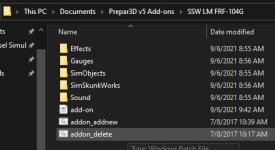
Screenshot 2021-09-06 095130.jpg

Thanks for any help or suggestions!
 
Hi
Is your xml correctly encoding? (UTF-8)
Had you a request from P3D for activating it?
It is the first aircraft you put in this folder or there are another aircrafts?
Is your xml file in a folder which must be in first level in C:\Users\name\Documents\Prepar3D v5 Files?
Regards
Michel
 
Is your xml correctly encoding? (UTF-8)
Had you a request from P3D for activating it?
It is the first aircraft you put in this folder or there are another aircrafts?
Is your xml file in a folder which must be in first level in C:\Users\name\Documents\Prepar3D v5 Files?

No request from P3D when it launches.
There are several other aircraft in my Prepare3D v5 Add-ons folder, but the F-104 has a folder of its own.
I have tried with or without the entire file folder structure, and this is a copied add-on.xml from other aircraft which work fine.
Maybe I just need to install the traditional way, and if I run into problems it will uninstall without ruining any other files. I just prefer the add-on method for my piece of mind.

Thanks for responding!
 
"... There are several other aircraft in my Prepare3D v5 Add-ons folder, but the F-104 has a folder of its own..."
Make a test with the same path as the others.
 
<SimBase.Document Type="AddOnXml" version="4,0" id="add-on">
<AddOn.Name>Sim Skunk Works Lockheed Martin FRF-104 G</AddOn.Name>
<AddOn.Description>Sim Skunk Works Lockheed Martin FRF-104 G</AddOn.Description>
<AddOn.Component>
<Category>SimObjects</Category>
<Path>SimObjects\Airplanes</Path>
</AddOn.Component>
<AddOn.Component>
<Category>Effects</Category>
<Path>Effects</Path>
</AddOn.Component>
<AddOn.Component>
<Category>Gauges</Category>
<Path>Gauges</Path>
</AddOn.Component>
</AddOn.Component>
<AddOn.Component>
<Category>Sound</Category>
<Path>Sound</Path>
</AddOn.Component>
</SimBase.Document>


Thanks for any help or suggestions!

You've got a duplicate /AddOn.Component line for one thing. 5th line up from the bottom.

Dave
 
You've got a duplicate /AddOn.Component line for one thing. 5th line up from the bottom.

Dave

Sometimes it takes a set of fresh eyes... Not sure how that extra line got in there, but thanks! While that solved one problem, the whole aircraft is black, and I got an error message about the sound config file. After all that, I think I'll just install the normal way.
 
Sometimes it takes a set of fresh eyes... Not sure how that extra line got in there, but thanks! While that solved one problem, the whole aircraft is black, and I got an error message about the sound config file. After all that, I think I'll just install the normal way.

Daft question perhaps -- but have you actually installed the textures in with the models?

Dave
 
Back
Top