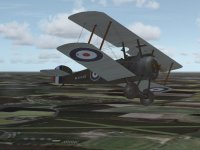
Goldhanger flight station; RFC night flying airfield

Please Pete,

There isn't much WW I scenery available so your scenery will be more than welcome.

Cheers,
Huub
 
Many thanks Pete,
What I would say is, that it really doesn't need a background tex, as home WWI airfields were not much more than cut grass fields and runways, which the Fs9 poly does nicely, along with your runways..IMHO.

Cheers

Shessi
 
Airfield not showing up in my scenery library, no Goldhanger or G953. Had a look in Goldhanger/scenery folder, there are 2 bgl's, Goldhanger exclude and Goldhanger RFC, but no ADE file
 
Airfield not showing up in my scenery library, no Goldhanger or G953. Had a look in Goldhanger/scenery folder, there are 2 bgl's, Goldhanger exclude and Goldhanger RFC, but no ADE file

Oops..looks like I forgot the AFCAD, I'm working away until Sunday with no access to pc

Sorry everyone

Pete
 
OK, to save more issues, I've asked current download to be removed from library, and I'll upload corrected version when I'm home next

Ttfn

Pete
 
Thanks Pete for having re-uploaded your scenery. Unfortunately I only get the runways, but no buildings. Did I something wrong? Would appreciate your advice.

Bernard
 
Thanks for your reply. I first had the static objects in Static Object Library and moved them in the Addon Scenery folder as suggested. But it didn't changed anything, Curiously when I open your file with Instant Scenery the objects appear correctly.

52890215711_69ca5115ae_b.jpg


Bernard
 
Replacement AF2 file and background for stock FS9 install's. save original AF2_G953.bgl somewhere
safe and then copy these file's into your Goldhanger RFC/scenery folder. These will give you a
ground poly and move the runways a little west and out of the water. Golden wings user's will find
replacememt bgl's in the GW-files folder

Hi Bernard, i just took all the bgls and texture's from static objects folder and placed them into Goldhanger RFC scenery/texture folder's and everything show's just fine including static aircraft
 

Attachments

  • Alt backgrounds.zip
    3.4 KB · Views: 4
Thanks Ian. That was it - putting everything together in one folder. Appreciate your helpful tip to enjoy Pete's contribution.

Bernard
 
Back
Top