
(Graphics) Exposure Compensation EV setting

tiger1962

SOH-CM-2026
I've just discovered this setting, but I have to reset it after each launch of the sim - it won't 'save' like my other graphics settings. Does anyone know how to set this in the UserOpt.cfg file?
Here's what it does, this shot is with Exposure Compensation EV set to zero:
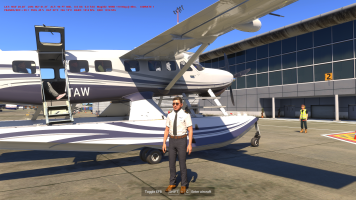
1752401646737.png

Now I set the slider to -1 for a darker image:
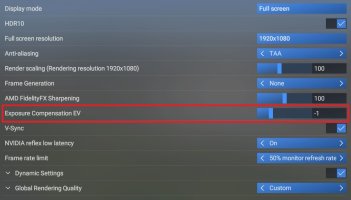
1752401718149.jpeg

Here's the result, which I much prefer:

1752401762061.png
 
I have no issue with Exposure Compensation EV, the settings are saved as e.g. ExposureBias -0.500000 in the Video section of my UserOpt.cfg file. Maybe it is GPU related? I have a NVIDIA GeForce RTX 4060 card.
 
I have no issue with Exposure Compensation EV, the settings are saved as e.g. ExposureBias -0.500000 in the Video section of my UserOpt.cfg file. Maybe it is GPU related? I have a NVIDIA GeForce RTX 4060 card.

Thank you Sir! My UserOpt.cfg didn't have that option, so I deleted it and relaunched the sim - it created a new UserOpt.cfg and this one now has the ExposureBias setting. (y)
 
Thanks for the tip, I had never noticed that setting before...
However, do you really prefer the second shot ?
To me, it's like it lost the vibrancy of the sun light... It looks almost as sad as a screenshot from P3D :(
 
Helpful! Personally I just turned off HDR. Looks great on my TV PC, but on my 49” Samsung monitor the Windows desktop ends up washed out. And the difference in MSFS and other games like Cyberpunk isn’t dramatic enough to hassle with turning it on/off each session.
 
on my 49” Samsung monitor the Windows desktop ends up washed out.

Yes I had a struggle with that on my monitor too. I found that re-calibrating the HDR color settings to not-quite black and not-quite white (on those two calibration screens) has fixed it but MSFS was still looking washed out, so I was really pleased to find the Exposure Compensation setting.
 
Yes, in HDR the shadows are deeper which makes the clouds better defined, especially from above.
Ah ok, you have an HDR monitor.
The problem with these monitors is that they kind of post-process the image before display, and when sharing a screenshot, these post-processing results are not visible.
For example and just for the sake of comparing, the shots posted by John Terrell are just perfect in colors and lighting, for me. They look just like real world pictures. I have a normal screen, not HDR, so I need the source picture to be nice already.
 
You can also go the other way and use a plus EV to brighten the image. I am sure most of you already know that, however.
 
Back
Top