• There seems to be an uptick in Political comments in recent months. Those of us who are long time members of the site know that Political and Religious content has been banned for years. Nothing has changed. Please leave all political and religious comments out of the forums.

    If you recently joined the forums you were not presented with this restriction in the terms of service. This was due to a conversion error when we went from vBulletin to Xenforo. We have updated our terms of service to reflect these corrections.

    Please note any post refering to a politician will be considered political even if it is intended to be humor. Our experience is these topics have a way of dividing the forums and causing deep resentment among members. It is a poison to the community. We appreciate compliance with the rules.

    The Staff of SOH

  • Server side Maintenance is done. We still have an update to the forum software to run but that one will have to wait for a better time.

Golden Age Simulations FSXA/P3D Models Freeware on SOH

Spad54

SOH-CM-2025
Hi all
Each year that we have been in business we have tried to provide some way of thanks for the support shown us over the years. As many of you know we have ceased development but still wanted to recognized the forum and it members. To that end I have been working with your admins to place all of our FSX and P3D models in the SOH resource depository. They may be found in the Golden Age Simulations folder in the forums "Resource" location. These models are offered "as is" there is no tech support. They may be modified as the user desires as long as they remain freeware and Golden Age Simulations is credited as the developer of the source files.
The admin team, in order to prevent surges on the server, will be doing a staggered roll out as defined below. The number of days before the next group can download will be dependent on continued server load or number of downloads per day. Any questions regarding access should be directed to them.

Charter Member last 2 years
Charter Member any time frame
Member +
Registered

Happy Holidays to all and Enjoy the "Toys"
Best
Paul and Gil
GAS
 
Incredibly generous of you Paul (and Gil). Thank you so much.

I have bought a number of GAS models over the years and loved them all, but especially the Pitcairn autogyro - such a fun little craft. I meant to buy a few more before you closed up shop but didn't make it.

Now I will be able to enjoy the ones I missed.

Thanks again.
Gavin
 
Wow, absolutely amazing!

This is truly remarkable, Paul (and Gil). Every one of your creations has found a home in my virtual hangars through FSX and P3Dv4.5, each aircraft carrying its own soul whenever the opportunity arises to fly them. Like Gavin, I share a special joy for the Pitcairn Autogiro, which continues to deliver thrills like no other. Your Golden Age Simulations aircraft feel like time capsules—setting the stage and often telling the stories of the men and machines through their manuals—allowing for truly one‑of‑a‑kind experiences to be lived out in the sim.

Thank you for your selfless generosity. Your passion shines through in the way you share your labors with the community. What a gift it is to know these birds will remain available via Sim Outhouse, bringing joy to so many for years to come.
 
Hi all
Each year that we have been in business we have tried to provide some way of thanks for the support shown us over the years. As many of you know we have ceased development but still wanted to recognized the forum and it members. To that end I have been working with your admins to place all of our FSX and P3D models in the SOH resource depository. They may be found in the Golden Age Simulations folder in the forums "Resource" location. These models are offered "as is" there is no tech support. They may be modified as the user desires as long as they remain freeware and Golden Age Simulations is credited as the developer of the source files.
The admin team, in order to prevent surges on the server, will be doing a staggered roll out as defined below. The number of days before the next group can download will be dependent on continued server load or number of downloads per day. Any questions regarding access should be directed to them.

Charter Member last 2 years
Charter Member any time frame
Member +
Registered

Happy Holidays to all and Enjoy the "Toys"
Best
Paul and Gil
GAS
Like others, I've bought a swag of GAS creations; I love low and slow flying.
Really appreciate your generosity. I will add a few more to the hangar in due course. Thanks Paul and Gil :)
 
A forum member has identified that the file associated with the Buhl pup resource was incorrect; pointing to the Aeromarine resource. It has been addressed and the correct file is now in place, tested by me in FSX and verified as all in order.
 
GAS Waco UPF-7 sound issues.

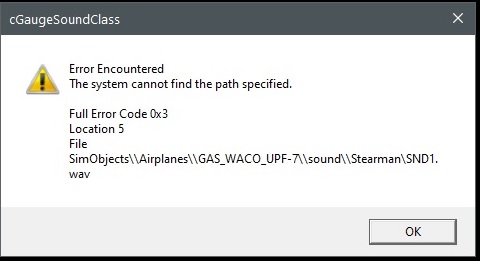
I installed the gas UPF-7 to my P3DV5 Addon directory, all was well except for the many popups that could not find snd.wav x 20 messages:

Untitled.jpg


Capture.jpg


This is my xml file i created for this addon - after I dismiss all 20 could not find messages, the plane loads with all the sounds.
Here is my xml file

<?xml version="1.0" encoding="utf-8"?>
<SimBase.Document Type="AddOnXml" version="4,0" id="add-on">
<AddOn.Name>Gas Waco UPF-7</AddOn.Name>
<AddOn.Description>Gas Waco UPF-7</AddOn.Description>
<AddOn.Component>
<Category>EFFECTS</Category>
<Path>Effects</Path>
</AddOn.Component>
<AddOn.Component>
<Category>SimObjects</Category>
<Path>SimObjects\Airplanes</Path>
</AddOn.Component>
</SimBase.Document>
 
GAS Waco UPF-7 sound issues.

I installed the gas UPF-7 to my P3DV5 Addon directory, all was well except for the many popups that could not find snd.wav x 20 messages:

Untitled.jpg


Capture.jpg


This is my xml file i created for this addon - after I dismiss all 20 could not find messages, the plane loads with all the sounds.
Here is my xml file

<?xml version="1.0" encoding="utf-8"?>
<SimBase.Document Type="AddOnXml" version="4,0" id="add-on">
<AddOn.Name>Gas Waco UPF-7</AddOn.Name>
<AddOn.Description>Gas Waco UPF-7</AddOn.Description>
<AddOn.Component>
<Category>EFFECTS</Category>
<Path>Effects</Path>
</AddOn.Component>
<AddOn.Component>
<Category>SimObjects</Category>
<Path>SimObjects\Airplanes</Path>
</AddOn.Component>
</SimBase.Document>
@Tako_Kichi

Same issue you had. Can you share how you caused the issue and fixed it.
 
Butch have you changed the aircraft folder name in any way, shape or form? Added GAS at the front maybe or removed an underscore in the folder name? It looks like you are using a 'remote' location for aircraft storage which means the entry in the panel.cfg file can no longer find the sound files it requires hence all the error messages.

If you do not want to install the aircraft into the usual 'SimObjects\Airplanes' folder for whatever reason you are going to have to edit the entry in the panel.cfg file to match your actual location of the aircraft folder. Open up the panel.cfg file and follow the steps below:

1) Scroll down to the [Vcockpit01] section.
2) Find the 'gauge00' line which should look like this:
gauge00=GAS_Sound_64!FBGS_XMLSound, 0,0,1,1,SimObjects\\Airplanes\\GAS_WACO_UPF-7\\sound\\Stearman#20
3) You are going to have to edit the 'SimObjects\\Airplanes\\GAS_WACO_UPF-7\\sound\\Stearman#20' part of that line (in red) to match the actual aircraft folder location on your computer.
4) Once you have made the changes save and test.

If you don't want to do that the only other alternative is to delete the aircraft from your current location and then re-install it to the 'usual' P3D 'SimObjects\Airplanes' folder.

NOTE: There are several other aircraft in the GAS section that also use the same method of accessing sound files (I cannot remember which ones I came across now but there were 2-3 IIRC) so be aware you may come across this problem again if you are installing to anywhere other than the default P3D 'SimObjects\Airplanes' folder.
 
This solution, while mentioned in the Buhl Pup users manual, applies to all who are installing in P3D version 4 and 5
Installation Instructions
An installer is provided for this package. Confirm your version of flight simulator before proceeding and when prompted. If installing for Prepar3D be aware that the default location is “Aircraft” folder.

NOTAM the P3D V4 – 5 model is NOT compatible with P3D versions 1-3. (*PBR textures)
If you are installing to your “Addon” folder, you will be required to modify the panel configuration file to prevent a sound error warning on loading in the sim. Follow the procedure as follows:
Browse to the Panel folder for the plane and open the panel.cfg in notepad.
The [Vcockpit01] section gauge00 points to the custom sounds.
Change the path specified in it to read the full path where it is installed in your version of Prepar3D
Example.
gauge00=GAS_Sound_64!FBGS_XMLSound, 0,0,1,1,E:\\Prepar3D v5 Add-ons\\Golden Age Simulations\\SimObjects\\Airplanes\\ GAS_Buhl_LA-1_Bull_Pup\\sound\\Fleet#19
 
Thanks for the clarification Paul, I hadn't installed the Buhl Pup so had not seen that info. In my case I had modified the folder name in the default 'Airplanes' location which is why I got the sound issues until I tweaked the panel.cfg entry myself. As I was a late comer to P3D and long after the final update for P3D v4.5 I never bother to install to an 'addon' folder and always do it the FSX way to the default 'Airplanes' folder.
 
Thanks to all for the replies. A lot of my sim related material is on my "G" drive and some on my "C" drive. A lot of sceneries will auto install to my
addon folder in my "C" drive and after awhile, P3D will take more time to load due to the amount of P3D related scenery and other aircraft files on
the "C" drive. I've decided to just install it conventionally to my "G" drive where P3D resides. I wish I could just move some of the sceneries and
other aircraft addons from "C" over to "G" but I guess that would entail a lot of uninstall/install work.

PS Reason I was installing to C drive addons was to keep the various effect and gauges folders contained in a neat and tidy package.
 
Last edited:
Back
Top