• There seems to be an uptick in Political comments in recent months. Those of us who are long time members of the site know that Political and Religious content has been banned for years. Nothing has changed. Please leave all political and religious comments out of the forums.

    If you recently joined the forums you were not presented with this restriction in the terms of service. This was due to a conversion error when we went from vBulletin to Xenforo. We have updated our terms of service to reflect these corrections.

    Please note any post refering to a politician will be considered political even if it is intended to be humor. Our experience is these topics have a way of dividing the forums and causing deep resentment among members. It is a poison to the community. We appreciate compliance with the rules.

    The Staff of SOH

  • Server side Maintenance is done. We still have an update to the forum software to run but that one will have to wait for a better time.

The Aircraft Carrier Thread.

BTW, I *think* what you're looking for is this:
I've attached my "master" ARRCAB.dat file. :eagerness:
Just unzip it and drop the .dat file into your ARRCAB folder in FS, over write the old one.
This will give you ALL of the landing cable locations I use, there are a lot of them and they cover a lot of different carrier scenery.

We're jumping the shark a little, I'll explain ARRCAB better later on, but you may as well load it now. :wiggle:

BTW, if you want to check out what's in the .dat file, just OPEN WITH then select NOTEPAD.

ARRCAB cable zones look like this:

[Zone23]
CarrierIdent=CVN-73 off Pensacola
FrontRightCornerLat=29.99933723
FrontRightCornerLon=-86.99993932
FrontLeftCornerLat=29.99930218
FrontLeftCornerLon=-87.00028318
BackLeftCornerLat=29.99902178
BackLeftCornerLon=-87.00024272
BackRightCornerLat=29.99907436
BackRightCornerLon=-86.99989886
DeckAltInFeet=67.5
CableCatchZoneHeightInFeet=2.4
RunwayHeadingInDegreesMag=351

This one is for the Flight Deck 3 USS George Washington just south of Pensacola.
It will, eventually, be your destination for two days of carrier landings. Six traps during the days and two traps at night in either the TA-4J or the T-45. Those night landings WILL be a handful (and a half) which is why you'll be doing some basic flying over land for a while. :wavey:
After that last night trap, you'll get your "wings of gold" and get sent to your squadron after you get type certified in the jet you wanted.

I'm compressing the basic stuff quite a bit but it DOES pay off when it comes time to land on the boat. Trust me, you'll do fine but you need to learn the trainers like the back of your hand.
 

Attachments

  • SBobs ARRCAB DAT.zip
    4.5 KB · Views: 2
Last edited:
Hmm. :unsure:

I was checking downloads to find the Alphasim T-34 package and found this:


Go down to the bottom of the page and check out Beechcraft_T34C_with_full_functionalities_and_fail.zip.
If you're looking for something a little more complicated, this might be your ticket.
I only want you to fly the T-34C so you get something with a little more power than the piston engine version, the T-34C is also a good intro to flying turbo props and a great trainer if you're thinking that the E-2C or the C-3 COD might be in your future. :wiggle:
This download features a complete sound folder, I'll be adding my favorite turbo prop sound folder to my update kits, but you have another option if you want it.

Anyway, enough waffling. I'll get into the full training spiel including finding NAS land-based scenery including max-detail scenery vs just adding an AFCAD, etc. and what to do with your training flights.
 
Gee sbob, I don't have a ARRCAB folder in my install. Now I DO have all of the Carr2006. I just don't know where the ARRCAB DAT file goes.
Incidentally I have made three successful traps in the T-45C. So I'm getting it so far.
 
That's great, but what made you stop after you landed? :dizzy:

There are several arrestor wire programs out there. I just did some quick searches and couldn't find any of them, naturally, except for 3Wire. :dizzy:

I'll tack an install zip for ARRCAB2.6 to this thread. :wiggle:
ARRCAB is the most hassle-free program of the bunch (IMO), just extract the full ARRCAB folder from the zip and drop it in your main FS9 folder.
Then create a shortcut icon and add that to your desktop or menu bar.
To run ARRCAB, start FS9 and load your plane and some scenery (a carrier is ideal but you can also start from a near-by airport).
Next, <alt><enter> so you can see your desktop. Hit the ARRCAB icon and it will start. At this point you can <ALT><ENTER> again to go back to your normal FS view. Just remember to shut ARRCAB off before you quit running FS.
From there, you'll need an aircraft that has a tailhook enabled in the aircraft.cfg file, a tailhook switch on your joystick or in your panel folder, and you'll also need to have FSIUPC installed.

ARRCAB is automatic. It will tell you which carrier deck is closest. It also contains "universal" catapult zones. Just line up (roughly) in line with the bow/catapults and hit <CTRL><.> to set your parking break. Hit <SHIFT><F9> and a deck crewman will tell you you're ready to go. Run up the throttles to at least 95% power and the cat will keep you in place. Hit your joystick trigger and hang on tight. :wiggle: ARRCAB will launch you off the carrier at around 150 KTS.
To land, you need the gear and tail hook down. Just aim for the center of the arresting wires on the deck. If your aim is good, you'll get yanked to a stop (quickly) along with some sound effects. Its a rush. :eagerness:

Putting the hook on a wire can be tricky. You need a good view of what it looks like when you're in the right spot.
Load up your plane and some carrier scenery. Taxi so that your tail hook (not your cockpit) is directly above the center of the arrestor cables. Take a look around. This is what you want to be seeing when you land on the deck. :wiggle:
If you land long, you'll miss the wires and BOLTER. If you land too short, you might catch the #1 wire or you'll bounce over the wires and it will be another BOLTER. You can do touch-and-go's if you leave your tail hook up.

If everything went right, you caught a wire and now you're sitting on the flight deck. Hit your brakes, bring the throttles back to idle, then raise the tail hook. You can now taxi off the landing zone and park up. Nothing to it. :wiggle:

Take a look inside your ARRCAB folder and you'll spot a couple of BGL files. These are "eye candy" BGLs for Fentress NOLF and NAS Patuxent River. All they add is some arrestor wires at the ends of the runways. You still need to add the cable zones in your ARRCAB DAT file. Or, grab my cable zones DAT file and replace the stock Arrestor Cables.dat file in ARRCAB.

We're jumping the shark a bit. I'll explain this stuff better later on. 😁
 

Attachments

  • arrcab26.zip
    3.1 MB · Views: 2
Thanks Sbob, I appreciate it! I have rcbco plus Carr2006. I guess the rcbco is what supplies the wire cause I catch it a sound as well. Pretty neat. So far I have, in addition to the T45, used the T-28 and ALPHA F-8 in the program.
 
OK, so some quick change of plans. :dizzy:
I mentioned that I wanted to upload the full (FD3) scenery for the USS George Washington south of NAS Pensacola (CVNP).
I checked with the Admins and got a firm "No" but let me at least make a case about why you need to scour EBay for the old Abacus Flight Deck 3 to 6 titles. The aircraft are border-line at best but the actual scenery ain't that bad. The Abacus AI planes look like FS2000 but don't sell them short. You really want their flight dynamics and you can graft-together the Abacus FD into some MAIW AI models without a lot of headaches. The Abacus AI are wet deck enabled (they can land on a carrier like they trapped a wire) while MAIW AI tend to be land-based.

Flight Deck3 is a kind of standout. It was meant more for FS2002 but it will install in FS9. You'll need to add some carrier deck AFCADs and if there's any interest I CAN post some AFCAD updates that work with AI traffic. :wiggle:

The "George" scenery for Pensacola is desirable because it is historically accurate for first-time carrier quals. FD3 carriers also have a neat Easter egg. Taxi over an open elevator and you'll drop down to the hanger deck. This is better at night because of the lighting. To get off the hanger deck and back on the flight deck, taxi slowly toward the bow or stern bulkheads and pass thru them. You'll get transported back on to the flight deck. Sometimes the cheap thrills are the best thrills. 😁 The ONLY way so far to find the Flight Deck series is to keep checking on EBay. Just run a search for "FS2004" and see what pops up. It looks like Abacus distributed a bunch of their titles over the years and eventually these box sets will "bubble up". You can usually score a single CD for around $20-$30 and I recently saw an Abacus bundle of FD3, 4, and 5 for something like $40. If you can't find a CD for FD3, don't worry about it. If the weather in the Gulf was bad, the Navy would shift carrier quals to NAS Jacksonville which dove-tails nicely with the O-G Carriers 2006 scenery.

Meanwhile, I have the Update Kits for the Alphasim T-34C, IRIS T-45, and RAZBAM TA-4J ready to get zipped-up and uploaded. I'll let you know when they will be available. :wiggle:
 
Viper, yes they work great and are worth trying to find. :eagerness:
FD5 especially has some stand-out aircraft and AI.
Abacus packages always felt like they were rushed into sale. 😁
They all have some flaws and most of them can be fixed.
I got hooked on them because they place the ships about where they should be.

I'm planning to cover all of the available (modern) carrier scenery later in more detail.
With ANY of the Flight Deck software, I would install them to a folder on your desktop first then manually load them into FS.
You can just do a regular automatic install with no issues, but manual gives you more control.
 
Viper, yes they work great and are worth trying to find. :eagerness:
FD5 especially has some stand-out aircraft and AI.
Abacus packages always felt like they were rushed into sale. 😁
They all have some flaws and most of them can be fixed.
I got hooked on them because they place the ships about where they should be.

I'm planning to cover all of the available (modern) carrier scenery later in more detail.
With ANY of the Flight Deck software, I would install them to a folder on your desktop first then manually load them into FS.
You can just do a regular automatic install with no issues, but manual gives you more control.

archive.org has Flight Deck 5...
 
They also have FD2 which looks interesting but it was intended for FS2K and I've had issues with some FS2K carrier scenery in FS9. :unsure:
I also have my FS2002 install to play with, so I'll probably try to download it. :wiggle:
Have any of you tried this site for downloads? Any problems with cooties or malware?

One thing with FD5, you don't need catapult or trap wire programs. That gets sorted out during install. I'm not sure if its 3Wire or RCBO?
This is a title where the aircraft are actually better than the scenery. You get a good selection of planes. The stand-outs (IMO) are the E-2 Hawkeye and the C-3 COD but all of them are fly-able and the AI are worth hanging on to. The USS Ford is kind-of *meh*. The deck textures look "pickled" when viewed up close and the real Ford had some mods done to the flight deck during construction but the locations are good.

:ernaehrung004:
 
Last edited:
They also have FD2 which looks interesting but it was intended for FS2K and I've had issues with some FS2K carrier scenery in FS9. :unsure:
I also have my FS2002 install to play with, so I'll probably try to download it. :wiggle:
Have any of you tried this site for downloads? Any problems with cooties or malware?

One thing with FD5, you don't need catapult or trap wire programs. That gets sorted out during install. I'm not sure if its 3Wire or RCBO?
This is a title where the aircraft are actually better than the scenery. You get a good selection of planes. The stand-outs (IMO) are the E-2 Hawkeye and the C-3 COD but all of them are fly-able and the AI are worth hanging on to. The USS Ford is kind-of *meh*. The deck textures look "pickled" when viewed up close and the real Ford had some mods done to the flight deck during construction but the locations are good.

:ernaehrung004:

I downloaded FD5 from archive.org and unzipped it... looks okay. I'll get around to Installing it in the next few days. (y) :)
 
Yeah, I grabbed the ISO for FD2 and burned it to a CD but it won't install on a 64-bit OS. :indecisiveness:
I wanted to see how many locations it had for the USS Nimitz and that was about all I wanted to do with it.
Maybe I'll goof around with it the next time I plug in the old Vista machine?
 
Like I said earlier, FD5 gets you the USS Gerry Ford. You can find it using airport IDs FD5A thru FD5E (four locations).
The deck texture looks a little funky to me but give it artist's license and call it Oily?
uss-ford-hi.jpg

Locations are off San Diego, Honolulu, English Channel, and off the coast of India (IO). By FD5, Abacus was looking more at FSX than FS9. :indecisiveness:
The Ford BGL model is unique as a super-modern carrier and is *not* a USS Nimitz clone. Its probably better to do the automatic install then move the scenery folders later.
 
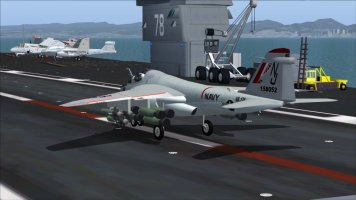
OK, so the Skyhawk is finally done. :wiggle:


I was able to find a "close enough" AOA Indexer for the TA-4J's VC. Short-final should be nose high (3-5 degrees) with the airspeed between 110 and 120 KTS.. As always, use your throttle to control your altitude on the glide slope. :eagerness:
This plane is NOT easy. Its twitchy and mostly underpowered when you need it.
I'd still like to fine tune some stuff like the stall alarm but I've been wrenching on this thing for a while and its time to step away for a while. :dizzy:
The first of you to prove that the overspeed alarm works gets a beer. I've had it up 10,000 feet with the throttle wide open before I've pointed the nose straight down and I still haven't heard it. 🤣
 
The A-4 series was limited to 0.9 IMN with external drop tanks, 1.2 IMN in most cases when clean. In reality, it was esentially "LBA" - limited by airframe. In other words, whatever it could do before drag limited it - clean they could go a little over Mach 1 in some cases. They had no airspeed warning indication sound or warning lights. I flew every model except thr A-4A, including the foreign sales types based on the A-4M.

None of them were underpowered during landing approaches - however, approaches were flown with speedbrakes out to keep the engine spooled up for quicker throttle response. It was very manueverable, quick and responsive in the groove compared to other types. The TA-4 was considerably more nose heavy than the single seaters.

Also, TA-4s were limited to 14,500 lbs for carrier landings and FCLP type landings (no flare).
 
Last edited:
None of them were underpowered during landing approaches - however, approaches were flown with speedbrakes out to keep the engine spooled up for quicker throttle response.
Yep, same for the Whale. Speed brakes out. Dang! I still remember my one CAT & TRAP aboard CVA-60 in the Med. We we flyin' spins.
 
That's why I didn't play with the RAZBAM flight dynamics. :loyal:
All I did was make the contact points and eye point tighter.
I did adjust the Overspeed values to 0.855 M and 550-ish KTS.
Reading that it's supposed to be nose heavy just made me smile. 😁
I'll try some traps with the boards out and a higher power setting.
 
Another point - I don't have the RAZBAM TA-4, but one thing I am always annoyed with in many sim aircraft is the pitch change with flap deflection parameter in the aircraft.cfg files - they seem to be total BS compared to real aircraft I am familiar with because it is typically way too high.

In the A-4 the flaps were typically lowered in the break or initial IFR approach at 250 KIAS along with the gear and speedbrakes - little to no noticable trim change except that needed as speed decreased to AoA donut speed.
 
See? That's why I wanted folks like you, Zippy, and Navy Chief all over this thread. :wiggle:
Without giving away the farm, there's a LOT the rest of us can learn from you.
I know the Navy as a Submariner (Its NOT pronounced "sub-MARE-in-er", that's a pet peeve of mine) so there's only so much info I can dispense about carrier OPS. If you'd like to learn how to sink a carrier, that's outside the scope of this thread. 😁

:ernaehrung004:
 
Back
Top