MSFS Hangover...

Browncoat

SOH-CM-2023
I took the plunge, and 2024 is...different from 2020. I like the fact that 2024 is taking up 'only' 81GB of hard disk space on my system, with all of my add-ons installed, compared to what would have been 150-180GB for 2020. I also appreciate the fact that I don't have to deal with sim software-bugs involving my GPU drivers in 2024 (yet...). The Sim is also really pretty and I see where they strive to keep the experience on a 'single-pane-of-glass'. ...though I have noticed that the 2024 file under my user folder in C Driver is...growing...and I'm not sure why. 2020's file is 52 MB, and 2024's is currently 16 GB. It was 'only' 10GB yesterday. I do have to say that so far, I have no complaints with how 2024 is running. 2020 ran smoothly on my system, and I feel that 2024 runs better.

But forget trying to select taking off from a parallel runway...at least in my experience when I try to fly out of an airport, like KAPA, and I try to select Runway 17R (the short runway), 2024 just decides that I'll fly off 17L instead... because why not? As a user I obviously don't know what I'm doing and I don't know what is good for me... :mad:

The assigning of controls drives me crazy, as did trying to figure out how to move/reassign my Community folder. I wanted it off my C-drive. YouTube was a gem for helping me with that. But please don't get me started on the UI. Simply put, I'm not a fan, too much duplication and 'hiding things'.

I have also been trying my add-on aircraft. So far, most of them seem to behave well. I haven't encountered any issues with the Flying Iron birds yet, and BlackBird 310 is a treat. I also picked up the BlackBird Zero and 2024-Navtive version of the Comanche. Both of those run like a dream, as they should since they are 2024 native.

I have noticed issues with two of my add-ons. The JustFlight Arrows, and the BlackBird Corsair. With the JustFlight non-turbo Arrow, I noticed that leaning out the mixture while in cruise increases the fuel flow. ...That makes no sense to me.

With the Corsair; I'll be on takeoff roll, 40"-45" of MP along with the 13' prop spinning at around 2700-3000 PRM...yet the UI readout states that the engine is developing only 1300-ish RPM. ...again, that's not right.

This is an interesting experience so far.
 
About your runway selection, this is weird...
Do you mean you just selected the runway (white dot on the map?) and it placed you on the OTHER runway instead ?
In that case, you could simply try to click on the runway somewhere else (not the white dot) and select "depart on ground - engine running", which might solve the problem. You might not have the correct orientation when you spawn, though...

Concerning the UI, the setting to choose the location of the community folder is indeed strangely located. I don't know why they didn't keep it in the general settings section, but whatever. You found it anyways and once you know where the setting is located, it's easy to manipulate.

Concerning the assignment of controls, I was a bit puzzled at first because I expected it to be identical to MSFS2020. But it didn't take me long to adapt. In the end, there's nothing so special or hard about it. Search for the control, assign an axis or button... not different from MSFS2020 really...
 
"But forget trying to select taking off from a parallel runway...at least in my experience when I try to fly out of an airport, like KAPA, and I try to select Runway 17R (the short runway), 2024 just decides that I'll fly off 17L instead... because why not? As a user I obviously don't know what I'm doing and I don't know what is good for me..."

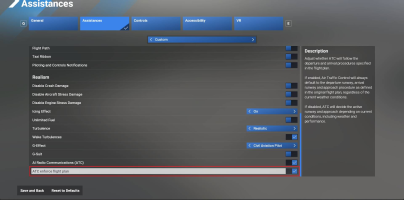
You can toggle that "feature" off: Assistances -> page down all the way to the end -> ATC enforce flight plan -> on

The default setting is off, I guess to simulate real life, where you don't decide which runway to use, the tower does.

As for the rest, yes, it is a (at times frustrating) learning curve. However, there are lots of tutorials and video guides on line.
As for native 2020 planes not always being fully compatible in 2024, the best you can do is make sure you have the latest
updates, and hopefully those will fix the problems.

As for me, I spent 1 hour flying in 2024, and I never went back to 2020 again...
 
Hello Daube,

“Do you mean you just selected the runway (white dot on the map?) and it placed you on the OTHER runway instead ?”

Yep. That is exactly what happens. Every time. It really is a minor annoyance, but at the same time, why should that be happening?

As far as the controls, I get you and agree. I will get used to it and figure it out.

I’m more annoyed by the gremlins that I have found so far with some of my addon aircraft, but I shouldn’t be surprised. ‘Ported’ 2020 aircraft won’t behave as expected in 2024, as they do in 2020. It still is disappointing given that I was hoping to continue to enjoy them. I will just have to wait for more native 2024 aircraft to appear, and not all of my addons show issues.

The Got Friends Wilga and Wildcat are still absolute treats to enjoy. I know that BlackBird is working on a 2024 Native Corsair, so I will wait for that.
 
The runway start issue should be fixed in SU5, which looks like it's going to ship this week:

From February release notes for the beta (I'm not running the beta):
  • Fixed player aircraft spawning at the wrong runway when launching a freeflight in some airports

As far as the aircraft issues, make sure you have the latest versions, as most 2020 planes that are still actively supported have gotten tweaks to address 2024 issues. JustFlight has released native FS2024 upgrades for many of their planes for free. The Turbo Arrow and Warrior II (I don't own the base Arrow, but I'm sure it was updated too) are native 2024, as are the Hawk T1 and Vulcan. There was a version 1.52 update for the FG-1D that fixed some 2024 issues.
 
I took the plunge, and 2024 is...different from 2020. I like the fact that 2024 is taking up 'only' 81GB of hard disk space on my system, with all of my add-ons installed, compared to what would have been 150-180GB for 2020. I also appreciate the fact that I don't have to deal with sim software-bugs involving my GPU drivers in 2024 (yet...). The Sim is also really pretty and I see where they strive to keep the experience on a 'single-pane-of-glass'. ...though I have noticed that the 2024 file under my user folder in C Driver is...growing...and I'm not sure why. 2020's file is 52 MB, and 2024's is currently 16 GB. It was 'only' 10GB yesterday. I do have to say that so far, I have no complaints with how 2024 is running. 2020 ran smoothly on my system, and I feel that 2024 runs better.

But forget trying to select taking off from a parallel runway...at least in my experience when I try to fly out of an airport, like KAPA, and I try to select Runway 17R (the short runway), 2024 just decides that I'll fly off 17L instead... because why not? As a user I obviously don't know what I'm doing and I don't know what is good for me... :mad:

The assigning of controls drives me crazy, as did trying to figure out how to move/reassign my Community folder. I wanted it off my C-drive. YouTube was a gem for helping me with that. But please don't get me started on the UI. Simply put, I'm not a fan, too much duplication and 'hiding things'.

I have also been trying my add-on aircraft. So far, most of them seem to behave well. I haven't encountered any issues with the Flying Iron birds yet, and BlackBird 310 is a treat. I also picked up the BlackBird Zero and 2024-Navtive version of the Comanche. Both of those run like a dream, as they should since they are 2024 native.

I have noticed issues with two of my add-ons. The JustFlight Arrows, and the BlackBird Corsair. With the JustFlight non-turbo Arrow, I noticed that leaning out the mixture while in cruise increases the fuel flow. ...That makes no sense to me.

With the Corsair; I'll be on takeoff roll, 40"-45" of MP along with the 13' prop spinning at around 2700-3000 PRM...yet the UI readout states that the engine is developing only 1300-ish RPM. ...again, that's not right.

This is an interesting experience so far.
For runway selection filing a vfr/ifr flight plan on your efb tablet helps. You can do this on the menu pre flight.

As far as the controls, patience and trial and error. You can actually look by category
 
A new FS2024 update of Airshow Assistant is coming that changes how liveries/planes are handled in FS2024 so no more rescans or missing liveries. Plus other improvements.

In the meantime, the current version causes CTDs when starting second flights, changing planes, and other situations. It's a real mess.
 
Concerning odd runway take off selection, my situation began sometime after 2024 release. For any airport I'm limited to only one runway and direction. Selecting a white dot on other runways-directions reverts to the one MS2024 insist using. :mad:
 
Back
Top