• There seems to be an uptick in Political comments in recent months. Those of us who are long time members of the site know that Political and Religious content has been banned for years. Nothing has changed. Please leave all political and religious comments out of the forums.

    If you recently joined the forums you were not presented with this restriction in the terms of service. This was due to a conversion error when we went from vBulletin to Xenforo. We have updated our terms of service to reflect these corrections.

    Please note any post refering to a politician will be considered political even if it is intended to be humor. Our experience is these topics have a way of dividing the forums and causing deep resentment among members. It is a poison to the community. We appreciate compliance with the rules.

    The Staff of SOH

  • Please see the most recent updates in the "Where did the .com name go?" thread. Posts number 16 and 17.

    Post 16 Update

    Post 17 Warning

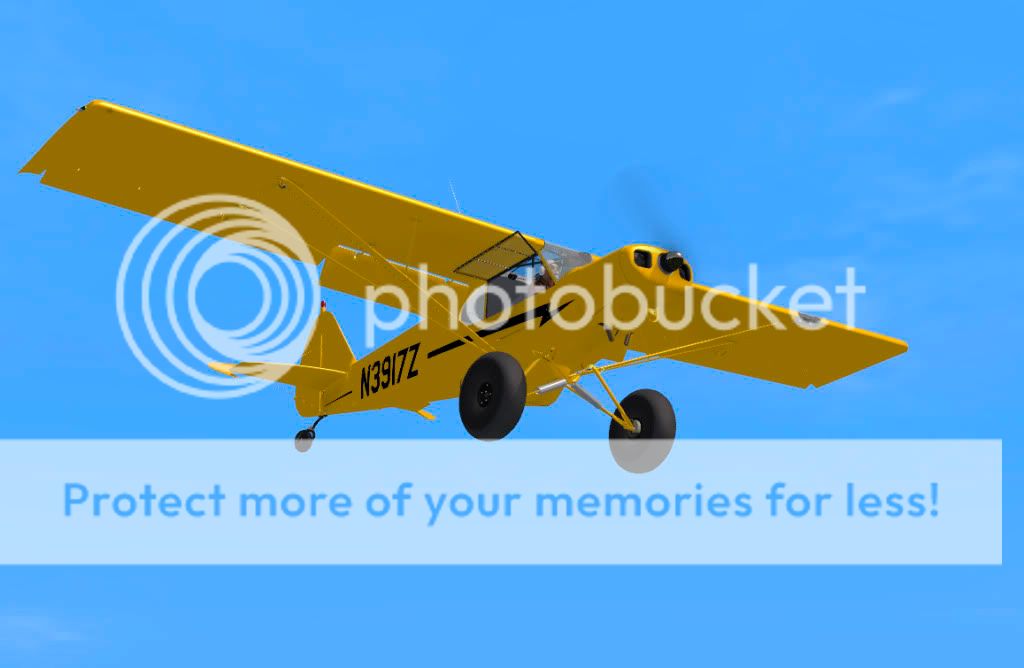
Super Cub: Now Available

Yes - just downloading mine as well - thanks Mike. It would be good to know what changes are made before loading it as I dont appear to have any probs with wrong airspeeds etc.

For me to have no complaints about a product is so rare!!!

Just small changes, in the Classic and Extreme packages (and obviously the Complete package). Don't quite remember what, I just changed the master files as word cames in and I looked at things, but it is basically two items changed in the Extreme airfiles; someone claimed their mag switch was inop in the Experimental (worked for me, but I regenerated the model just to be sure), and corrected a bone-headed error in which N8050C had two red nav lights.

In the future, I will also send out updates that just contain the corrected files, as I know that some folks that live in remote areas and only have satellite download, find that downloading the whole Complete installer can be troublesome. In that case, you'll just need to manually install by dropping the update into your aircraft folder. Instructions will come with the update, in any case. :)

Mike
 
Here's a good contribution from a user I thought I'd share:

I found out that if you change the atc_model line in the General section of every aircraft to PA18, default ATC says:" ...type Piper Super Cub..." which is correct!
[General]
atc_type=Piper
atc_model=PA18
editable=0
performance=
Category = airplane


Regards,

Jose


Mike
 
1. This download is a new "Complete" install so it will be necessary to uninstall the existing one?

2. Should the uninstall be done from windows control panel or the uninstall icon in All Programs/Flight Replicas Super Cub-Complete for FSX/Uninstal Flight Replicas Super Cub?

3. Any additional things to do, clean up wise, after the uninstall?

Note: I'm on Vista 64. No problems installing the original Super Cub D/L (or any other addon for that matter)
 
1. This download is a new "Complete" install so it will be necessary to uninstall the existing one?

2. Should the uninstall be done from windows control panel or the uninstall icon in All Programs/Flight Replicas Super Cub-Complete for FSX/Uninstal Flight Replicas Super Cub?

3. Any additional things to do, clean up wise, after the uninstall?

Note: I'm on Vista 64. No problems installing the original Super Cub D/L (or any other addon for that matter)


Hi there. You should be able to just run the installer, and it will automatically overwrite the existing files.

If you've done any custom paint schemes, with new entries in the aircraft.cfg, you should back those aircraft.cfg up, and then paste back into the new aircraft.cfg your new texture entries (only!).

Mike
 
Repaint C-FHCG is now available.

http://www.mediafire.com/file/dz1lwyjtkkz/Flight Replicas Super Cub Classic C-FHCG.zip

wip-93.jpg
 
Outstanding paint, gajit...they're getting better as you go-

Request-could someone do a dirty one of the extreme 1, please..!
 
Outstanding paint, gajit...they're getting better as you go-

Request-could someone do a dirty one of the extreme 1, please..!

Hi

Just buying the extreme version now so i will have a look. :ernae:
 
Just another one - for the Extreme2 - Mike did a very good job at the paintkit, so it is fun to "customize" this Beauty. So many parts you can give a personal touch.....:jump: Look inside ......

Greetings :wavey: Dirk
 
What a beaut..Luv it gajit..go for it...

also -Dirk I'm trying to download yours now, Thankyou! :running:
 
Does anyone else have this problem?

If you cycle your views from the cockpit to the outside and back again. Your sound is mixed with both inside and outside engine sounds and the only may to get rid of it is to throttle all the way down and then back to your desired throttle setting.

Another question. I bought "Extreme version" and I now think I want the complete version. Is it possible to "Upgrade"?

Thanks

Ben
 
Does anyone else have this problem?

If you cycle your views from the cockpit to the outside and back again. Your sound is mixed with both inside and outside engine sounds and the only may to get rid of it is to throttle all the way down and then back to your desired throttle setting.

Another question. I bought "Extreme version" and I now think I want the complete version. Is it possible to "Upgrade"?

Thanks

Ben

I've noticed no sound issues here. Just a sense that the engine response / torque is more powerful than I expect. I'm running into the orange too quickly on take off and really find it important to throttle back to 2,000 to 2,300 in a hurry to avoid just that. With careful attention to RPM and rate of climb I'm getting better and can hold altitude pretty tight when I get there but holding a heading even with wind and gusting intentionally set to 0 eludes me at this point. But, as I'm not a R/L pilot of the S-Cub (or any plane for that matter) I have no point of reference. Maybe the S-Cubs require active aileron control at all times. But it's still all good fun.

I went with the complete package because it seemed too cost effective to pass up for what I was getting.
 
Does anyone else have this problem?

If you cycle your views from the cockpit to the outside and back again. Your sound is mixed with both inside and outside engine sounds and the only may to get rid of it is to throttle all the way down and then back to your desired throttle setting.

Another question. I bought "Extreme version" and I now think I want the complete version. Is it possible to "Upgrade"?

Thanks

Ben

Yeah, something like that here too.
Dunno why
 
Notice that also - has someone dropped Mike a line about that problem ? It is the same that I have with the default Beaver - it seems that the sound did not change while the view did.

Dirk
 
Notice that also - has someone dropped Mike a line about that problem ? It is the same that I have with the default Beaver - it seems that the sound did not change while the view did.

Dirk

There is considerable throttle lag when throttling down, and this is normal. This is from en email from Tom: "After takeoff you have to pull the throttle back a long ways before the RPM starts decreasing very much at all!"

It took a while to find a way to get it to lag as it does!

There is a sound bug in FSX, that sometimes leaves the full rpm sound when you've throttled back, and I get it as well. The only cure there that I use is to quickly use the drop down sound menu, turn sound off and on, and then it resets normally.

Some sounds change with view, some do not. This is just something within FSX. The custom sounds in the package will not, but they are not normally heard in the outside views (except the wind sounds, but they shouldn't be too loud).


Mike
 
There is a sound bug in FSX, that sometimes leaves the full rpm sound when you've throttled back, and I get it as well. The only cure there that I use is to quickly use the drop down sound menu, turn sound off and on, and then it resets normally.

Mike
There are two other ways as well:

- Hit "Q", which will turn off and on the sound. Cycle with that key and it should resume to normal.

OR

- Go full throttle up, which will cycle the sound.

This is an issue as Mike described which has plagued FSX for some time (SP1 or SP2 or so, as I believe it was introduced then). Some models tend to have a larger problem with this, but it is hard to pin it down. I know of nobody who has completely solved the problem however, and if they have, they certainly haven't told me about it.

As much as I love FSX, it is interesting how many developers work to fix bugs in FSX itself for THEIR own addons.
 
Back
Top