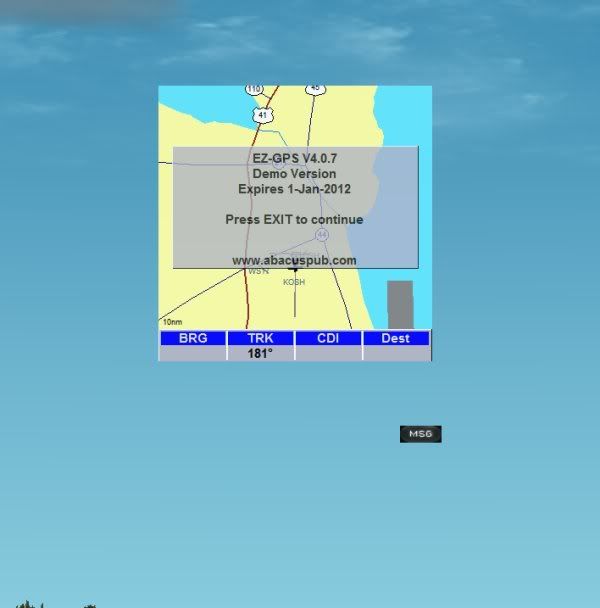
Anyone have Abacus EZgps?

TeiscoDelRay

Life Time CM
I have a question if you do. I downloaded the demo version and when going into fsx and selecting a plane that I coupled it with the ezgps screen comes up but says press Exit to continue. Well of course if you press exit you are out of FSX so what are they talking about?
 
That would be great if I had a button like that, I do see some buttons but they dont say exit and when you press on them they do not function. Thanks though, always get good advice here.

Image1-5.jpg
 
The ezGPS did not load correctly. When properly loaded it will have a full face to it much like an iPod. All you have showing is the display. The case isn't showing. You need to reload the aircraft and try again.:salute:
 
Secret Key

Like a lot of games, hitting the Esc key will allow you to 'continue' with 'setup' (ie: skip the promo/tunes, etc). It will not exit the 'game', per se. Have you tried hitting 'Esc' key instead? Cheers.
Chuck B
Napamule
They DON'T tell you EVERYTHING (hehe)
 
Well I tried everything including two different versions of the program and it is the same thing each time. I have had problems with Abacus software not working before and although I emailed there support several times I never received and answer. Thanks for the help but this one is not going to work.
 
Well I tried everything including two different versions of the program and it is the same thing each time. I have had problems with Abacus software not working before and although I emailed there support several times I never received and answer. Thanks for the help but this one is not going to work.
Too bad! It does that to me from time to time, no idea what causes it really, but reloading the airplane always corrects it. I always assumed it was a graphics issue rather than a program issue but I usually don't know what I'm talking about so you can't rely on that.
 
I havnt used it for a while, and i have also seeing that issue, its usually a size issue in the plane panel config. I managed to fix it a few times but cant remember what i did. Iy adds the gauge to the panel, so find it and then mess around with the settings. but make a backup first.
 
Thanks, I tried to change some settings for it, position, size and zorder and got it to work once but only once. Interesting that it is so touchy
 
Back
Top