• There seems to be an uptick in Political comments in recent months. Those of us who are long time members of the site know that Political and Religious content has been banned for years. Nothing has changed. Please leave all political and religious comments out of the forums.

    If you recently joined the forums you were not presented with this restriction in the terms of service. This was due to a conversion error when we went from vBulletin to Xenforo. We have updated our terms of service to reflect these corrections.

    Please note any post refering to a politician will be considered political even if it is intended to be humor. Our experience is these topics have a way of dividing the forums and causing deep resentment among members. It is a poison to the community. We appreciate compliance with the rules.

    The Staff of SOH

  • Please see the most recent updates in the "Where did the .com name go?" thread. Posts number 16 and 17.

    Post 16 Update

    Post 17 Warning

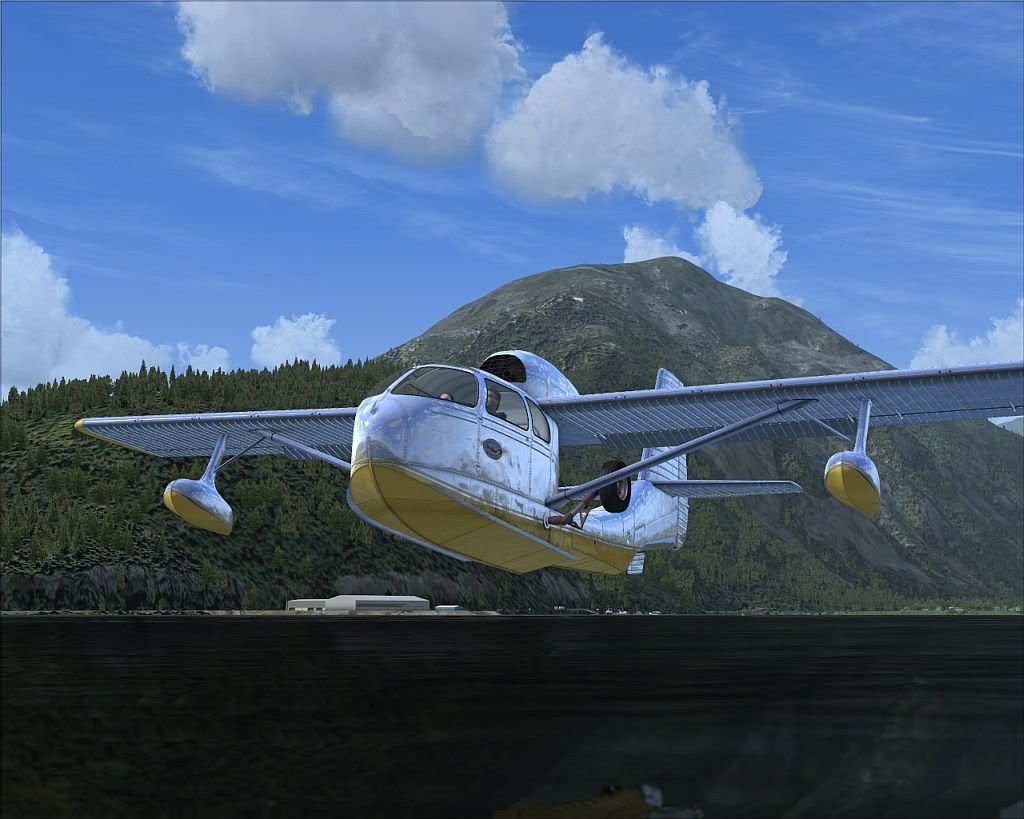
(Payware) KCFS releases the KCFS Seabee SP1!

Gibbage

Charter Member
Hay guys! Its been a long road, but I hope its well worth it. The SP1 took is a bit longer then we had hoped, so we included a bunch of new features with the standard bug fixes that come with SP's. We debated on if we wanted to call this an "enhancement pack" since the new feature list grew longer then the bug list!!!

Please take a look at the new visuals I added to the Seabee. We enhanced the normal maps (both internal and external) and even added a PAX (customer request)! Passenger is removable by moving the seat slightly forward, if you like to fly solo ;) For current customers, just download the new Flight 1 wrapper listed on the page below, and install on top of your current install.

If you have custom livery's, remember to BACK UP any edits in the aircraft.cfg so you can re-insert them into the NEW aircraft.cfg file after the update.

This is definitly not the last SP for the Seabee, as we have many more enhancements planned for the summer!

As always, if you find bugs, please visit us at the KCFS forums and let us know! Any other comments, questions or suggestions feel free to post them here at SOH!!!

http://www.kcflightshop.com/
 
Just installed SP1 Kevin and guess what? I'm still getting the water spout when I apply the "anchor" at sea. Too late(early?) to check the other bits. But as soon as the Bahrain Formula 1 practice #2 is finished late morning, I'll continue to play/test.
 
Thats very odd. I thought we got that one fixed! I will look into it.

*EDIT* just double checked and im not getting the water spout at all. Did you install new or on top of the old?
 
I installed brand new to keep things totally separate during "testing." Just to be sure, I re-verified I had the SP1 release with the extra pair of skins and the lady passenger -- I do.

I tested the anchor with both the VC "brake" key and the keyboard method(ctr+'.'). The spout pops on using either method.

Also you changed the wake and spray effect which I thought may be the cause, but since I don't have the new effect(fx_wake_s) all I got was a flat sea at take off and landing, so I reverted to the default:
wake=fx_wake_s//fx_wakeBow_carrier// fx_wake
water=fx_wake_s// fx_spray

I did notice one other bit, but not sure if it is wrong or more likely a fsX limitation. The Seabee will drift in a 10 to 16 knot wind regardless if the anchor is deployed.

Every thing else looks great especially the bare metal :)
 
interesting. I can't reproduce it on my side any longer. The spray was found to be sound triggered, if that helps. Can you send me a screenshot?

Also, anyone else having the spray when parked on water?

And yes, the anchor line is just for looks, like the tie down ropes on land.
 
I deleted the install and installed it a new. this time I do not get the spout:icon_eek: The only thing I did differently was to install directly into fsX. The first time I put it into a temp folder as I always do. That meant I had to manually move the one effect and one sound file into their proper place and of course the plane itself.

If the spout was sound related it appears I may have messed up on the transfer. Anyway this time was successful. Now off to the races (actually Bahrain practice).

Thanks for hanging in with me overnight:cowboy:
 
Mr. Kevin,
I´m unable to find the uninstal.exe for the plane (Looked in control panel->uninstall and in the plane folder). Can you tell me the name of the uninstall file and where it is? I think uninstalling the original plane is the best, isnt´t it?
 
No need to uninstall , overwrite and run the installer as an administrator allowing it to do its job , do not manually install the pieces from a destop folder .
 
I can't seem to see where to get the service pack. Nothing of mention in the KCFS forums either unless I overlooked it. I'll have a look in the beta area.
 
I always thought the pilot was setting in a strange position. Looks like he is leaning back. Same now for the co-pilot. Is this the normal setting position for the B ?
 
To get the Sp1, just re-download the exe from the products page. There is no uninstaller. If you want to uninstall the Seabee, just delete the folder from your sim objects/aircraft folder.
 
Also, I get wake, but no spray with SP1. This is what's in the config file. This was an over-write of the original installation.

wake=fx_wake_s//fx_wakeBow_carrier//fx_wake
water=fx_wake_s//fx_spray
 
Love the metal:engel016:

seabee-15.jpg
 
Yes, we are still planning on doing the Lycoming powered Seabee with extended wing tips and new coweling. The V-8 powered "Super Bee" is also possible, but it all depends on how well things go. Im also thinking about recording a sound pack soon once weather clears up. I have a local Seabee owner willing to give me a ride so I can do some recordings, but its down for its annual and weather up here (Seattle) has been crap since November!
 
How to

get these huge texture files down to 1 mg instead of over 4 mgs they are so my system can run this, especially in ORBX.
 
get these huge texture files down to 1 mg instead of over 4 mgs they are so my system can run this, especially in ORBX.

You can resize them all, but it will greatly lower visual quality. Maybe I can do a 1K texture pack for people who need the performance? I dont think it would take all that much to do it.
 
You can resize them all, but it will greatly lower visual quality. Maybe I can do a 1K texture pack for people who need the performance? I dont think it would take all that much to do it.

Thanks that would be great. Maybe some people will see a difference but these old eyes can't see any difference from some of my older planes with the smaller texture sizes and they will work much better on my computer.
 
You can resize them all, but it will greatly lower visual quality. Maybe I can do a 1K texture pack for people who need the performance? I dont think it would take all that much to do it.

Hi Kevin,

I'm having the same problem as Reddog in Orbx N.A.. For instance, I have no problem running Lionheart's Aerospool Dynamic and other planes at Orcas with the addons Accu-Feel and FSDiscover. But when I activate FSDiscover with the Seabee, FSX freezes then crashes. I'm don't know 1k textures from 4k textures, it's all magic to me. I just assume the high quality visuals are sucking up a lot of memory and causing FSX to crash. I'm running XP 32bit, an i7 975, and a Nvidia GTX 285 and 2.9 g of ram. Any help would be appreciated.

Thanks,

Joe
 
Back
Top