
-
Please see the most recent updates in the "Where did the .com name go?" thread. Posts number 16 and 17.
-
Special Server Maintenance
Just when you think you have everything running some what better...
You get a message from the Hosting company. Short story they need to move us to a new server. I have been working with them to plan a good date for all concerned. Here is what we have come up with as a schedule.
- November 4th 17:00 -5UTC shut off the forums and start backup proceedures. During this time there will be no access to the forums or the Resource Section.
- November 5th Continue with Backups and download same until complete.
- November 6th 7:00 turn over server to hosting company to move system to new server
- November 7th - 8th restore backups and upgrade forum software.
If all goes well we should be back online on November 8th.
To keep you updated we will post updates on AVSIM forums.
Thank you for your support.
You are using an out of date browser. It may not display this or other websites correctly.
You should upgrade or use an alternative browser.
You should upgrade or use an alternative browser.
P-3 Thread continued...
- Thread starter StormILM
- Start date


CG_1976
Ret. US Coastie/RCAF
You know. my Dad was in for 30 year. I spent all of my childhood around these planes. I never noticed that. I talked to my Dad about and yes you are right. Maybe I was to awe struck to notice.
Great pics guys.
The P-3AEW&C had the dome. They were converted RAAF Bs. That one I had to look up.
Just found her
http://www.warbirdregistry.org/orionregistry/orion-153446.html
This one visited JBSA and KSAT three weeks ago.

malibu43
Charter Member


DaveWG
Charter Member
Here's a quick run though of the mods I made using MdlMatxx so the P-3C can be used in FSX DX10 or P3dV2
I didn't spend a lot of time on this, it's very much a quick and dirty edit as the model is still in beta thing may well change.
It seems to work fine for me and I haven't found any problems, but there may well be something I've missed.
First and foremost, back up your original files!
Load up Mdlmatxx and load in the first MDL. All the MDLs will need editing, including the VC models.
Go though the list of materials on the left hand side and for each, check the value in the "Reflection Scale" box.

If it's a one, change it to zero.

then click the "Send modified material back" box

When you done all the materials, click "Save Updated MDL"

As I said, it's a rough edit. I haven't checked if all the materials need doing, so you may find some parts that need to be shiny or reflective may now not be.
This should work as described, but use at your own risk, I cannot be held responsible if your PC explodes, turns into a micro black hole or becomes self-aware.
I didn't spend a lot of time on this, it's very much a quick and dirty edit as the model is still in beta thing may well change.
It seems to work fine for me and I haven't found any problems, but there may well be something I've missed.
First and foremost, back up your original files!
Load up Mdlmatxx and load in the first MDL. All the MDLs will need editing, including the VC models.
Go though the list of materials on the left hand side and for each, check the value in the "Reflection Scale" box.
If it's a one, change it to zero.
then click the "Send modified material back" box
When you done all the materials, click "Save Updated MDL"
As I said, it's a rough edit. I haven't checked if all the materials need doing, so you may find some parts that need to be shiny or reflective may now not be.
This should work as described, but use at your own risk, I cannot be held responsible if your PC explodes, turns into a micro black hole or becomes self-aware.

falcon409
SOH-CM-2026
Thanks for that Dave. Just a quick note for P3D_Ver2 users, it appears that the external model is fine, so "all mdls" isn't necessary as far as I can see, however the VC definitely needs these tweaks as aside from the main gauge panel, everything else has the "chrome appearance". That "interior mdl" seems to be all you need to tweak if you are using P3D_Ver2. I also did not touch any LOD1 material that was labeled as a "$gauge" as I assumed that would remove any reflection from the gauges. The rest that had the "1" I changed to "0" and the VC looks great and that one interior model will fix all the VC's as they are all aliased to that mdl file. Thanks again to Dave for making that available.. . . . . . .It seems to work fine for me and I haven't found any problems, but there may well be something I've missed.
First and foremost, back up your original files!
Load up Mdlmatxx and load in the first MDL. All the MDLs will need editing, including the VC models.
Go though the list of materials on the left hand side and for each, check the value in the "Reflection Scale" box.
If it's a one, change it to zero.
then click the "Send modified material back" box
When you done all the materials, click "Save Updated MDL"
As I said, it's a rough edit. I haven't checked if all the materials need doing, so you may find some parts that need to be shiny or reflective may now not be.
Fire Fighter test
https://skydrive.live.com/embed?cid...=A3DFC97064B66EA4!892&authkey=ABPfSCze5eH2stw
I am at the P-3A Aerostar to this link.
There is a P-3A and P-3C link destination.
It is set to load the shared texture and VC of the P-3C.
The P-3A is to apply the mdlmatxx, but chrome display in DX10 in my case was not fixed.
https://skydrive.live.com/embed?cid...=A3DFC97064B66EA4!892&authkey=ABPfSCze5eH2stw
I am at the P-3A Aerostar to this link.
There is a P-3A and P-3C link destination.
It is set to load the shared texture and VC of the P-3C.
The P-3A is to apply the mdlmatxx, but chrome display in DX10 in my case was not fixed.
https://skydrive.live.com/?cid=A3DF...64B66EA4&id=A3DFC97064B66EA4!887&sc=documents
Can you download on this link?
Can you download on this link?


gray eagle
SOH-CM-2026
Older Repaints not compatible with V3 Beta
I tried to add one of the older 2.9 repaints to the new V3 Beta and most of it show except for the zinc Chromate on the landing gear doors (yellow).
Is there any way to fix this? I got this repaint (VP6) from flightsim.
View attachment 4072
I tried to add one of the older 2.9 repaints to the new V3 Beta and most of it show except for the zinc Chromate on the landing gear doors (yellow).
Is there any way to fix this? I got this repaint (VP6) from flightsim.
View attachment 4072
I tried to add one of the older 2.9 repaints to the new V3 Beta and most of it show except for the zinc Chromate on the landing gear doors (yellow).
Is there any way to fix this?
P-3C_ORION_FSX\Texture.USNAVY_Common\p3_eg01_t.bmp
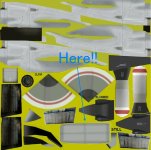
This part is the texture and part present in FSX version.
DaveWG
Charter Member
Thanks for that Dave. Just a quick note for P3D_Ver2 users, it appears that the external model is fine, so "all mdls" isn't necessary as far as I can see, however the VC definitely needs these tweaks as aside from the main gauge panel, everything else has the "chrome appearance". That "interior mdl" seems to be all you need to tweak if you are using P3D_Ver2. I also did not touch any LOD1 material that was labeled as a "$gauge" as I assumed that would remove any reflection from the gauges. The rest that had the "1" I changed to "0" and the VC looks great and that one interior model will fix all the VC's as they are all aliased to that mdl file. Thanks again to Dave for making that available.
Odd. When I tried it in P3dV2 it had the high reflective surfaces same as FSX DX10.
gray eagle
SOH-CM-2026
P-3C_ORION_FSX\Texture.USNAVY_Common\p3_eg01_t.bmp
View attachment 4073
This part is the texture and part present in FSX version.
So, If I understand this, that file you show there would have to be repainted to match the dark blue of the VP6 repaint that was done for the older V2.9 correct?
So, If I understand this, that file you show there would have to be repainted to match the dark blue of the VP6 repaint that was done for the older V2.9 correct?
You should repaint it so that you enjoy it. There are other some parts and texture that you must revise in the same way.
gray eagle
SOH-CM-2026

gray eagle
SOH-CM-2026
VP6 Repaint
Now compatible with the new V3 Beta

This is custom Passenger Wing View I made


Now compatible with the new V3 Beta
This is custom Passenger Wing View I made
gray eagle
SOH-CM-2026
VP6 Rapaint PT 2
Couple more


Any one interested in this converted repaint, let me know.
Any one interested in this converted repaint, let me know.