• Please see the most recent updates in the "Where did the .com name go?" thread. Posts number 16 and 17.

    Post 16 Update

    Post 17 Warning old domain name stealing credentials

  • Special Server Maintenance

    Just when you think you have everything running some what better...

    You get a message from the Hosting company. Short story they need to move us to a new server. I have been working with them to plan a good date for all concerned. Here is what we have come up with as a schedule.

    1. November 4th 17:00 -5UTC shut off the forums and start backup proceedures. During this time there will be no access to the forums or the Resource Section.
    2. November 5th Continue with Backups and download same until complete.
    3. November 6th 7:00 turn over server to hosting company to move system to new server
    4. November 7th - 8th restore backups and upgrade forum software.

    If all goes well we should be back online on November 8th.

    To keep you updated we will post updates on AVSIM forums.

    Thank you for your support.

P-3 Thread continued...

It is an interior model that it is in the linked Websites.
The file of the same name exists in the P-3C_ORION_FSX "model" folder . Please exchange it.

View attachment 4279As you can see in attached picture, there was no file of same name to replace. I am using current V3 Beta version. I copied this file to folder shown.
Was this file a fix for the light switch? In what way? Thanks:adoration:


Edit:

I think I have figured out what is wrong here.

1. I was using an older version of the V3 Beta and noticed the the model folder had different MDL file there.
2. The model.cfg folder for the older V3 Beta was making a call on the older interior P3b mdl file.
3. The Model.cfg USN TYPE O (and others) that I was using needed to be updated by changing the
name of the older interior file to the newer one.

As a result, it looks as thought I am getting the older panel from the V2.9 version.
I have VC cockpit but no 2d cockpit.
 
View attachment 4279As you can see in attached picture, there was no file of same name to replace. I am using current V3 Beta version. I copied this file to folder shown.
Was this file a fix for the light switch? In what way? Thanks:adoration:


Method of settlement.
The file is applied (rename about the CFG file).
Or, P-3C is downloaded again, and the file is overwrited. (It is sure to become the same name. )
 
NOTE: KBT TEAM... any possibility of a dedicated cockpit switch for the fire retardant dump?


The wing light is not applied in this P-3 series. Therefore, only it is for the effect and this switch can be used.
https://skydrive.live.com/embed?cid...=A3DFC97064B66EA4!900&authkey=AJSb6k_OugzyWhs

Let you do well after that.:wavey::wavey:


View attachment 4270

I have reinstalled the latest version of the Basic P3 program then copied the interior mdl file to the model folder and I am happy to say
that now I have a functioning wing lights toggle switch (It now toggles on/off)

I guess the new interior mdl file was all about animating that wing lights switch (shown in picture above).

Thanks for the fix. Domo arigato (どうもありがとう KBT.
 
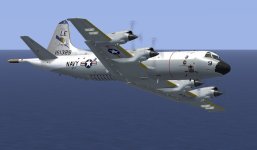
VP-11 White and Gley

This color pattern was newly painted.
 

Attachments

  • p3-20140216-2.jpg
    p3-20140216-2.jpg
    34.5 KB · Views: 4
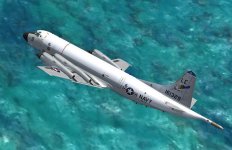
VP40 Textures posted

Converted for the V3 Beta KPT P3 Orion.


143zuk4.jpg


2nlbrcj.jpg


Link:

http://www.sim-outhouse.com/sohforums/local_links.php?catid=3&linkid=18172
 
Great looking paints, Gray Eagle!

BTW, just arrived in Pensacola for a long weekend, to start looking at houses. Plan to move here this summer. NC
 
Been away and trying to catch up with this and you guys!

Can't for the life of me get the engines to start normally manually. Can get #1 with Ctrl + E and that's it. What am I missing?
 
Any chance of getting these 3 from the V2.9 days

Bill
 

Attachments

  • 1.jpg
    1.jpg
    84.5 KB · Views: 0
  • 2.jpg
    2.jpg
    59.2 KB · Views: 0
  • 3.jpg
    3.jpg
    79.1 KB · Views: 0
Been away and trying to catch up with this and you guys!

Can't for the life of me get the engines to start normally manually. Can get #1 with Ctrl + E and that's it. What am I missing?

Have you tried the Ctrl + E then 2, Ctrl + E then 3, etc. ?
 
Yes, thanks, and that didn't work very well. Now trying the small starter toggles in the VC and red lolipop shaped mixture controls but would like to hear how others start the enignes, one by one manually (I prefer not to auto start).
 
Would love to see my old squadron: VP-26 "Tridents"

Here is a photo of a real one, at least. Also carrying an LSRS pod. BuNo 161411, photo taken at NAF Atsugi in December last year.
IMG_3806_161411.jpg


Different squadron but caught on the same day. BuNo 163291 from VP-69 Totems.
IMG_3372_163291.jpg


In case someone wishes to create a repaint for either of these two, I can provide higher resolution photos to help.

-Esa
 
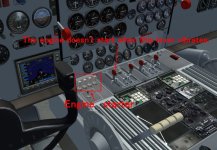
The engines doesn't start when this lever vibrates.
The vibration stops if the throttle lever is moved in that case.
Afterwards, the engine start starts normally by the engine starter.

When the time of the level that is the engine halt condition passes, the re-start might become difficult.
 

Attachments

  • engine_st.jpg
    engine_st.jpg
    100.8 KB · Views: 4
[SUP]KBT - many thanks! Now have four turning and burning!

Where is the battery/electrical main switch on the Orion?[/SUP]
 
Back
Top