Playing with the Avro Anson float

Marvin Carter

Charter Member 2015
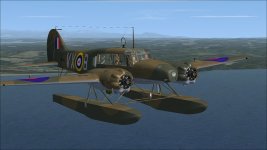
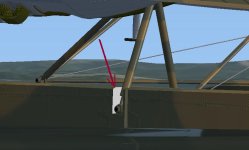
Just doing a what if paint, also can any one help me to find where this texrure is on float, Red arrow???
 

Attachments

  • float1.jpg
    float1.jpg
    46.8 KB · Views: 0
  • flaot2.jpg
    flaot2.jpg
    32 KB · Views: 0
j2vLLch.jpg


6iGip3A.jpg
 
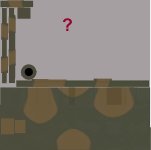
This is the float texture, I have no idea where on here is the spot for the missing one above???
 

Attachments

  • float3.jpg
    float3.jpg
    17.3 KB · Views: 0
This is the float texture, I have no idea where on here is the spot for the missing one above???

Marvin, when I have a problem identifying a particular area on a texture file I usually create an extra layer above the texture file and colour it completely red. This will let you know if the part you are looking for is actually on that texture. I then create a dds file and install it on the paint I am doing. Everything on that texture then shows up in red. If the part you are after is included then you know you have the correct texture file. Once that is established I just repeat the process by reducing the size of the red layer to one quarter and repeat the process. I keep reducing the size of the red area until I find the area that contains the part. Laborious but sometimes the only way!
Hope this helps, Peter
 
Back
Top