• Please see the most recent updates in the "Where did the .com name go?" thread. Posts number 16 and 17.

    Post 16 Update

    Post 17 Warning old domain name stealing credentials

  • Special Server Maintenance

    Just when you think you have everything running some what better...

    You get a message from the Hosting company. Short story they need to move us to a new server. I have been working with them to plan a good date for all concerned. Here is what we have come up with as a schedule.

    1. November 4th 17:00 -5UTC shut off the forums and start backup proceedures. During this time there will be no access to the forums or the Resource Section.
    2. November 5th Continue with Backups and download same until complete.
    3. November 6th 7:00 turn over server to hosting company to move system to new server
    4. November 7th - 8th restore backups and upgrade forum software.

    If all goes well we should be back online on November 8th.

    To keep you updated we will post updates on AVSIM forums.

    Thank you for your support.

8N1-Grimes Field

falcon409

SOH-CM-2026
323216618771397574.jpg

A new entry has been added to Add-Ons Library, category FSX Scenery

Description: Grimes Airport (8N1) is a privately owned public-use airport located two miles east of Bethel, Pa. and is the home of the Golden Age of Aviation Museum.

To check it out, rate it or add comments, visit 8N1-Grimes Field
The comments you make there will appear in the posts below.
 
Very nice Ed thank you.

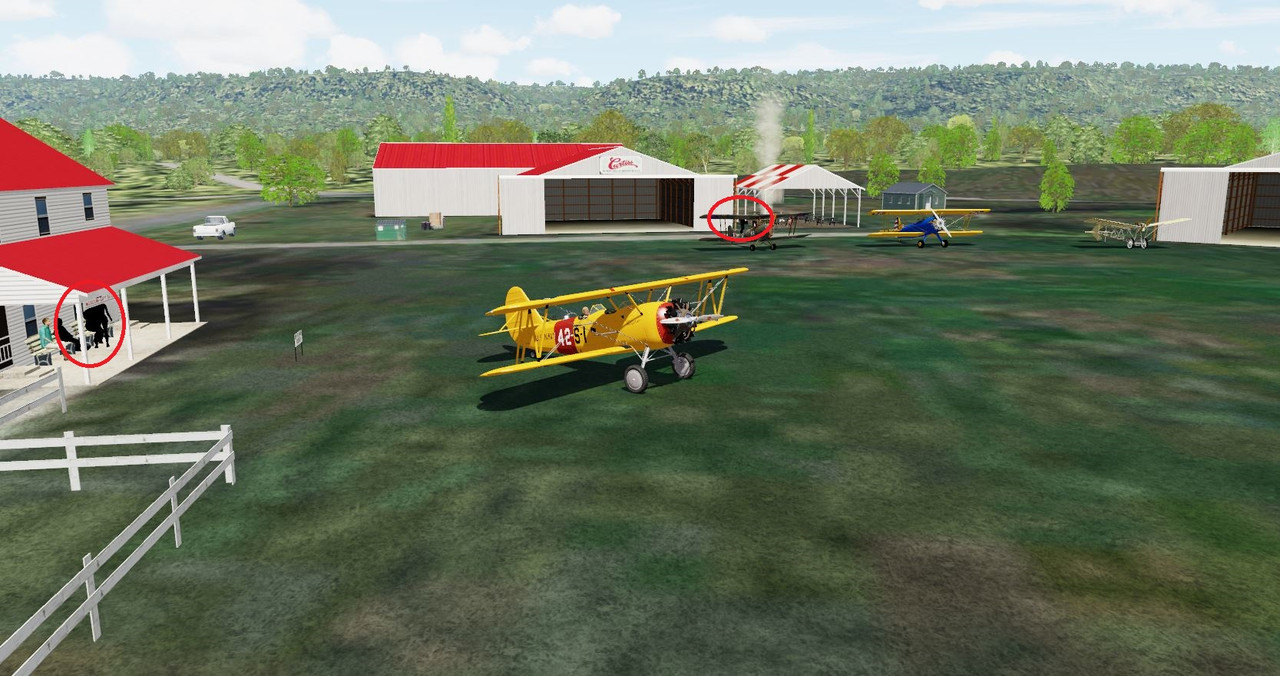
This works well in P3D V5.3 - a few people without their textures, I circled in red.

How do you incorporate the people (placement) bgl file into the scenery? MCX will not open that one for me.....

Capture.jpg
 
I ran a check to see if I possibly failed to include some textures. I unchecked every scenery addon I have (including all scenery object libraries) except the Grimes Airfield. I reloaded the scenery and observed that all 3D People are textured. So the textures that were included in the package are the ones texturing those models.

Not sure why those particular models are showing the way they are and the others are fine but I can assure you that you have the correct textures.

I know this is shot in P3D-V5, but if you still have FSX installed, try it there to see if the textures show up. I don't see why V5 would single out those textures, but anything is possible with these Sims.
 
Last edited:
Back
Top