• There seems to be an uptick in Political comments in recent months. Those of us who are long time members of the site know that Political and Religious content has been banned for years. Nothing has changed. Please leave all political and religious comments out of the forums.

    If you recently joined the forums you were not presented with this restriction in the terms of service. This was due to a conversion error when we went from vBulletin to Xenforo. We have updated our terms of service to reflect these corrections.

    Please note any post refering to a politician will be considered political even if it is intended to be humor. Our experience is these topics have a way of dividing the forums and causing deep resentment among members. It is a poison to the community. We appreciate compliance with the rules.

    The Staff of SOH

  • Please see the most recent updates in the "Where did the .com name go?" thread. Posts number 16 and 17.

    Post 16 Update

    Post 17 Warning

A couple of quick Sierra pics

anthony31

SOH-CM-2022
hello all

Just a couple of quick pics of the Tecnam Sierra I'm still working on (when will I ever finish this damn plane?)

Somethings to notice, yes that is the Reality XP GPS in there. So there is a version that will allow you to use the RXP 530 GPS if you have it. The audio panel and transponder are from the RXP 530 GPS as well but the SL-30 I had to make myself. The SL-30 is a combined nav/com with a CDI display. I haven't done all the SL-30 features (there are so many) but the CDI works.

The second thing is the VC rain effects on the canopy windows.
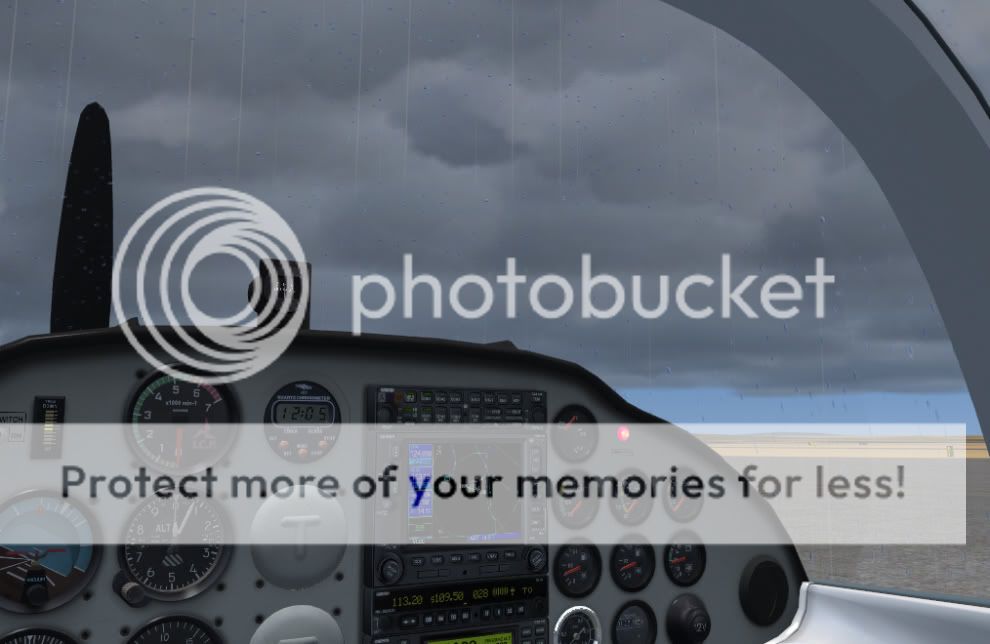
064VCrainandRXPGPS.jpg


And I thought, why not make the raindrops appear on the exterior model as well? A few flip all polygons commands and hey presto!

065VCrainexterior.jpg
 
Hi Anthony,

What will the standard avionics look like if we are not so fortunate as to have RXP?
Those rain drops look seriously cool!!! Do they have movement effects?
 
Ultralight! Ultradetailed!

I'm learning to fly with a plane like this, same panel, same engine, but high wings model (tecnam P92). Well, your cockpit is as real as that one! Very detailed, bravo! I'm looking forward to fly it! Payware, isn't it?
 
I dont understand where you got the idea Anthony... It never rains iin Australia does it?

It never rains in southern California...

<object height="385" width="480">


<embed src="http://www.youtube.com/v/-pyC7WnvLT4&hl=en_US&fs=1" type="application/x-shockwave-flash" allowscriptaccess="always" allowfullscreen="true" height="385" width="480"></object>

Back to topic...


VC looks great Anthony! :applause:
Glad someone figured out rain effects for FSX, finally.
I admit, that is one thing I have missed from FS9.
 
Hi Anthony,

Is the SL30 unit your own; because in other pics you have shown us there is no SL30, so will those who dont own the RXP get an SL30 or will there be an option to fit standard avionics (Yes Please!!!!!!) like in earlier pics?
 
Craig

The SL-30 unit is one I've added for the RXP version. The avionics in the RXP version is all flat so people can swap out the avionics with whatever they want without having to worry about any 3d knobs. The standard version uses the default 295 GPS (although with a 296 body), iCom comms radio and GTX 320 transponder which is what most Sierras seem to be fitted out with (although the GPS model varies quite a bit). In the standard version these are all 3d so not really possible to swap out radios in the standard version (plus I do some freaky stuff with the standard radios to get the lighting just right).


If you wanted to you could edit the panel.cfg of the RXP version and replace the RXP530 with the default big GPS as well as replacing the audio panel and transponder with default version if you wanted to.

Here's a pic of the standard avionics which shows how 3d they are.

049PreB2.jpg


PS. We've had over a metre of rain (3'+) so far this year where I live.
 
Hi Anthony,

Thanks. Would it be possible to overlay the Free SimFLYER GPS 296 on your 295/296? It would be more realistic that way. It would be perfect fit! I can even PM the files to you to overlay.
 
Hi Craig

This is the first I've heard about the simflyer gps so I'm downloading it from flightsim now. As long as the commands used by the simflyer are the same key commands as used by the default GPS then it should be possible but I will have a look at the simflyer gauge and see how it goes.

I just show the display of the default GPS gauge with everything else being redone in the model so all the buttons and the case are part of my model. This way, when you press the off button the GPS actually turns off (it doesn't really turn off though as I just switch the VC panel out and replace it with a blank display).

Here is a pic of the RXP version where I've replaced the RXP gauges with default radios and GPS leaving my SL30 in. Took all of about 2 minutes work to do.

066VCwithdefaultGPS.jpg
 
Thank you for allowing us some flexibility! Some pay-ware isn't as good as your free stuff! (I know as I have purchased some junk in my time!) Ant, have you made it one open stack or have you separated it into segments? Ant, I can also recommend to you Pam (Warchild) for help with your FDE. She really good and I'm sure she would be prepared to help you.
 
That looks absolutely superb, Ant! I'm another one who appreciates the option to swap out gauges where possible, so this looks like it'll be another keeper. :salute:

Ian P.
 
Craig

I've had a look at the simflyer 296 and I don't think it will work in the Sierra.

To be honest with you I don't think you'd miss much as, to me, the simflyer 296 looks a lot like the default 295 rather than the current version of the 296 with many of the simflyer pages being almost identical to the default 295.

The RXP version radio stack is one piece although you can see in the pic that the edges have a bit of a 3d effect. If you can ignore that you can put whatever you want in the radio stack. All the other gauges are 3d though so you can't change them.
 
Back
Top