
-
Please see the most recent updates in the "Where did the .com name go?" thread. Posts number 16 and 17.
-
Special Server Maintenance
Just when you think you have everything running some what better...
You get a message from the Hosting company. Short story they need to move us to a new server. I have been working with them to plan a good date for all concerned. Here is what we have come up with as a schedule.
- November 4th 17:00 -5UTC shut off the forums and start backup proceedures. During this time there will be no access to the forums or the Resource Section.
- November 5th Continue with Backups and download same until complete.
- November 6th 7:00 turn over server to hosting company to move system to new server
- November 7th - 8th restore backups and upgrade forum software.
If all goes well we should be back online on November 8th.
To keep you updated Tom Clayton has offered to post updates on AVSIM forums.
Thank you for your support.
You are using an out of date browser. It may not display this or other websites correctly.
You should upgrade or use an alternative browser.
You should upgrade or use an alternative browser.
A question for FSX users
- Thread starter giria
- Start date

I still have FSX:SE on this system (I do have FSX+Accel on another tower too) but I only use it now when I am testing items I have created as a FSX/P3D developer of aircraft and sceneries. Almost 100% of my flying is done in P3D v4.5 and I chose v4.5 as it has the best compatibility with FSX add-ons while still giving me all of the benefits of a 64-bit system. I love my P3D and it's performance gains over FSX and that is why my FSX is for testing only.


As I answered in June to a similar question:
I have been using FSX since it was released as the Gold edition, and have flown nothing else since.
Between flying, repainting, and creating scenery additions, FSX still meets all my simming needs.
I have been using FSX since it was released as the Gold edition, and have flown nothing else since.
Between flying, repainting, and creating scenery additions, FSX still meets all my simming needs.
LJToranaXU1
Members +
Still using FSX SE, have too much invested in payware and customised aircraft/scenery to throw away by going to a newer sim.

Naismith
Charter Member
Same here.Still using FSX SE, have too much invested in payware and customised aircraft/scenery to throw away by going to a newer sim.

I still use FSX besides P3Dv4 and MSFS2020. FSX with no ORBX installed and less than 100 aircraft gives great performance. My flights are mostly short ones, taking off from a base near the sea and flying to a carrier nearby. No OOM's, no CTD's. the only scenery I have installed is the VIetnam Project scenery, Biarritz, Solenzara and Hyères.
Cees
Cees
jor henderson
Members +
I am still using fs2004, could not get away with FSX (or CFS3 for that matter)
FSX: Steam Edition for me. I'm still using it because of all the add-on aircraft, scenery, real-time weather program, AI flight program (which uses routes, not just point A to point B flights), and airports that I purchased, downloaded, or even made myself (Airport Design Editor). I know much of this would transfer to P3Dv4, but FSX:SE does just fine for my purposes.
Are you implying that more than 100 aircrafts will affect FSX's performance?? I have more than 100 and do not see any affect on FSX performance????FSX with no ORBX installed and less than 100 aircraft gives great performance.
Regards,
Aharon
I'm curious, how many of you still using FSX? Why did you still use it?
I am still using FSX for 18 straight years. Here are four major reasons:
Reason 1: FSX is doing well for me with my beautiful screenshots even though MS2020/FS2024 offer more superior screenshots.
Reason 2. I want to switch to MS2020 or MS2024 because their screenshots are embarrassing my screenshots but I cannot switch from FSX to those two new flight sim platforms because the 2 flight sims do NOT have ALL freeware and payware planes that FSX has especially historic airline jets such as Tridents or BAC-111s or DC-10s or so on.
Reason 3: MS2020 or MS2024 requires more computing power and the prices of laptops are too high for me. I want to wait until the prices go down and become reasonable. I do not want to spend four thousand bucks on a new laptop. I am keeping eye on price market for the laptop with specific configuration: 64 GB ram, 5 TB SSD drive, 16 GB dedicated video ram, and 16 or 18 inch screen with no less than 240HZ.
Reason 4: Do not have patience or time to handle deep or difficult learning curves in MS2020/MS2024.
Regards,
Aharon

erican2
Members +
I built a new PC recently & installed FSX with my favourite planes.
I refuse to move onto the new sims as I hate being online & the updates breaking things. I have enough problems trying to keep my truck mods working in ATS & ETS2 as that is always being updated.
It's a constant battle that I don't want.
I refuse to move onto the new sims as I hate being online & the updates breaking things. I have enough problems trying to keep my truck mods working in ATS & ETS2 as that is always being updated.
It's a constant battle that I don't want.
Loading time.....Are you implying that more than 100 aircrafts will affect FSX's performance?? I have more than 100 and do not see any affect on FSX performance????
Regards,
Aharon
Cees
The fewer aircraft you have in the sim's '.../SimObjects/Airplanes' folder the faster FSX will start initially as it has fewer aircraft entries to scan. Wait times between clicking on the sim icon and the aircraft selection menu appearing can be reduced significantly by pulling out any aircraft you are not currently flying on a regular basis.Are you implying that more than 100 aircrafts will affect FSX's performance?? I have more than 100 and do not see any affect on FSX performance????
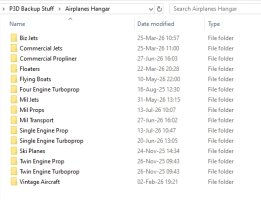
In my P3D install I only keep my favourite aircraft/helos installed and all the others are in a categorized 'back-up' hangar on a different drive. When I want to fly one of the backed-up aircraft I just 'copy and paste' or 'drag and drop' the aircraft folder into the active '.../SimObjects/Airplanes' folder and we are good to go. Likewise when I am done flying a type for a while I will 'copy and paste' or 'drag and drop' the aircraft folder back into the back-up hangar (just in case I had added new paints or changed .cfg files for some reason) and delete the aircraft from the active sim folder.
Here is a shot of my aircraft back-up hanger and the way I sort things (I do the same with my helos too).
Loading time.....
Ahhh interesting Thanks for letting me know. I thought little bit long loading time is normal for FSX and I did not realize that the loading time is tied to number of aircrafts in FSX.
Oh well I have been surviving little bit loading time of FSX for 18 years so I can survive for more years. The funny thing is that when I start FSX, I go to kitchen to make myself monster size mug of Earl Grey tea and FSX will be ready when I come back from kitchen.
Regards,
Aharon
The fewer aircraft you have in the sim's '.../SimObjects/Airplanes' folder the faster FSX will start initially as it has fewer aircraft entries to scan.
Never knew that. Thanks for interesting fact. My reply to your statement is same as above in my reply to Cees.
Wait times between clicking on the sim icon and the aircraft selection menu appearing can be reduced significantly by pulling out any aircraft you are not currently flying on a regular basis.
In my P3D install I only keep my favourite aircraft/helos installed and all the others are in a categorized 'back-up' hangar on a different drive. When I want to fly one of the backed-up aircraft I just 'copy and paste' or 'drag and drop' the aircraft folder into the active '.../SimObjects/Airplanes' folder and we are good to go. Likewise when I am done flying a type for a while I will 'copy and paste' or 'drag and drop' the aircraft folder back into the back-up hangar (just in case I had added new paints of changed .cfg files for some reason) and delete the aircraft from the active sim folder.
Thanks for interesting statements and ideas. I have survived little bit long loading time of FSX so I can survive for more years. LOL I originally thought the little bit loading time of FSX is normal not realizing it depends on number of aircrafts on the FSX.
Regards,
Aharon
