• Please see the most recent updates in the "Where did the .com name go?" thread. Posts number 16 and 17.

    Post 16 Update

    Post 17 Warning old domain name stealing credentials

  • Special Server Maintenance

    Just when you think you have everything running some what better...

    You get a message from the Hosting company. Short story they need to move us to a new server. I have been working with them to plan a good date for all concerned. Here is what we have come up with as a schedule.

    1. November 4th 17:00 -5UTC shut off the forums and start backup proceedures. During this time there will be no access to the forums or the Resource Section.
    2. November 5th Continue with Backups and download same until complete.
    3. November 6th 7:00 turn over server to hosting company to move system to new server
    4. November 7th - 8th restore backups and upgrade forum software.

    If all goes well we should be back online on November 8th.

    To keep you updated Tom Clayton has offered to post updates on AVSIM forums.

    Thank you for your support.

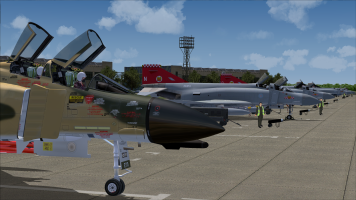
ACG RAF Wattisham

back home again.... tryed it and it actually helped !!

i also copied the old "EGUW_ADEX_JY_OBJ.bgl" file and it brought me even more objects

thanks a lot

Please disregard my post as you do not need to copy over the file from old install. I just started from scratch
(as I had the same problem) and installed SODE from scratch as the manual and the forum post at ACG suggest
(I did this the first time) and found where my problem was. I'm using FSX SE and when I start the sim I get two
program start ups for AICarriers.net and TacPac, (can chose to start them or not) and I did not notice the one for
SODE and just clicked NO and went on my way. After reinstalling SODE and the scenery and started up the sim I
clicked Yes for SODE and got the trusted installer message from the sim, and all is well with Wattisham now.

If you still need help getting it to run please post here or PM me and I will get you sorted.

Joe

P.S. Can one of the Mods please delete my post above so to not confuse any body else with the wrong way of
fixing the problem. Thanks


Strange how the mind plays tricks on you, isn't it?

I always remembered the hangars being green in the phantom era.

Dave
 
face to user people

I would like to know how this was done- for FSX. Face-to-user has a trigger or condition usually made with Modeltweaker as I recall. This done with makemdl. If the object has a transparency to it as well you get to keep the face-to-user when imported into FSX, but the trans is not good (either a black box around the object or incorrect background-box- we've all seen this).

If you correct the trans for FSX this works, but you lose the 'condition'. In other words you can have one or the other but not both.

In this scenery for FSX I see that both ARE working! How is this done. I tried to export the person, using makemdl model then putting it into its own library. This seemed to work, but the face-to-user seems to rotate just a certain amount then stops until you move around to the opposite side.

a pizza, a case of favorite brew, a raise, and 3 week vacation for the trick. freeware designer Bob
 
I got everything installed, and all looks great. I do, however, about every other start up of FSX a warning sign that SODE quit working. Next start up everything seems fine. During the install, instructions told me to remove an xml-demo but I did not see any such demo file. Perhaps I overlooked something? Bob
 
Please disregard my post as you do not need to copy over the file from old install. I just started from scratch
(as I had the same problem) and installed SODE from scratch as the manual and the forum post at ACG suggest
(I did this the first time) and found where my problem was. I'm using FSX SE and when I start the sim I get two
program start ups for AICarriers.net and TacPac, (can chose to start them or not) and I did not notice the one for
SODE and just clicked NO and went on my way. After reinstalling SODE and the scenery and started up the sim I
clicked Yes for SODE and got the trusted installer message from the sim, and all is well with Wattisham now.

If you still need help getting it to run please post here or PM me and I will get you sorted.

Joe

P.S. Can one of the Mods please delete my post above so to not confuse any body else with the wrong way of
fixing the problem. Thanks


May i ask where u got your bell RAF rescure from?

any chance of a copy please
 
We are pleased to say that ACG RAF Wattisham scenery and AI packs were uploaded to Avsim early this morning - hopefully in time for their appearance later today.

The files are called:

FS9:
ACG_RAF_Wattisham_1991_FS9_1.zip

ACG_Wattisham_AI_Phantoms_FS9_1.zip


John, Stevo and Pete

ACG

Hello, are these two packages still available somewhere? I’ve searched on avsim library allthough to no avail…

Does anybody know where i can find them?
 
Thanks a ton! Much appreciated!
Allthough i was looking for the AI Phantom Traffic packs… i’ve got the scenery allready… those seem not to be listed there nor on avsim anylonger…
 
Back
Top